
iambutterz7 - Minecraft Skins & Skin History
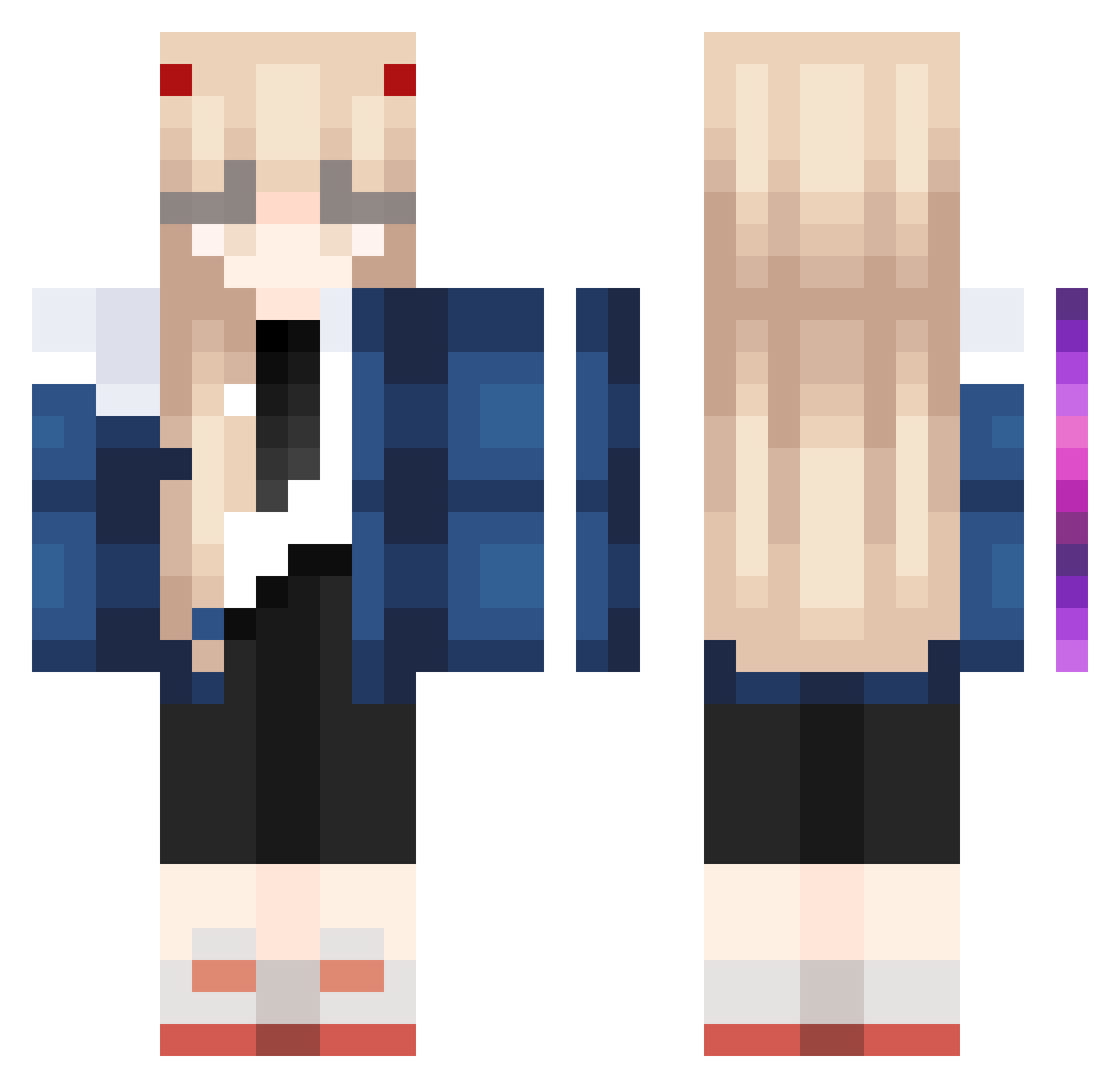
Current Minecraft skin of the player iambutterz7, loaded from the official Mojang API. Rotate the 3D model with your mouse or finger, then download the skin as a PNG file and use it in Minecraft: Bedrock Edition or Java Edition for free. When iambutterz7 changes their skin, this page updates automatically and the old skin stays in the history below.
Other players with this skin (995)
iambutterz7 was the 705th player we have seen with this skin, first spotted on 08.10.2026. The same skin was seen on these players. Open a nickname to see their current skin and skin history.
 Cruxology 5DongE anshcn None1206 Nekotina__ Magnamalo1 aoeiburgers BULLET_cn QuadlingX ZS_0222 wjfpz Nick_Fury69 IncludeStdio Riot111 Xx_Sylph_xX Elly0601 tyrmoe Itsabb0 MattKozlov21 midnighters90 stompy12345 yushao87 Dead_Mack shocks_sama ELeSiS_CriMson xTENGx Lynxess_ star0121 zzgg21 Zoadow MaximusZero RedRiot_XD PocketOriana zSawr moqizhai sookimon bunnniye MELTELIA SideBreak072508 BibiPow Behjer Metrowell ErrorDawes AsterismNeko Cannazuki Verykio18 Tashii_Chan YunDG Boomy8827 MsStoneyBankai Light30 yor33 terrorusa Chai1338 Rax1809 Azurite12 DreamDiana little_wich Ash1931 Mangaholic
More Zero Two Minecraft skins
How to install the iambutterz7 skin
- Press the Download button above to save the skin as a PNG file.
- Minecraft: Bedrock Edition (PE): open the Dressing Room from the main menu (or tap your character → Edit Character), go to Classic Skins → Owned, press the + (new skin) button, choose the downloaded PNG and pick the Classic (Steve) model. Works on PC and mobile; consoles cannot import custom skins.
- Minecraft: Java Edition: open the Minecraft Launcher, go to the Skins tab, click New Skin, load the PNG, pick the Classic (Steve) model and press Save & Use. You can also upload it at minecraft.net → Profile → Change Skin.
The skin does not show up after import - what should I do?
Restart Minecraft and open the Dressing Room again - imported skins sometimes appear only after a restart. Also make sure you selected the imported skin and picked the Classic (Steve) model.
Which model should I choose, Classic or Slim?
This skin is designed for the Classic (Steve) model. If you pick the wrong model, the arms of the skin will look stretched or squeezed.
Is the skin of iambutterz7 free to download?
Yes. Press Download, save the PNG file and use it in Minecraft: Bedrock Edition or Java Edition - no payment or registration needed. The skin also works on multiplayer servers and Realms.
More skins
Looking for more? Go back to all Minecraft skins and check the top skins of the week, month and all time, or find any player's skin by nickname.