
iHOO1 - Minecraft Skins & Skin History
Current Minecraft skin of the player iHOO1, loaded from the official Mojang API. Rotate the 3D model with your mouse or finger, then download the skin as a PNG file and use it in Minecraft: Bedrock Edition or Java Edition for free. When iHOO1 changes their skin, this page updates automatically and the old skin stays in the history below.
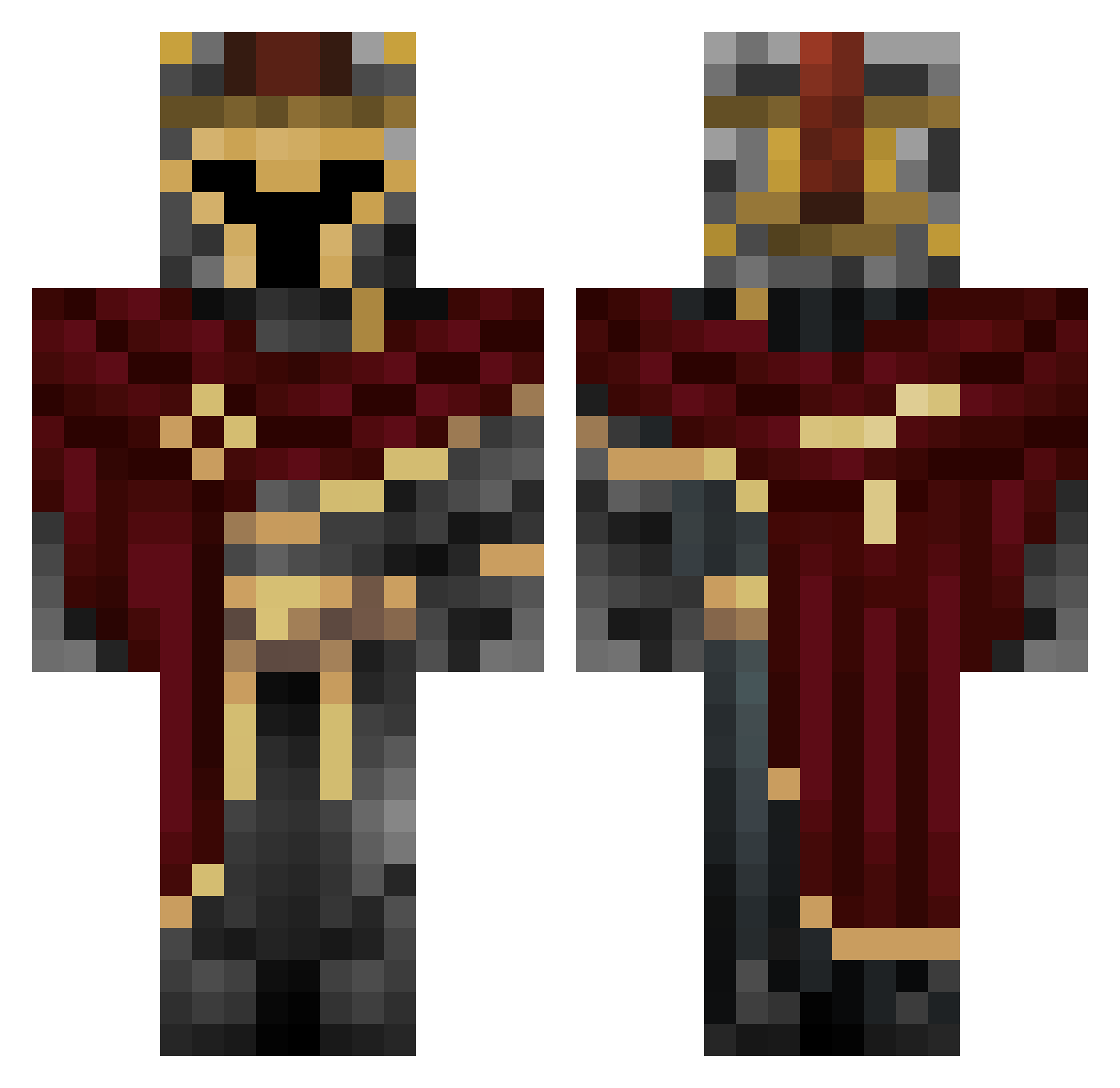
Other players with this skin (454)
iHOO1 was the 35th player we have seen with this skin, first spotted on 30.07.2026. The same skin was seen on these players. Open a nickname to see their current skin and skin history.
 AlexplayzMC20 Pan_mizeriak0 Star_Fighter2006 Mashmacster Astr0spy VojtaO Korvex158
 Tonin_69 Lyre333 Junconeitor Cubrix_ InZirt Karakurt13 alber0 67BigC qian33
 PORTMC22 arct6c Tymek721 giandfc Spiderman32424 OperatorCysterny Ivaxxa
 martinsaltori TheTurkingRanger HotRodReaper SmallFrostlink Vendorr
 CAVILYON_BUBA hype1536
 tyleriswashed Wolfe2ev0 WoidZ matheusmnmnm Andreas01020304 MyPull O_CTL LUV999 DamiTambu GutoXX samueleM_ __Shroomie_ taudinol Yammus ajax1231 Gold3n_Kn1ght kriver17 Noopy173 RedCyanide_ OjectR Mast3r_B8ter drexp14 Paopao8689
 RavenBirdMC Artix_PL ZN2898 Malle1022
 Evildrifteruk YungCarbo DUSISI
More Spartan Minecraft skins
How to install the iHOO1 skin
- Press the Download button above to save the skin as a PNG file.
- Minecraft: Bedrock Edition (PE): open the Dressing Room from the main menu (or tap your character → Edit Character), go to Classic Skins → Owned, press the + (new skin) button, choose the downloaded PNG and pick the Classic (Steve) model. Works on PC and mobile; consoles cannot import custom skins.
- Minecraft: Java Edition: open the Minecraft Launcher, go to the Skins tab, click New Skin, load the PNG, pick the Classic (Steve) model and press Save & Use. You can also upload it at minecraft.net → Profile → Change Skin.
The skin does not show up after import - what should I do?
Restart Minecraft and open the Dressing Room again - imported skins sometimes appear only after a restart. Also make sure you selected the imported skin and picked the Classic (Steve) model.
Which model should I choose, Classic or Slim?
This skin is designed for the Classic (Steve) model. If you pick the wrong model, the arms of the skin will look stretched or squeezed.
Is the skin of iHOO1 free to download?
Yes. Press Download, save the PNG file and use it in Minecraft: Bedrock Edition or Java Edition - no payment or registration needed. The skin also works on multiplayer servers and Realms.
More skins
Looking for more? Go back to all Minecraft skins and check the top skins of the week, month and all time, or find any player's skin by nickname.