
Current Minecraft skin of the player hogangsta99, loaded from the official Mojang API. Rotate the 3D model with your mouse or finger, then download the skin as a PNG file and use it in Minecraft: Bedrock Edition or Java Edition for free. When hogangsta99 changes their skin, this page updates automatically and the old skin stays in the history below.
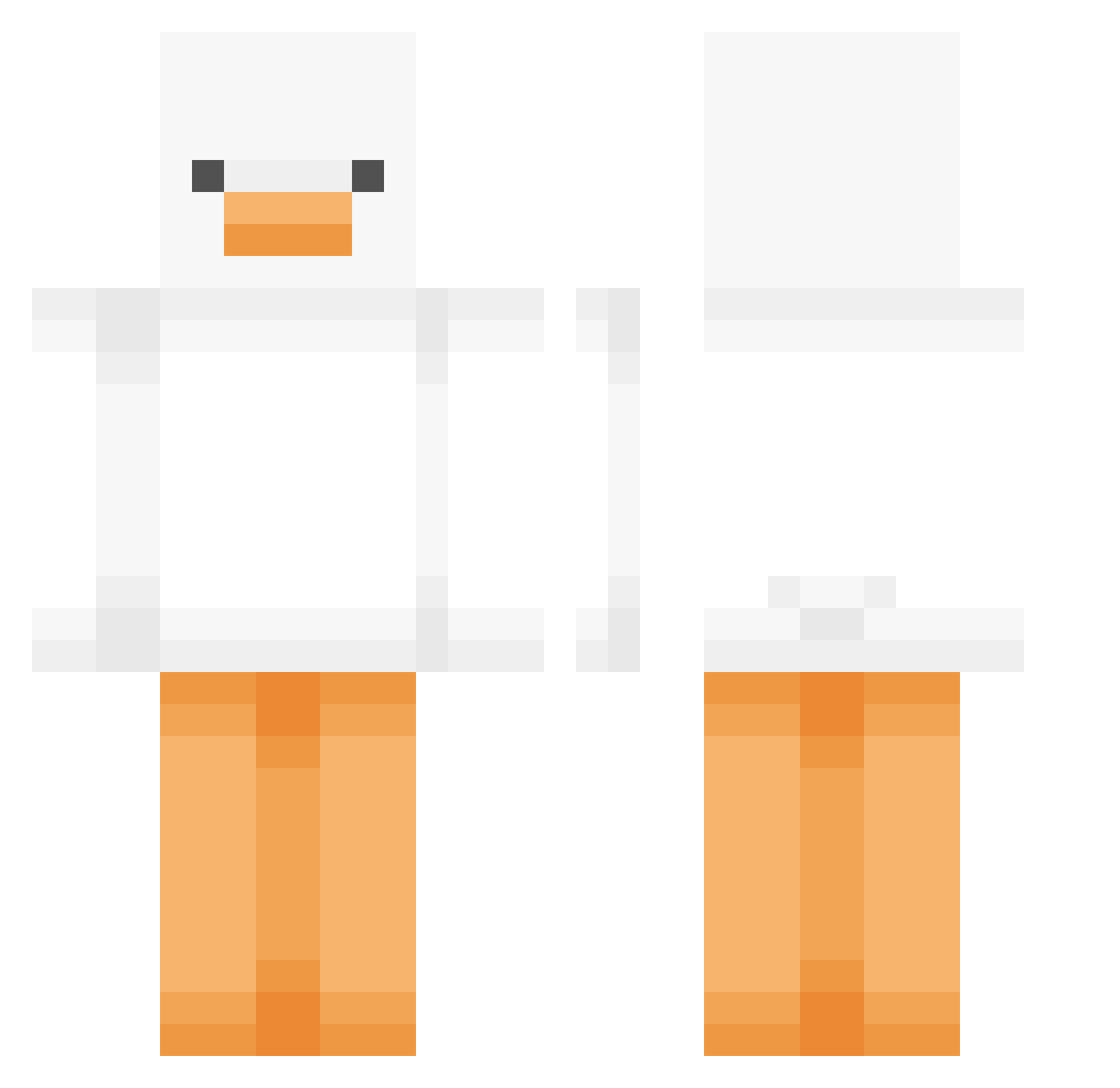
Other players with this skin (379)
hogangsta99 was the 71st player we have seen with this skin, first spotted on 07.08.2026. The same skin was seen on these players. Open a nickname to see their current skin and skin history.
 Charlies_ abbigail456 KKUMAA27 dbthal11 kayleighrose Ezriel00 QUIRKYpeep MERUMI__ Manjung lccjerry TheYeetinator Lolituu ola_szon POY_ Mi_manchi___ moru_3 dongsiri JunJangMj1102 Dodogyuuun amorkaylak Mok_a skidmark_420 VitaminCeCe QuackZ_00 Yulli1557 AGooseManoose emmamaxine Hamish53 fiskengubbi
 hotdogdaddy420 Shadow_Broer YoRHa TTyoung doldol17 bibiacutekawai MineBrine c4ttooo UshioTakoyaki Big_ManRaga micky1212 d_7w15 StarkPurple grenis_ KamieLanches
 LH_Lalou_76 sunbullnam Namuuii Chilliiiii LuccaCool GamMouse
 ToiletTerligi Lunario69420 Urskin dksldksl123 yeoni0225 Bumblebuzzz BBong2 JJ_Hwan xxsaya godriper1
More Duck Minecraft skins
How to install the hogangsta99 skin
- Press the Download button above to save the skin as a PNG file.
- Minecraft: Bedrock Edition (PE): open the Dressing Room from the main menu (or tap your character → Edit Character), go to Classic Skins → Owned, press the + (new skin) button, choose the downloaded PNG and pick the Classic (Steve) model. Works on PC and mobile; consoles cannot import custom skins.
- Minecraft: Java Edition: open the Minecraft Launcher, go to the Skins tab, click New Skin, load the PNG, pick the Classic (Steve) model and press Save & Use. You can also upload it at minecraft.net → Profile → Change Skin.
The skin does not show up after import - what should I do?
Restart Minecraft and open the Dressing Room again - imported skins sometimes appear only after a restart. Also make sure you selected the imported skin and picked the Classic (Steve) model.
Which model should I choose, Classic or Slim?
This skin is designed for the Classic (Steve) model. If you pick the wrong model, the arms of the skin will look stretched or squeezed.
Is the skin of hogangsta99 free to download?
Yes. Press Download, save the PNG file and use it in Minecraft: Bedrock Edition or Java Edition - no payment or registration needed. The skin also works on multiplayer servers and Realms.
More skins
Looking for more? Go back to all Minecraft skins and check the top skins of the week, month and all time, or find any player's skin by nickname.