
frisksan12 - Minecraft Skins & Skin History
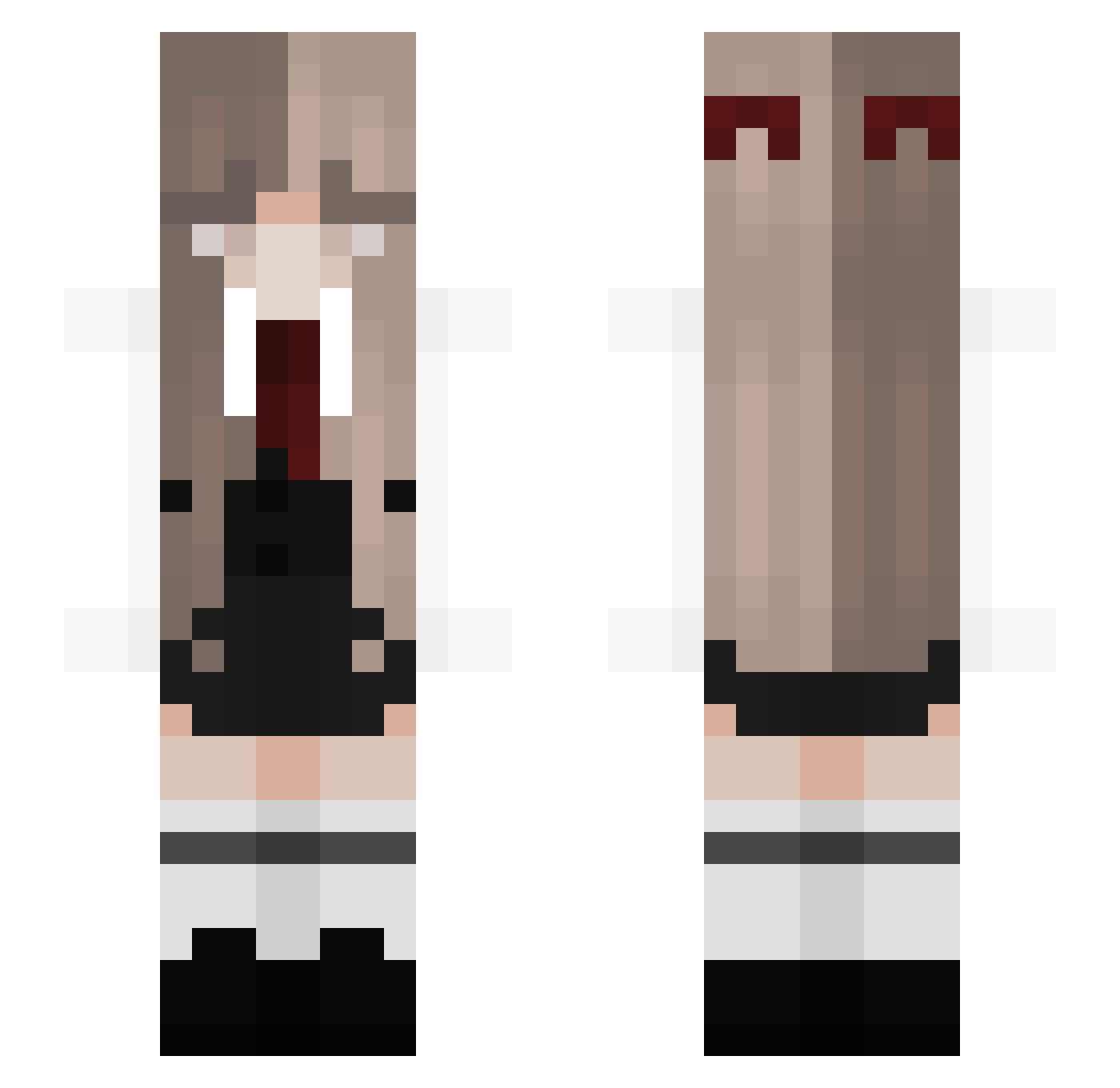
Current Minecraft skin of the player frisksan12, loaded from the official Mojang API. Rotate the 3D model with your mouse or finger, then download the skin as a PNG file and use it in Minecraft: Bedrock Edition or Java Edition for free. When frisksan12 changes their skin, this page updates automatically and the old skin stays in the history below.
Other players with this skin (152)
frisksan12 was the 67th player we have seen with this skin, first spotted on 10.09.2026. The same skin was seen on these players. Open a nickname to see their current skin and skin history.
 B4rC0de1 Leilastar77 FloppyFishy Night1ngale_ RainSamurai8 Yanto SniikySnow _Asunaaa_ WForange erinisnthere Swailay coffexco Seconds_love yepLuca BINOD1984 Nekutsumori BLKHWK01 cainos_hot_wife Flameeee_ xTessya AnumaGrr nezuwumii Itz_zoe kwiijane MChlebem wilbyscoot mee_alana QuandaleDingle_s SosoCorrea11 Shin9741 Todopepe BrechtjeSpechtje Azuryqh SubToMiles romnqse michellefr0mhell XwaxY woojin707 chun0912 AnnebethGrace leafbones1 zecchio Aidman11 Feuerschatte Aspiration920911 raisimp puthyslayaa slople TraCKey breadenj0yer thedauksavage XxX_zzx Suuuugar_ LowKeyKindaCute Sn3akyone leaf163 XfgmcJJ xpvpgod123 paranoraa maniulka3
More Bow Minecraft skins
How to install the frisksan12 skin
- Press the Download button above to save the skin as a PNG file.
- Minecraft: Bedrock Edition (PE): open the Dressing Room from the main menu (or tap your character → Edit Character), go to Classic Skins → Owned, press the + (new skin) button, choose the downloaded PNG and pick the Slim (Alex) model. Works on PC and mobile; consoles cannot import custom skins.
- Minecraft: Java Edition: open the Minecraft Launcher, go to the Skins tab, click New Skin, load the PNG, pick the Slim (Alex) model and press Save & Use. You can also upload it at minecraft.net → Profile → Change Skin.
The skin does not show up after import - what should I do?
Restart Minecraft and open the Dressing Room again - imported skins sometimes appear only after a restart. Also make sure you selected the imported skin and picked the Slim (Alex) model.
Which model should I choose, Classic or Slim?
This skin is designed for the Slim (Alex) model. If you pick the wrong model, the arms of the skin will look stretched or squeezed.
Is the skin of frisksan12 free to download?
Yes. Press Download, save the PNG file and use it in Minecraft: Bedrock Edition or Java Edition - no payment or registration needed. The skin also works on multiplayer servers and Realms.
More skins
Looking for more? Go back to all Minecraft skins and check the top skins of the week, month and all time, or find any player's skin by nickname.