
fatso12345678910 - Minecraft Skins & Skin History
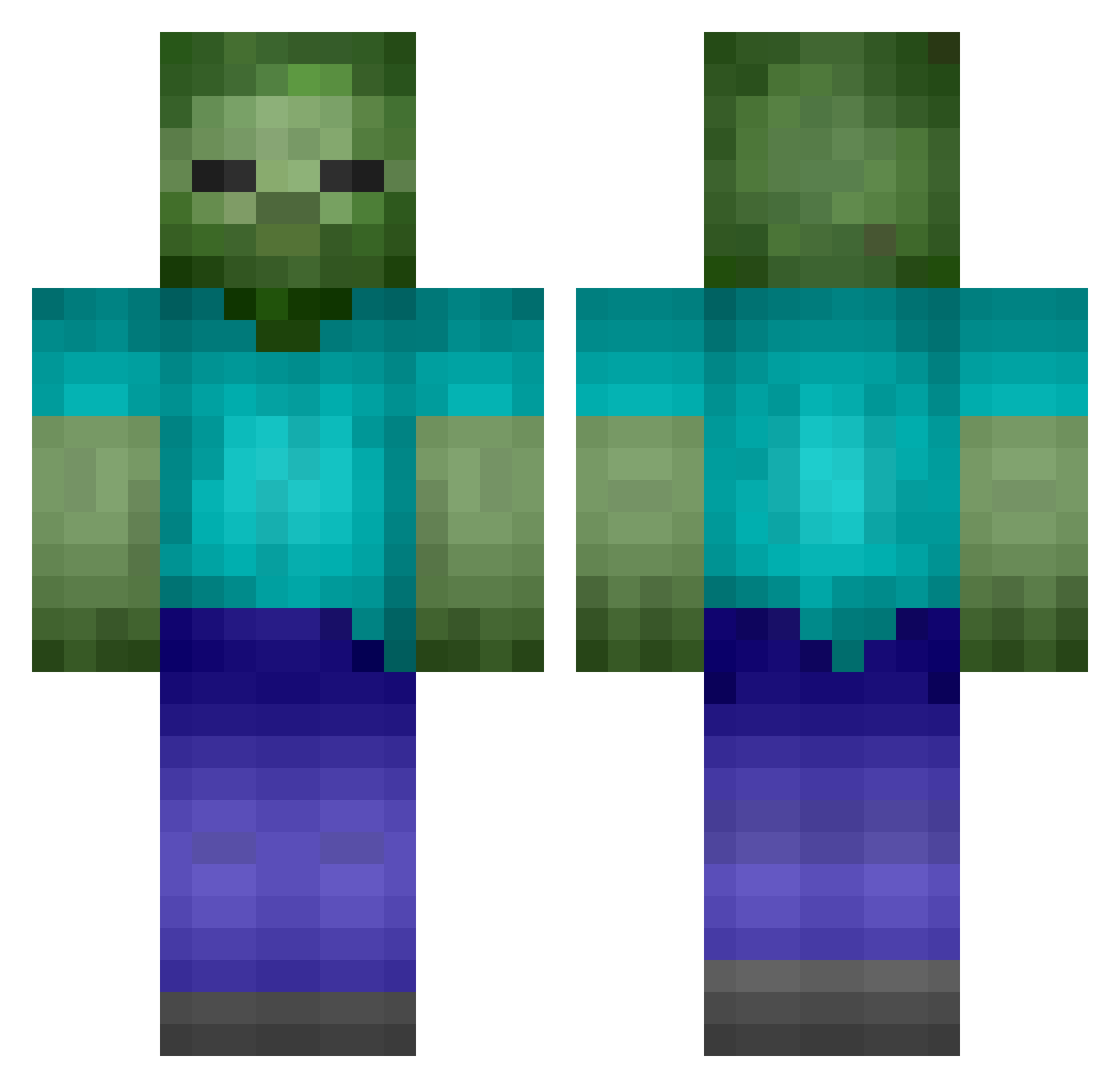
Current Minecraft skin of the player fatso12345678910, loaded from the official Mojang API. Rotate the 3D model with your mouse or finger, then download the skin as a PNG file and use it in Minecraft: Bedrock Edition or Java Edition for free. When fatso12345678910 changes their skin, this page updates automatically and the old skin stays in the history below.
Other players with this skin (200)
fatso12345678910 was the 119th player we have seen with this skin, first spotted on 01.10.2026. The same skin was seen on these players. Open a nickname to see their current skin and skin history.
 T8ER_TOT Noahsjungle FinnrRastas ggogi NordicWarrior4 PSNeymar mit55ch ___Phoenix__ kouhei428 talanbean PanicZone20 Finchy29 319 dan1061 koristo24 protuukka jopro01 Jacobhearn1998 blackmagic202 blastergamer126 kasey44 Fr3ak1n0ut Desecrator Comez_97 SILVAN_1999 darkmaul8 walexs nerfgamer13 antony960 the_Doom_ZombiJr Bust2627M higo1311 Mr_Treeman_ Bill_Kerman TittyMcLovin Jeongyongjae Zombie Terror_Sumo Shvade jachca lucce2525 HattyHtn CurseBot1 D3laya skateer12345 Cirylo _Mx4_ bigfacecat Snooky Dj_gilou curtman MiniumStriker123 XxZOMB1EPROxX EmanuelPost turbo04 guiserp jam762 NinjaMoa splatman9 Fipser3737
More Zombie Minecraft skins
How to install the fatso12345678910 skin
- Press the Download button above to save the skin as a PNG file.
- Minecraft: Bedrock Edition (PE): open the Dressing Room from the main menu (or tap your character → Edit Character), go to Classic Skins → Owned, press the + (new skin) button, choose the downloaded PNG and pick the Classic (Steve) model. Works on PC and mobile; consoles cannot import custom skins.
- Minecraft: Java Edition: open the Minecraft Launcher, go to the Skins tab, click New Skin, load the PNG, pick the Classic (Steve) model and press Save & Use. You can also upload it at minecraft.net → Profile → Change Skin.
The skin does not show up after import - what should I do?
Restart Minecraft and open the Dressing Room again - imported skins sometimes appear only after a restart. Also make sure you selected the imported skin and picked the Classic (Steve) model.
Which model should I choose, Classic or Slim?
This skin is designed for the Classic (Steve) model. If you pick the wrong model, the arms of the skin will look stretched or squeezed.
Is the skin of fatso12345678910 free to download?
Yes. Press Download, save the PNG file and use it in Minecraft: Bedrock Edition or Java Edition - no payment or registration needed. The skin also works on multiplayer servers and Realms.
More skins
Looking for more? Go back to all Minecraft skins and check the top skins of the week, month and all time, or find any player's skin by nickname.