
fabrezey - Minecraft Skins & Skin History
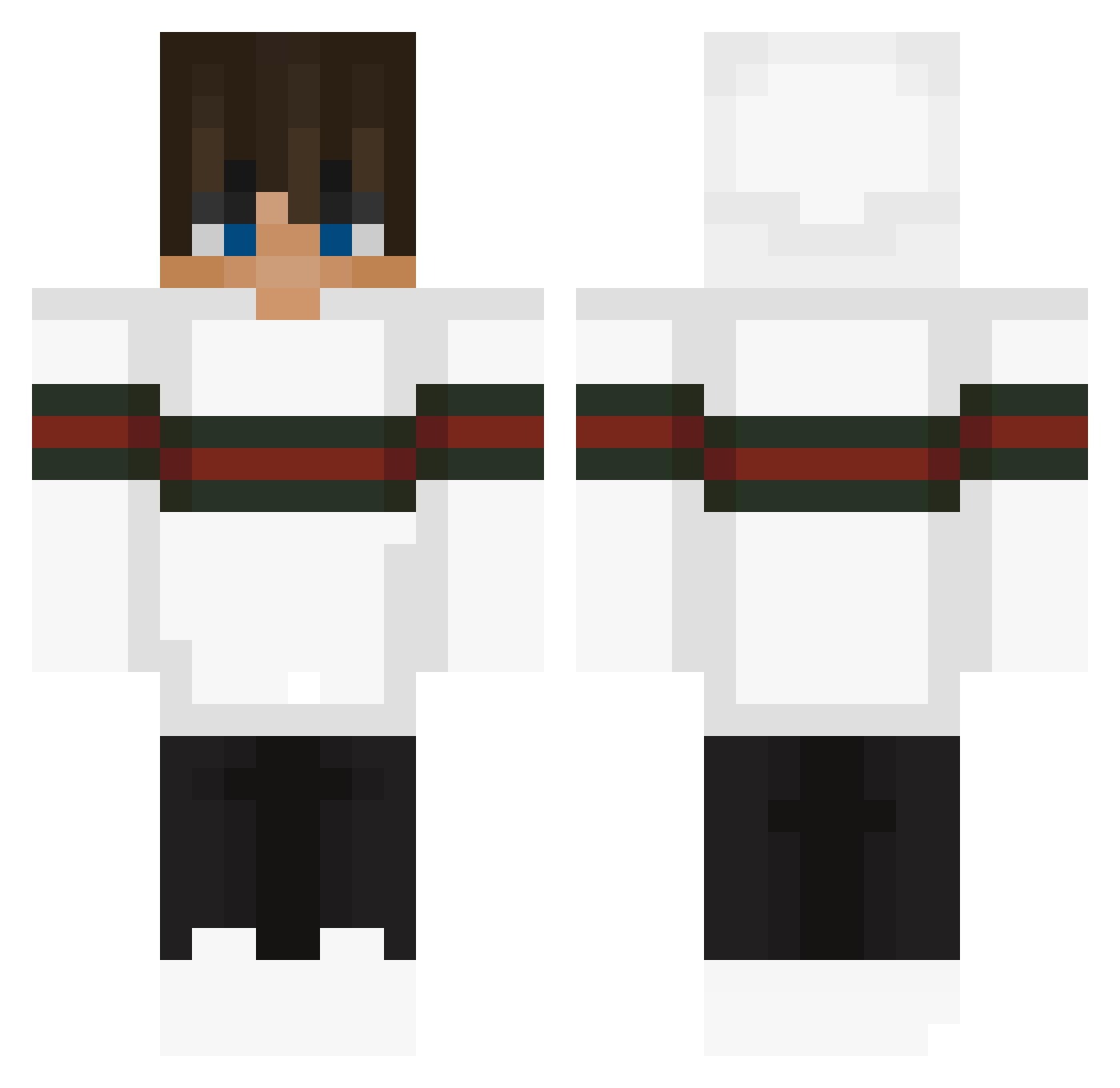
Current Minecraft skin of the player fabrezey, loaded from the official Mojang API. Rotate the 3D model with your mouse or finger, then download the skin as a PNG file and use it in Minecraft: Bedrock Edition or Java Edition for free. When fabrezey changes their skin, this page updates automatically and the old skin stays in the history below.
Other players with this skin (289)
fabrezey was the 92nd player we have seen with this skin, first spotted on 29.08.2026. The same skin was seen on these players. Open a nickname to see their current skin and skin history.
 xPretty_Boy MadMax275 Dybson23 PRIMESRCOMBO EI218 KilianG05 Max_Oder_So S_im_on23 SevenUp3 xSebaxtianCraftx KaliGHG WillynillyP marcianekee idontcarewhat lasis_27 Rafaelfps Grandwizzzman toymaster_gaming ElpTV CripTik22 BIVIMINI Zitronenpresse4 ExpertLastt tayartv sora4321 Givemesunday LisekGaming123 Luca5_Goated YHuntel02 jungyoom Chibyebye BurritoMunchR Quetzal_no1 ChefBuddha13 Ianisdagoat fenglngye Giovanni9633
 MrTomX_ Tarig_Gamer MynamesJev serixdennis1 SIR_GUCCI TheRaceKid CLIKKukg shihabkhan TheDeathDuo MaxLzz ARockiY SasukeNBN Thebobs25 Yigitygt1423 Michael15_ lil_luke2009 lameplayer66 Kakaga Ultragamer07 AstroGiuli Porch77 keenj1 jerekke
More Streetwear Minecraft skins
How to install the fabrezey skin
- Press the Download button above to save the skin as a PNG file.
- Minecraft: Bedrock Edition (PE): open the Dressing Room from the main menu (or tap your character → Edit Character), go to Classic Skins → Owned, press the + (new skin) button, choose the downloaded PNG and pick the Classic (Steve) model. Works on PC and mobile; consoles cannot import custom skins.
- Minecraft: Java Edition: open the Minecraft Launcher, go to the Skins tab, click New Skin, load the PNG, pick the Classic (Steve) model and press Save & Use. You can also upload it at minecraft.net → Profile → Change Skin.
The skin does not show up after import - what should I do?
Restart Minecraft and open the Dressing Room again - imported skins sometimes appear only after a restart. Also make sure you selected the imported skin and picked the Classic (Steve) model.
Which model should I choose, Classic or Slim?
This skin is designed for the Classic (Steve) model. If you pick the wrong model, the arms of the skin will look stretched or squeezed.
Is the skin of fabrezey free to download?
Yes. Press Download, save the PNG file and use it in Minecraft: Bedrock Edition or Java Edition - no payment or registration needed. The skin also works on multiplayer servers and Realms.
More skins
Looking for more? Go back to all Minecraft skins and check the top skins of the week, month and all time, or find any player's skin by nickname.