
checkyesjulie - Minecraft Skins & Skin History
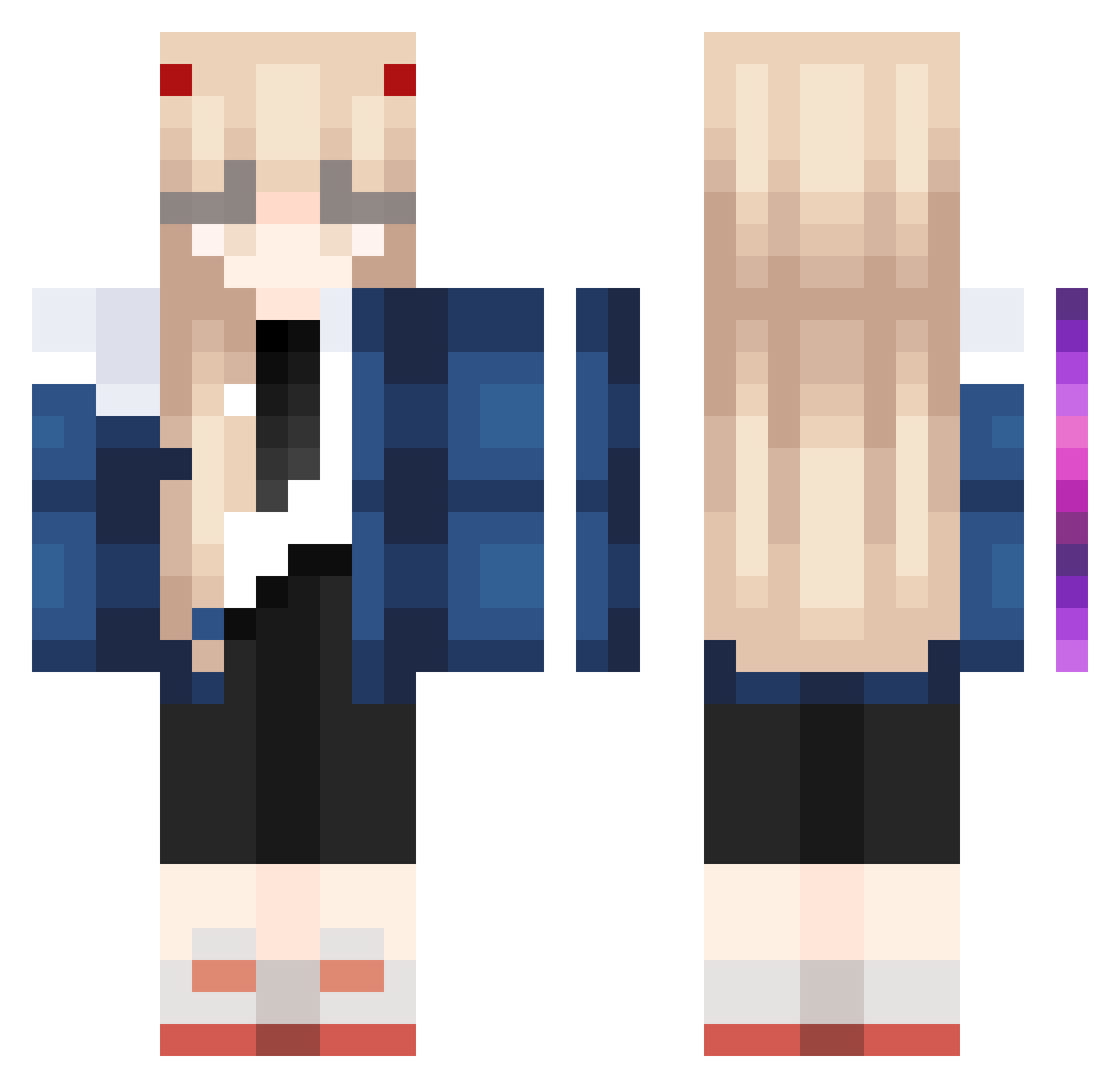
Current Minecraft skin of the player checkyesjulie, loaded from the official Mojang API. Rotate the 3D model with your mouse or finger, then download the skin as a PNG file and use it in Minecraft: Bedrock Edition or Java Edition for free. When checkyesjulie changes their skin, this page updates automatically and the old skin stays in the history below.
Other players with this skin (1023)
checkyesjulie was the 517th player we have seen with this skin, first spotted on 21.09.2026. The same skin was seen on these players. Open a nickname to see their current skin and skin history.
 Hinayx RedTearEIEI yizhishayuza elmikaaaaaa skittleblud jyunjyunko hhappy1628 AsnndPro Simpojimpo calebnice XNYLH6 wanglufei11 JntmLbmzxhb nhy61234 COVID_Lover raigabi ahuaqvq psychicsanji GOOD_RAUO 3sai BY_M0M Nomao3o Ulchzzz IIRNBO haya1215 he__ye L1nus_666 noor_UwU Kimkibok Alcoholisme Im_Not_a_Weeb alphoi7 Jxffrxyo dobi_scv Remyy_mm Zukiix Ancoora Akuw yeokyung Carrot_Sticc Qu1ao FearlesSHuman Rasuk511 DarkBladeDev sohyuu RiriSpark Super_Rei thatgmperson kuroyizu antomiauu Ai7rccc ylyhua emmaaa12 11link1 eb0b jini396 FattyGirl25 Paytonaa Old_KF Emile98
More Zero Two Minecraft skins
How to install the checkyesjulie skin
- Press the Download button above to save the skin as a PNG file.
- Minecraft: Bedrock Edition (PE): open the Dressing Room from the main menu (or tap your character → Edit Character), go to Classic Skins → Owned, press the + (new skin) button, choose the downloaded PNG and pick the Classic (Steve) model. Works on PC and mobile; consoles cannot import custom skins.
- Minecraft: Java Edition: open the Minecraft Launcher, go to the Skins tab, click New Skin, load the PNG, pick the Classic (Steve) model and press Save & Use. You can also upload it at minecraft.net → Profile → Change Skin.
The skin does not show up after import - what should I do?
Restart Minecraft and open the Dressing Room again - imported skins sometimes appear only after a restart. Also make sure you selected the imported skin and picked the Classic (Steve) model.
Which model should I choose, Classic or Slim?
This skin is designed for the Classic (Steve) model. If you pick the wrong model, the arms of the skin will look stretched or squeezed.
Is the skin of checkyesjulie free to download?
Yes. Press Download, save the PNG file and use it in Minecraft: Bedrock Edition or Java Edition - no payment or registration needed. The skin also works on multiplayer servers and Realms.
More skins
Looking for more? Go back to all Minecraft skins and check the top skins of the week, month and all time, or find any player's skin by nickname.