
bjm3153 - Minecraft Skins & Skin History
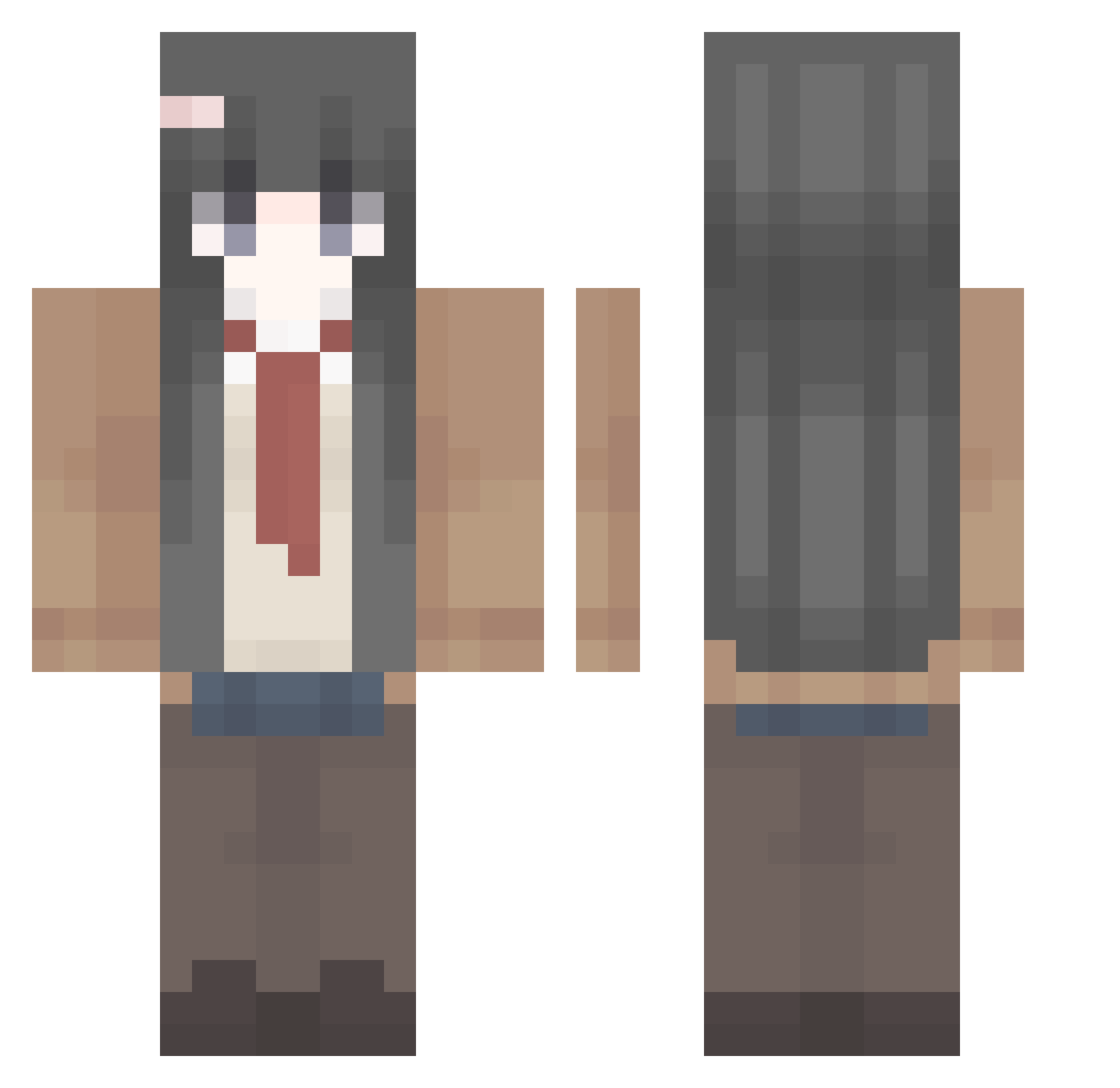
Current Minecraft skin of the player bjm3153, loaded from the official Mojang API. Rotate the 3D model with your mouse or finger, then download the skin as a PNG file and use it in Minecraft: Bedrock Edition or Java Edition for free. When bjm3153 changes their skin, this page updates automatically and the old skin stays in the history below.
Other players with this skin (410)
bjm3153 was the 372nd player we have seen with this skin, first spotted on 24.10.2026. The same skin was seen on these players. Open a nickname to see their current skin and skin history.
 yellow_kim yu_zhongyu reeefleks alejandriux HongYe1633 Fusq_ prodigal1236 ioriyuri Niyella wfYgL Krischi26 hutao_5kcan_0908 Maistappen VTIN765 AJIII0 byree FanFan1224 pandq_q Ozsutto lutena1 konrice minisoft YungNali ystef jnttt krzychuuv sunorin SANRIYUE2 Ryuji7375 Caycaykus Jasoxz skibidykaz noseq MikanAffine zhongguojiayou VR_tomoe SilunKim linbei5 kinkyle _Todesgott_ jerriey JohnnyJoestar228 Ysagi_ tianyar ASHES_BOY fanyizhi Shengui KokitoDesu GiveMeMana77 Luminous951_TW Sakura87458 Chavore HuyPhuc zhao0 Beyonder1l JunielJay EMTcawd pesisno medanasco schroda
More School Uniform Minecraft skins
See all 6647 School Uniform skins
How to install the bjm3153 skin
- Press the Download button above to save the skin as a PNG file.
- Minecraft: Bedrock Edition (PE): open the Dressing Room from the main menu (or tap your character → Edit Character), go to Classic Skins → Owned, press the + (new skin) button, choose the downloaded PNG and pick the Classic (Steve) model. Works on PC and mobile; consoles cannot import custom skins.
- Minecraft: Java Edition: open the Minecraft Launcher, go to the Skins tab, click New Skin, load the PNG, pick the Classic (Steve) model and press Save & Use. You can also upload it at minecraft.net → Profile → Change Skin.
The skin does not show up after import - what should I do?
Restart Minecraft and open the Dressing Room again - imported skins sometimes appear only after a restart. Also make sure you selected the imported skin and picked the Classic (Steve) model.
Which model should I choose, Classic or Slim?
This skin is designed for the Classic (Steve) model. If you pick the wrong model, the arms of the skin will look stretched or squeezed.
Is the skin of bjm3153 free to download?
Yes. Press Download, save the PNG file and use it in Minecraft: Bedrock Edition or Java Edition - no payment or registration needed. The skin also works on multiplayer servers and Realms.
More skins
Looking for more? Go back to all Minecraft skins and check the top skins of the week, month and all time, or find any player's skin by nickname.