
bartuzas - Minecraft Skins & Skin History
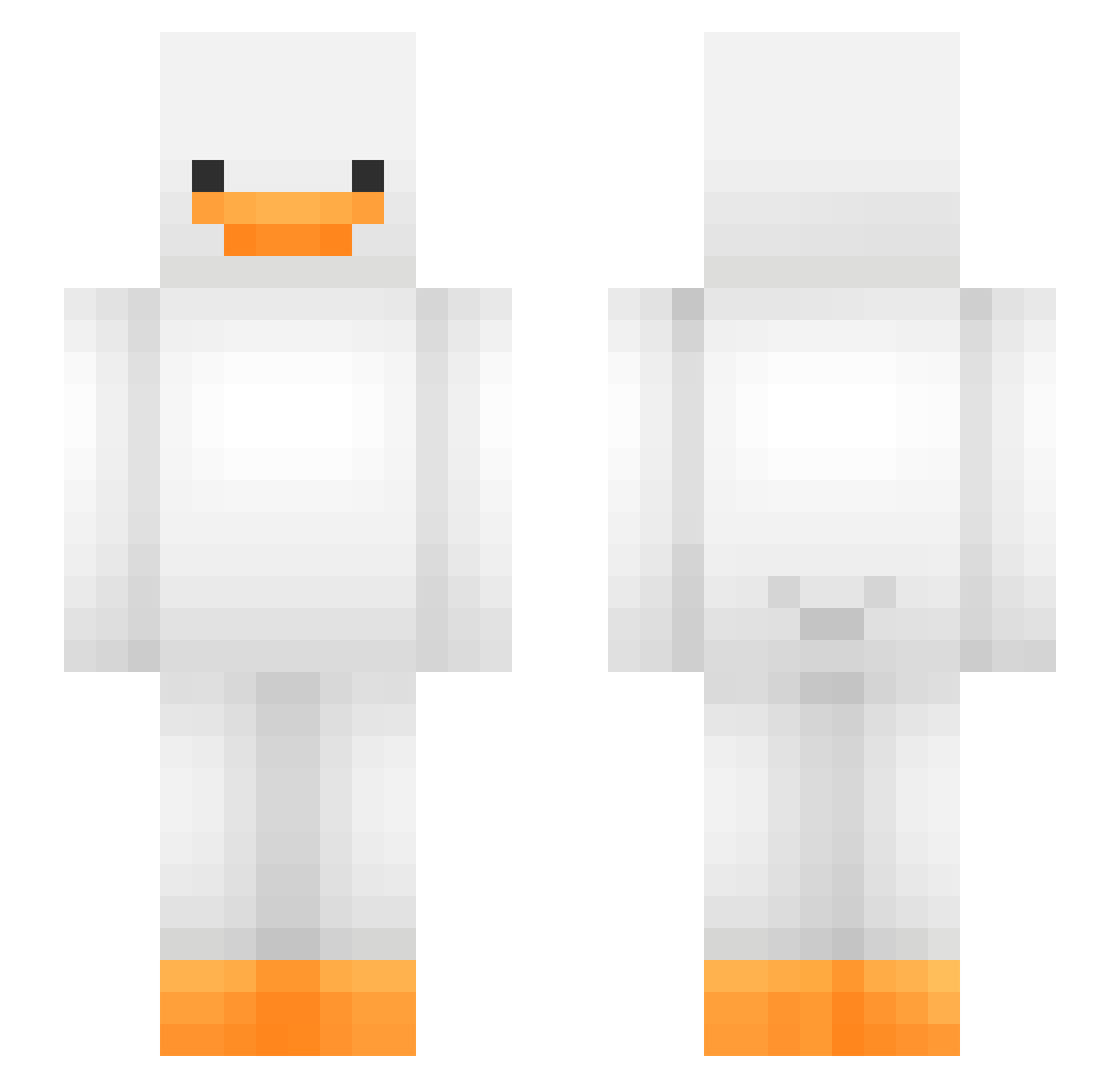
Current Minecraft skin of the player bartuzas, loaded from the official Mojang API. Rotate the 3D model with your mouse or finger, then download the skin as a PNG file and use it in Minecraft: Bedrock Edition or Java Edition for free. When bartuzas changes their skin, this page updates automatically and the old skin stays in the history below.
Other players with this skin (475)
bartuzas was the 31st player we have seen with this skin, first spotted on 02.08.2026. The same skin was seen on these players. Open a nickname to see their current skin and skin history.
 Nesss12 LiniBu CatlessWhisper zaza246 _Trungy_ TRASH1598 NotSoSpicyBuns Adeliuxsas Jahol11 martin28054 FakenDruggo mataviejitas_01 FatalVonDir Jeembo7 ONYX_BOY Bocian999 scookes1 TeoG05 gseon noxyOreo LipstickGuy gkwltn1124 Jootaewoo syriosi petitVX jacksonrobert08 FLAPIE0 Tolppa1 yunginincharge Rados54 FirDark speedagan Attaboy342 Zeelandistan kimulumba Marcomonkey flowerbee0023 leviathan8880 KasfuA Daydaybabe cheesemuncher5 d1baddie akssud Martin1107 Shadow_elf202
 K_Kimchi_ BlueBoss MrFinesser_ n_nh77 asseater121420 datguyson
 SIO_5 zhou_uuuuu lardjiujai __Macho__ Alex_is_sad Celineaw
 PerzikCZ stowik_ milana444555
More Duck Minecraft skins
How to install the bartuzas skin
- Press the Download button above to save the skin as a PNG file.
- Minecraft: Bedrock Edition (PE): open the Dressing Room from the main menu (or tap your character → Edit Character), go to Classic Skins → Owned, press the + (new skin) button, choose the downloaded PNG and pick the Slim (Alex) model. Works on PC and mobile; consoles cannot import custom skins.
- Minecraft: Java Edition: open the Minecraft Launcher, go to the Skins tab, click New Skin, load the PNG, pick the Slim (Alex) model and press Save & Use. You can also upload it at minecraft.net → Profile → Change Skin.
The skin does not show up after import - what should I do?
Restart Minecraft and open the Dressing Room again - imported skins sometimes appear only after a restart. Also make sure you selected the imported skin and picked the Slim (Alex) model.
Which model should I choose, Classic or Slim?
This skin is designed for the Slim (Alex) model. If you pick the wrong model, the arms of the skin will look stretched or squeezed.
Is the skin of bartuzas free to download?
Yes. Press Download, save the PNG file and use it in Minecraft: Bedrock Edition or Java Edition - no payment or registration needed. The skin also works on multiplayer servers and Realms.
More skins
Looking for more? Go back to all Minecraft skins and check the top skins of the week, month and all time, or find any player's skin by nickname.