
bananan7554 - Minecraft Skins & Skin History
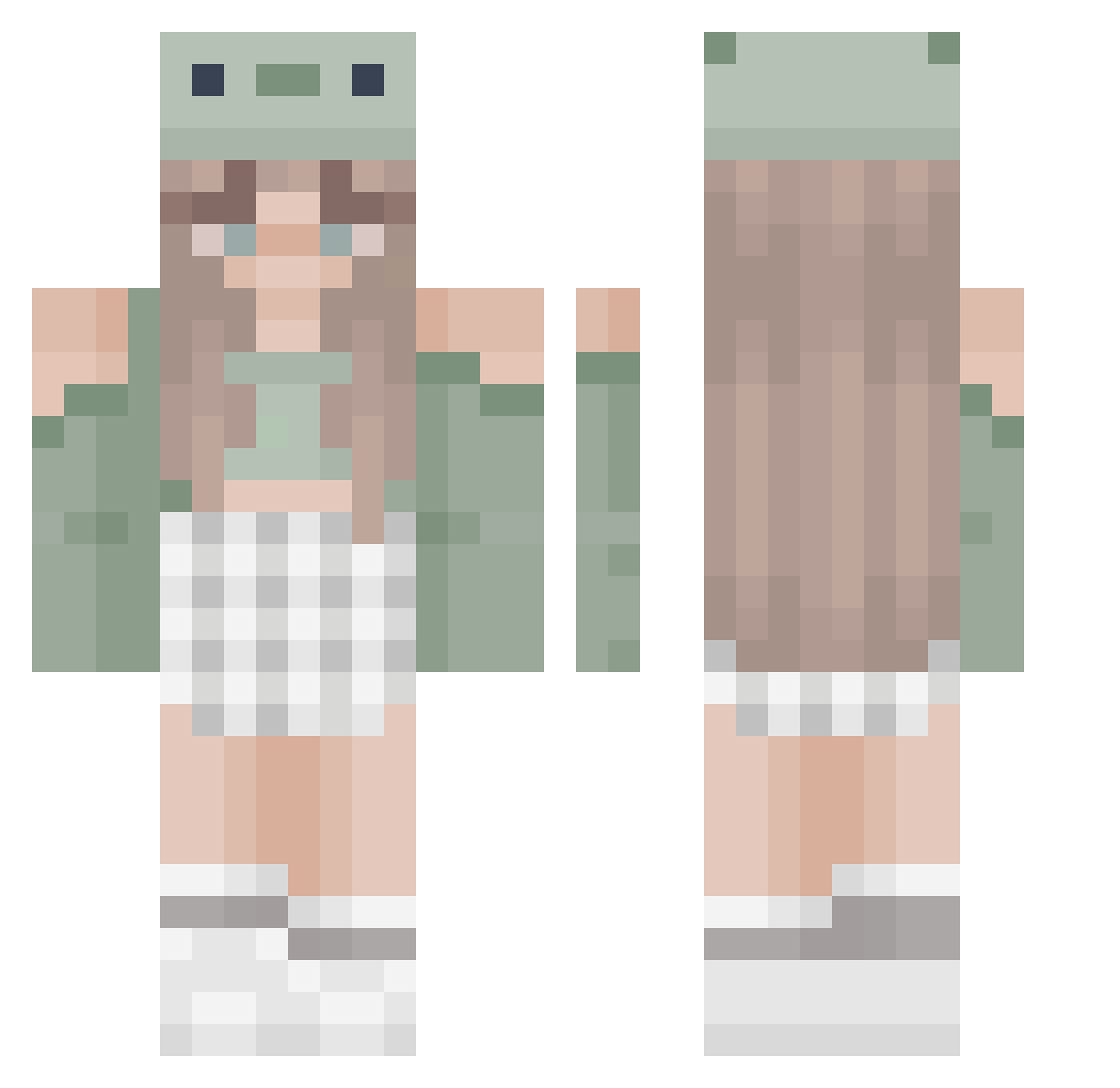
Current Minecraft skin of the player bananan7554, loaded from the official Mojang API. Rotate the 3D model with your mouse or finger, then download the skin as a PNG file and use it in Minecraft: Bedrock Edition or Java Edition for free. When bananan7554 changes their skin, this page updates automatically and the old skin stays in the history below.
Other players with this skin (466)
bananan7554 was the 156th player we have seen with this skin, first spotted on 01.09.2026. The same skin was seen on these players. Open a nickname to see their current skin and skin history.
 sydthecarrot Spacefruit2795 JessGM00 Maxmia13 Minyoongi08 qulligreen2000 avanaomi rebbiie PlonsjeDeKorte lily23106 Ildenys GAMERGRlLL Sydvicious111 PurpleFrog134 alicat55523 pixiekarina gsskye Anixon33 do_re_miaa xQueenTina Randomium0 kgmkat uniminilove KitKat1804 lynchLenya carinagrm smushlyn KERENOGA NoIdea1056 duda236 VickyHuckleton a3th3ria lpslearia100 LovelyBonnie MetalFrost9988 Tropicano875 iykmeno VAL1OSA 24good potawi kiwl00 Laurenishhh Y0PINEL pizzaluvr333 catj101 lostgreta Abildk BlubberryBlossom Alice_the_pand ADATUDE amandanorling Laurakng cecely67 CastOrange13548 Donutroses
 RileyR0se DocTart Estalitha Gam3rG1rl1337 Pietpukje
More Sage Green Minecraft skins
How to install the bananan7554 skin
- Press the Download button above to save the skin as a PNG file.
- Minecraft: Bedrock Edition (PE): open the Dressing Room from the main menu (or tap your character → Edit Character), go to Classic Skins → Owned, press the + (new skin) button, choose the downloaded PNG and pick the Classic (Steve) model. Works on PC and mobile; consoles cannot import custom skins.
- Minecraft: Java Edition: open the Minecraft Launcher, go to the Skins tab, click New Skin, load the PNG, pick the Classic (Steve) model and press Save & Use. You can also upload it at minecraft.net → Profile → Change Skin.
The skin does not show up after import - what should I do?
Restart Minecraft and open the Dressing Room again - imported skins sometimes appear only after a restart. Also make sure you selected the imported skin and picked the Classic (Steve) model.
Which model should I choose, Classic or Slim?
This skin is designed for the Classic (Steve) model. If you pick the wrong model, the arms of the skin will look stretched or squeezed.
Is the skin of bananan7554 free to download?
Yes. Press Download, save the PNG file and use it in Minecraft: Bedrock Edition or Java Edition - no payment or registration needed. The skin also works on multiplayer servers and Realms.
More skins
Looking for more? Go back to all Minecraft skins and check the top skins of the week, month and all time, or find any player's skin by nickname.