
ahaaaaaaaa - Minecraft Skins & Skin History
Current Minecraft skin of the player ahaaaaaaaa, loaded from the official Mojang API. Rotate the 3D model with your mouse or finger, then download the skin as a PNG file and use it in Minecraft: Bedrock Edition or Java Edition for free. When ahaaaaaaaa changes their skin, this page updates automatically and the old skin stays in the history below.
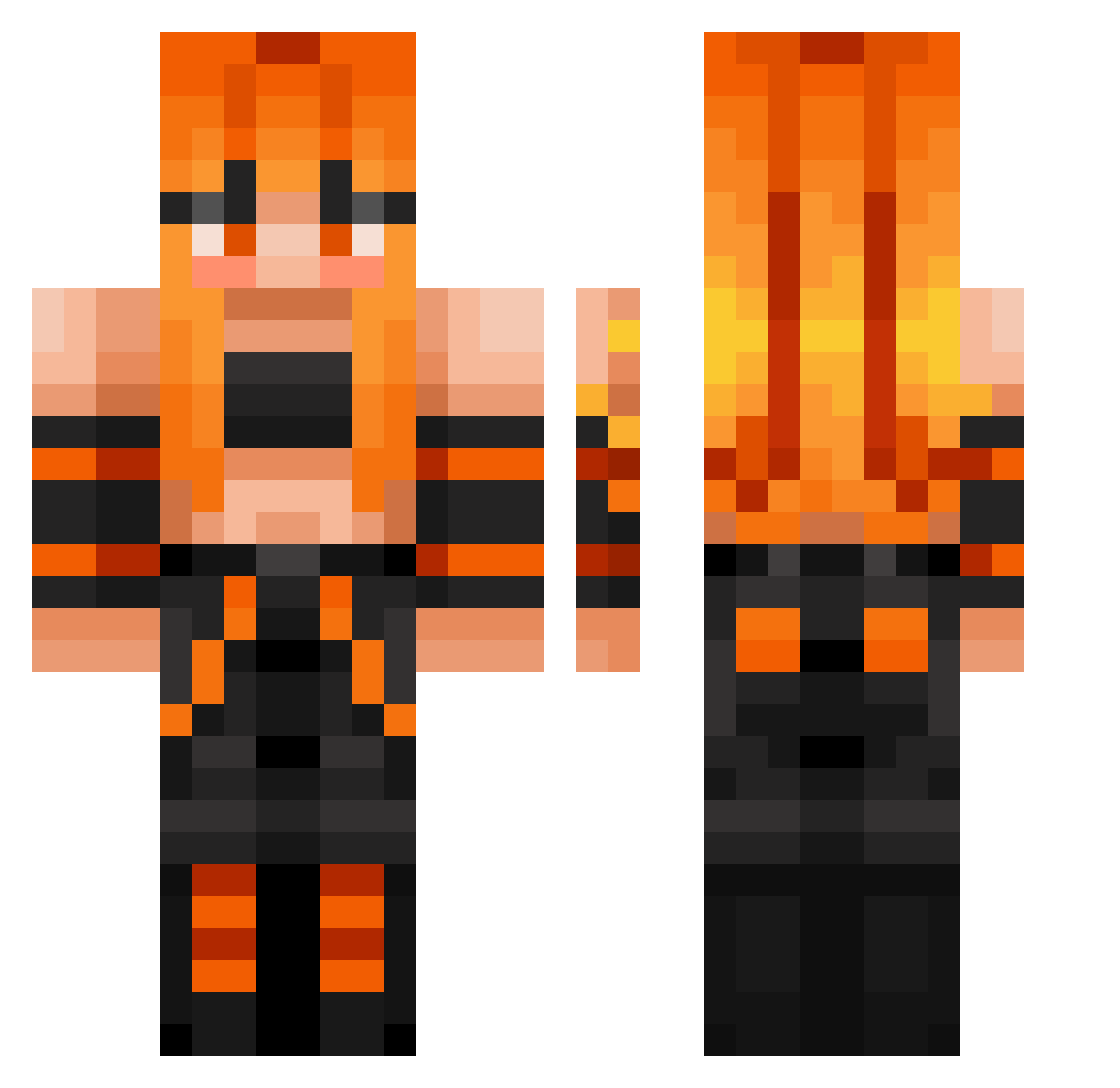
Other players with this skin (397)
ahaaaaaaaa was the 143rd player we have seen with this skin, first spotted on 05.09.2026. The same skin was seen on these players. Open a nickname to see their current skin and skin history.
 tarlee MT_Noob Droghox horse2009 TheDeathOfFaith
 MR_Synapses Hunderka1826 Louira aliceterre Sherla6913
 RagnarokDragon azgamer Siltharin Micaly hallscrum Blakney KINGs201 wxzin aydanGB mijaaqui
 zombiekilla0009
 CYMinecraft2 Remigton2003 clempan2012 Matth3w404 romi_playsswem EmmieG22 DeadshotAtila Levkira Moritz_Kl YOUNG_JU_779 Uglier_Frog SlyLight myeyes666 Jearonz bunches1234 Emberry7 DAVINAHOLLOW CaptCon5002 SorenDavison LinkAsh HarbingerOfDawn AnimaExE Im_SpecialOG Jonathnnn Apollo_1989 Blokkerboy Perfectkl
 kymiti ucchan0526 Whit3P0W3Rranger PeteTheReese Genuine_Calamity WRAITHLORDXD
 alex_la_jare Nin2010 CallMeN4N4 karissa1738 cygnusplm BringTheStorm
More Girl Minecraft skins
How to install the ahaaaaaaaa skin
- Press the Download button above to save the skin as a PNG file.
- Minecraft: Bedrock Edition (PE): open the Dressing Room from the main menu (or tap your character → Edit Character), go to Classic Skins → Owned, press the + (new skin) button, choose the downloaded PNG and pick the Classic (Steve) model. Works on PC and mobile; consoles cannot import custom skins.
- Minecraft: Java Edition: open the Minecraft Launcher, go to the Skins tab, click New Skin, load the PNG, pick the Classic (Steve) model and press Save & Use. You can also upload it at minecraft.net → Profile → Change Skin.
The skin does not show up after import - what should I do?
Restart Minecraft and open the Dressing Room again - imported skins sometimes appear only after a restart. Also make sure you selected the imported skin and picked the Classic (Steve) model.
Which model should I choose, Classic or Slim?
This skin is designed for the Classic (Steve) model. If you pick the wrong model, the arms of the skin will look stretched or squeezed.
Is the skin of ahaaaaaaaa free to download?
Yes. Press Download, save the PNG file and use it in Minecraft: Bedrock Edition or Java Edition - no payment or registration needed. The skin also works on multiplayer servers and Realms.
More skins
Looking for more? Go back to all Minecraft skins and check the top skins of the week, month and all time, or find any player's skin by nickname.