
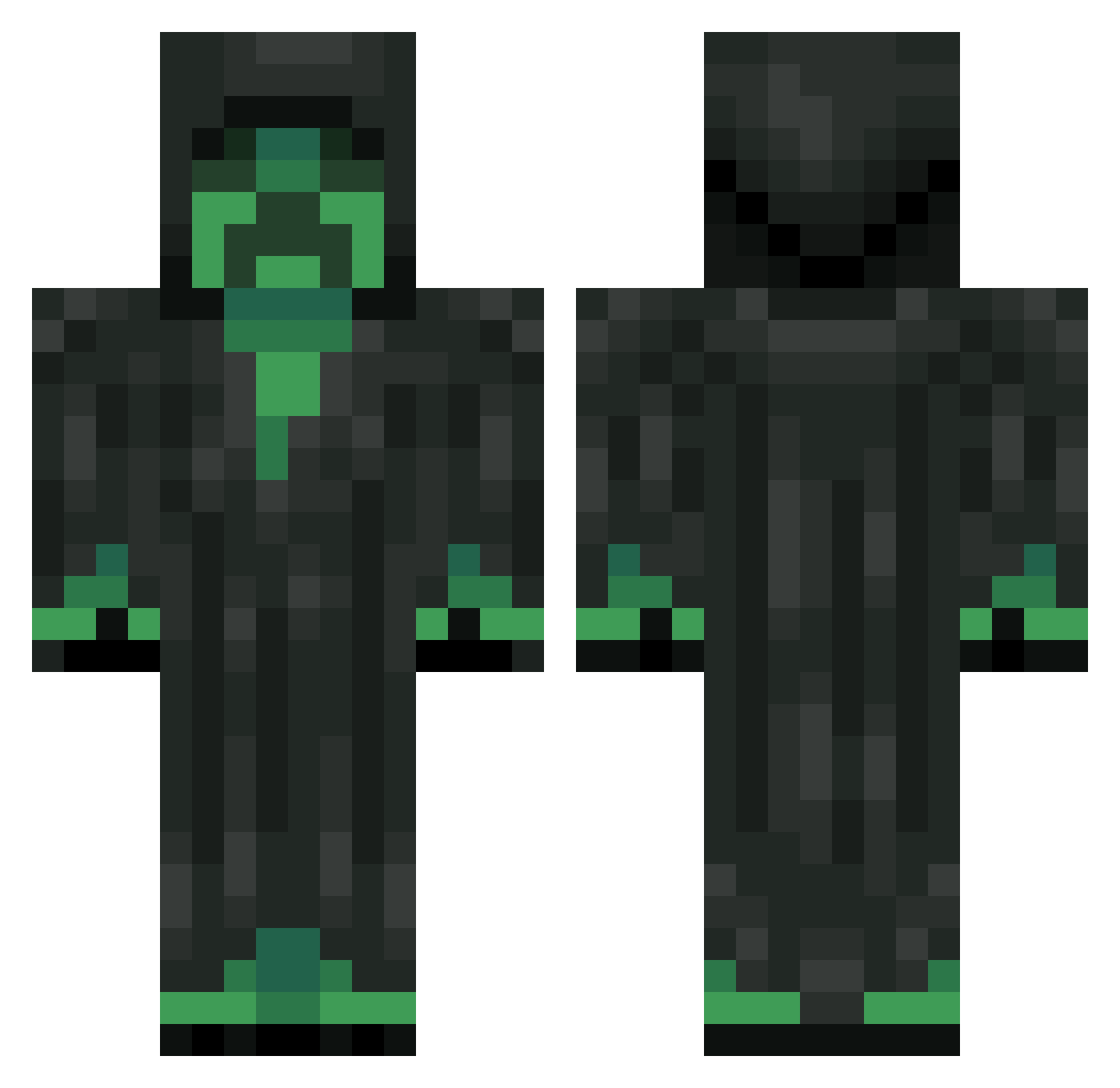
Current Minecraft skin of the player ZhuJunan, loaded from the official Mojang API. Rotate the 3D model with your mouse or finger, then download the skin as a PNG file and use it in Minecraft: Bedrock Edition or Java Edition for free. When ZhuJunan changes their skin, this page updates automatically and the old skin stays in the history below.
Other players with this skin (251)
ZhuJunan was the 132nd player we have seen with this skin, first spotted on 15.09.2026. The same skin was seen on these players. Open a nickname to see their current skin and skin history.
 Lochtor HitlerJr13 usiboo7 Spieldose GameGuy21 Mikseri_ iPLATTV Livingshadow2134 Rira06 SarkastikMenace larseriknyb LikeSsundee doktor_creeper tobi_twue ZmekMan MLGraginChimps Dam0_666 Yergrim Sossef Heimwich Jan3 TNTlover299 pop9dominecraft Beastly_Boi23 RainBlaziken M0nt3x MrAddictionz dakotakennedy10 EliasFut jesseschechtel GRIMM1920 x24 XIAmFrostyX Deckenventilatoa milt1100 Munchie_Munch03 Thujone666 kreepincreeper minegaming132 Buckkie Cohe567 migo_J Cadiras Mojangs_Finest Bruucey oOSpeedy_ViperOo kikodoze d4nhd lloydm37 casper_8 SnowArda Behe48 ROBI04 AkinoriKenpachi soumil15 CrystallCreeper krazzysingh jent900 TheLeftHand42 tytonray
More Grim Reaper Minecraft skins
How to install the ZhuJunan skin
- Press the Download button above to save the skin as a PNG file.
- Minecraft: Bedrock Edition (PE): open the Dressing Room from the main menu (or tap your character → Edit Character), go to Classic Skins → Owned, press the + (new skin) button, choose the downloaded PNG and pick the Classic (Steve) model. Works on PC and mobile; consoles cannot import custom skins.
- Minecraft: Java Edition: open the Minecraft Launcher, go to the Skins tab, click New Skin, load the PNG, pick the Classic (Steve) model and press Save & Use. You can also upload it at minecraft.net → Profile → Change Skin.
The skin does not show up after import - what should I do?
Restart Minecraft and open the Dressing Room again - imported skins sometimes appear only after a restart. Also make sure you selected the imported skin and picked the Classic (Steve) model.
Which model should I choose, Classic or Slim?
This skin is designed for the Classic (Steve) model. If you pick the wrong model, the arms of the skin will look stretched or squeezed.
Is the skin of ZhuJunan free to download?
Yes. Press Download, save the PNG file and use it in Minecraft: Bedrock Edition or Java Edition - no payment or registration needed. The skin also works on multiplayer servers and Realms.
More skins
Looking for more? Go back to all Minecraft skins and check the top skins of the week, month and all time, or find any player's skin by nickname.