
ZUMPER - Minecraft Skins & Skin History
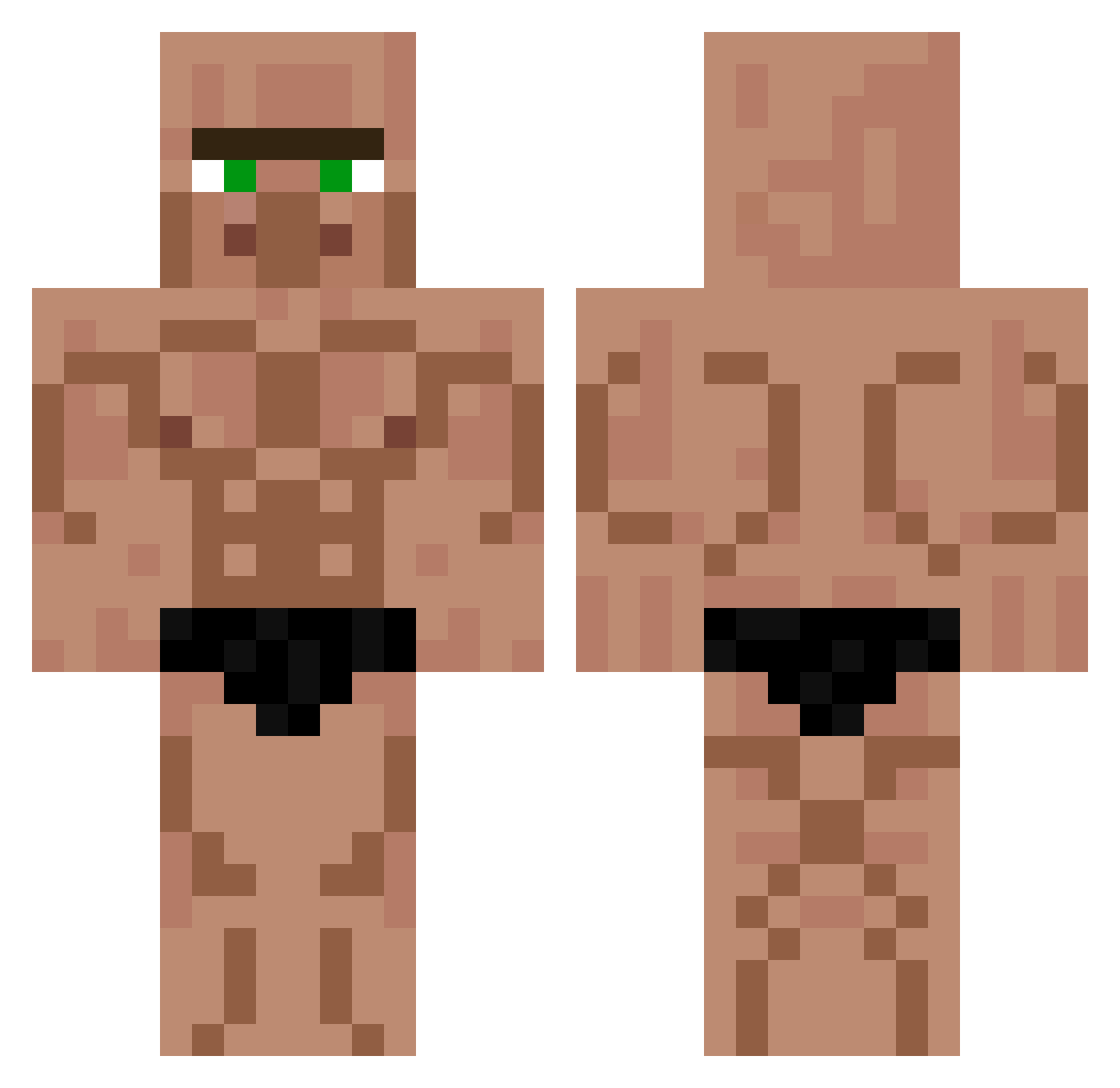
Current Minecraft skin of the player ZUMPER, loaded from the official Mojang API. Rotate the 3D model with your mouse or finger, then download the skin as a PNG file and use it in Minecraft: Bedrock Edition or Java Edition for free. When ZUMPER changes their skin, this page updates automatically and the old skin stays in the history below.
Other players with this skin (514)
ZUMPER was the 477th player we have seen with this skin, first spotted on 11.11.2026. The same skin was seen on these players. Open a nickname to see their current skin and skin history.
 FreshOutTheOv3n LZsigma AlexTnT2012 maguilinha ikerom15 ASWDrago04 COLDMAN_ Bluesiak Mr_Crayz fermitrry SebaltoOxXx itsdax1234 super1244 Dig0d FlyingBurritto Ninja212132 JossMou Rysz4rd DANXBABA dukezin007 migiude12 Fluffypuff6323 WeavyOnAir SpookyJsam ImperialsArePpl2 WavyNetiPot ChrisBumstead1 DWUN14 Efe_Oyunda52 stenhrdd fartgiggle Negoow1 Wie_Evelyn arnelolpower InuTileSasha Gregorio2 LeanyLek Toasterpoet6911 ErTodesengel Deku_Midoria DennaWins Chevengur_2 Shmin_Fidd Theonlychinese Weicheng1020 ashippee Geber_18 LisiastyPL Riper_Z5 Baztian13 Agnes2011 gabrieldidthis kivancbeyimogluu aiksosik Mick53 Erickinho22 Zeroes0 Daywalker843484 Dalabangala Gabrielus13
More Buff Minecraft skins
How to install the ZUMPER skin
- Press the Download button above to save the skin as a PNG file.
- Minecraft: Bedrock Edition (PE): open the Dressing Room from the main menu (or tap your character → Edit Character), go to Classic Skins → Owned, press the + (new skin) button, choose the downloaded PNG and pick the Classic (Steve) model. Works on PC and mobile; consoles cannot import custom skins.
- Minecraft: Java Edition: open the Minecraft Launcher, go to the Skins tab, click New Skin, load the PNG, pick the Classic (Steve) model and press Save & Use. You can also upload it at minecraft.net → Profile → Change Skin.
The skin does not show up after import - what should I do?
Restart Minecraft and open the Dressing Room again - imported skins sometimes appear only after a restart. Also make sure you selected the imported skin and picked the Classic (Steve) model.
Which model should I choose, Classic or Slim?
This skin is designed for the Classic (Steve) model. If you pick the wrong model, the arms of the skin will look stretched or squeezed.
Is the skin of ZUMPER free to download?
Yes. Press Download, save the PNG file and use it in Minecraft: Bedrock Edition or Java Edition - no payment or registration needed. The skin also works on multiplayer servers and Realms.
More skins
Looking for more? Go back to all Minecraft skins and check the top skins of the week, month and all time, or find any player's skin by nickname.