
XDSAVAGE132 - Minecraft Skins & Skin History
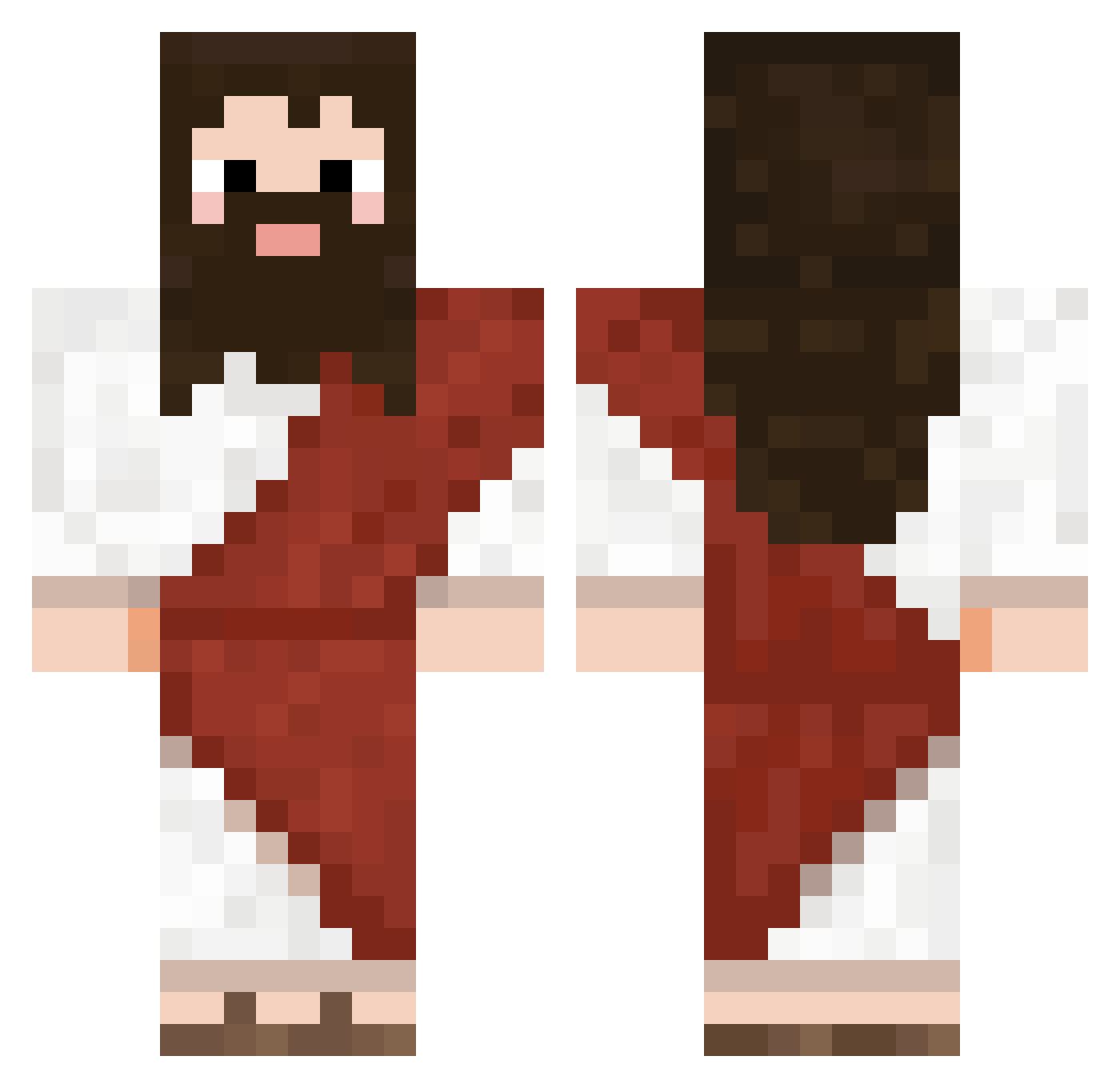
Current Minecraft skin of the player XDSAVAGE132, loaded from the official Mojang API. Rotate the 3D model with your mouse or finger, then download the skin as a PNG file and use it in Minecraft: Bedrock Edition or Java Edition for free. When XDSAVAGE132 changes their skin, this page updates automatically and the old skin stays in the history below.
Other players with this skin (722)
XDSAVAGE132 was the 64th player we have seen with this skin, first spotted on 01.08.2026. The same skin was seen on these players. Open a nickname to see their current skin and skin history.
 Juanfma zemsif Thais_oCarlos Min5_eo krivotracher69 DemonIzrod asty33 Mylungsareblack
 mmmRaniel
 AD_MGK pedrohauagge patoliwka thexend Christain_Boii SonarYup vtiXD
 simonolo8 sl0w78 Juh78 LightAirGames1 azzic Terranasaurus52 23cj Waspeyy Elpoio21 IronmanPro2 Oppaaiii
 LeMonke156 Gupeixoto JerkyDingDong kubazak222 enosako BlondBull simplyafish AnneFrank420 fonkareli talughost MarkTewksbury GabeiusBabyius MattisWoxen FoxTooht Diild Incil Jose10S quorom1 sofia_ayumi takenokowwww Biddysmalls DeadFury simunx cartinovec Feijuca69 Knakworstknakker ViperSpades
 mar3mixek ScorpZeroo Pedrovski_24 PUPSISSS RobotbijNL withyoumoment
More Biblical Minecraft skins
How to install the XDSAVAGE132 skin
- Press the Download button above to save the skin as a PNG file.
- Minecraft: Bedrock Edition (PE): open the Dressing Room from the main menu (or tap your character → Edit Character), go to Classic Skins → Owned, press the + (new skin) button, choose the downloaded PNG and pick the Classic (Steve) model. Works on PC and mobile; consoles cannot import custom skins.
- Minecraft: Java Edition: open the Minecraft Launcher, go to the Skins tab, click New Skin, load the PNG, pick the Classic (Steve) model and press Save & Use. You can also upload it at minecraft.net → Profile → Change Skin.
The skin does not show up after import - what should I do?
Restart Minecraft and open the Dressing Room again - imported skins sometimes appear only after a restart. Also make sure you selected the imported skin and picked the Classic (Steve) model.
Which model should I choose, Classic or Slim?
This skin is designed for the Classic (Steve) model. If you pick the wrong model, the arms of the skin will look stretched or squeezed.
Is the skin of XDSAVAGE132 free to download?
Yes. Press Download, save the PNG file and use it in Minecraft: Bedrock Edition or Java Edition - no payment or registration needed. The skin also works on multiplayer servers and Realms.
More skins
Looking for more? Go back to all Minecraft skins and check the top skins of the week, month and all time, or find any player's skin by nickname.