
Vincentisnothim - Minecraft Skins & Skin History
Current Minecraft skin of the player Vincentisnothim, loaded from the official Mojang API. Rotate the 3D model with your mouse or finger, then download the skin as a PNG file and use it in Minecraft: Bedrock Edition or Java Edition for free. When Vincentisnothim changes their skin, this page updates automatically and the old skin stays in the history below.
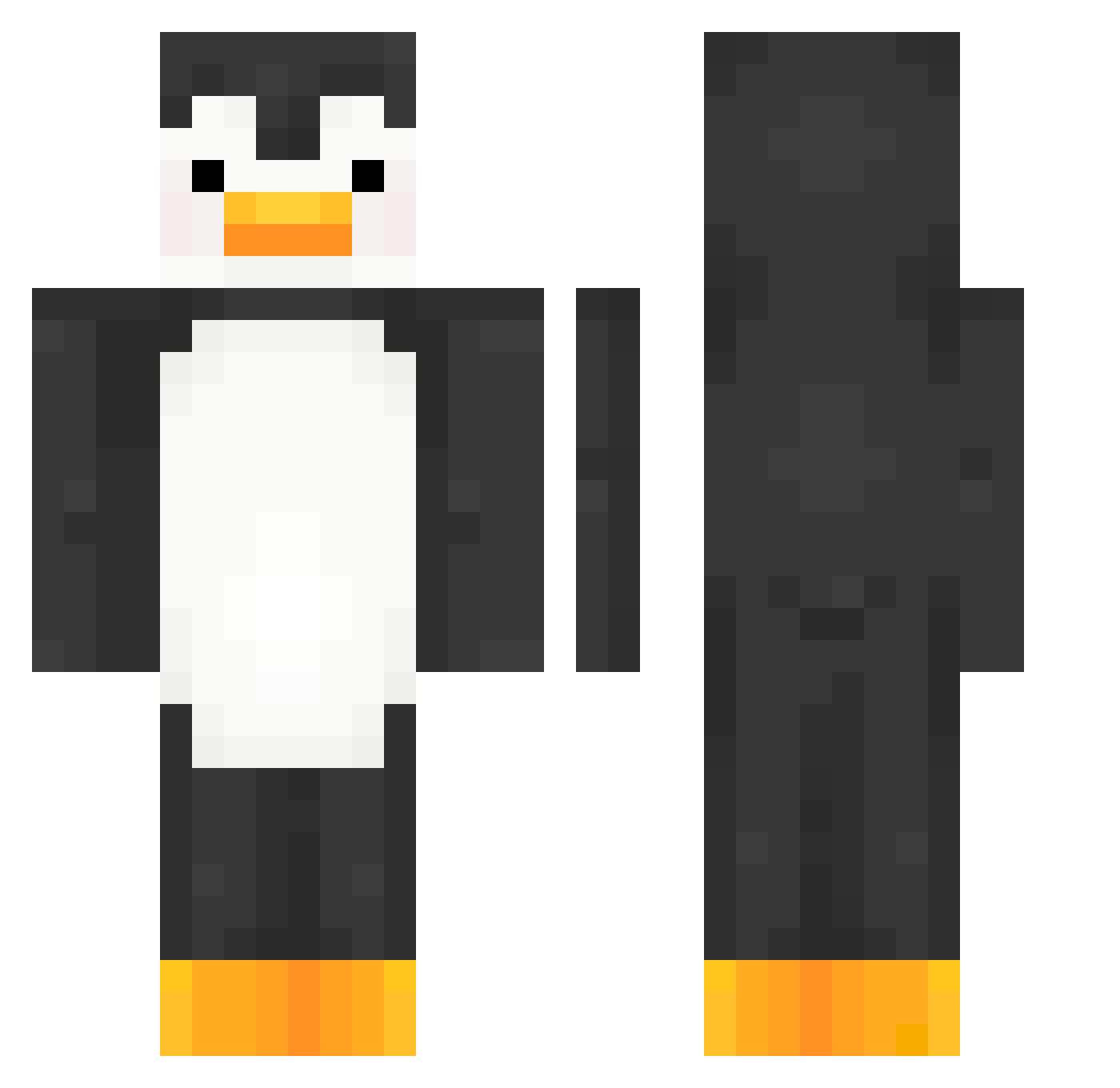
Other players with this skin (197)
Vincentisnothim was the 24th player we have seen with this skin, first spotted on 07.08.2026. The same skin was seen on these players. Open a nickname to see their current skin and skin history.
 Liliedog
 Angel_912 hayefbay AlphaMGC mikk12132 zallylol tq1123 SLICEofWONDER VOJ2012TA maryuTT
 prollynotpolver Stephanii_22 jarla78 julesrules69 OllyKitty ConnorMcgregor04
 Saxman97
 Gulejda MiniAloof georgib1 Gorb668 dinon67 BitSam Macolony CeresTop HoveringVendette najandojan backfisch_hauns fouchika_ white_giveee foohls 151w jaxgamer719 NotWilds NinjaKuan _Des1re_ Xzen1 KongHugo Holliee__ BallHandler_ TTVMrLumpen calebtofooly Adam_Menel ItsJakkal alphawolfflames NAVARRETEE D1MS1M Content___ lxghtyear creamycheesecake
 matixx_W Morvnik viktor_dream Centarie StrikeLikeMike ZenLux24 Eunanmc Tumtum_chicken VIXDAM karannx
More Penguin Minecraft skins
How to install the Vincentisnothim skin
- Press the Download button above to save the skin as a PNG file.
- Minecraft: Bedrock Edition (PE): open the Dressing Room from the main menu (or tap your character → Edit Character), go to Classic Skins → Owned, press the + (new skin) button, choose the downloaded PNG and pick the Classic (Steve) model. Works on PC and mobile; consoles cannot import custom skins.
- Minecraft: Java Edition: open the Minecraft Launcher, go to the Skins tab, click New Skin, load the PNG, pick the Classic (Steve) model and press Save & Use. You can also upload it at minecraft.net → Profile → Change Skin.
The skin does not show up after import - what should I do?
Restart Minecraft and open the Dressing Room again - imported skins sometimes appear only after a restart. Also make sure you selected the imported skin and picked the Classic (Steve) model.
Which model should I choose, Classic or Slim?
This skin is designed for the Classic (Steve) model. If you pick the wrong model, the arms of the skin will look stretched or squeezed.
Is the skin of Vincentisnothim free to download?
Yes. Press Download, save the PNG file and use it in Minecraft: Bedrock Edition or Java Edition - no payment or registration needed. The skin also works on multiplayer servers and Realms.
More skins
Looking for more? Go back to all Minecraft skins and check the top skins of the week, month and all time, or find any player's skin by nickname.