
Tsblock123 - Minecraft Skins & Skin History
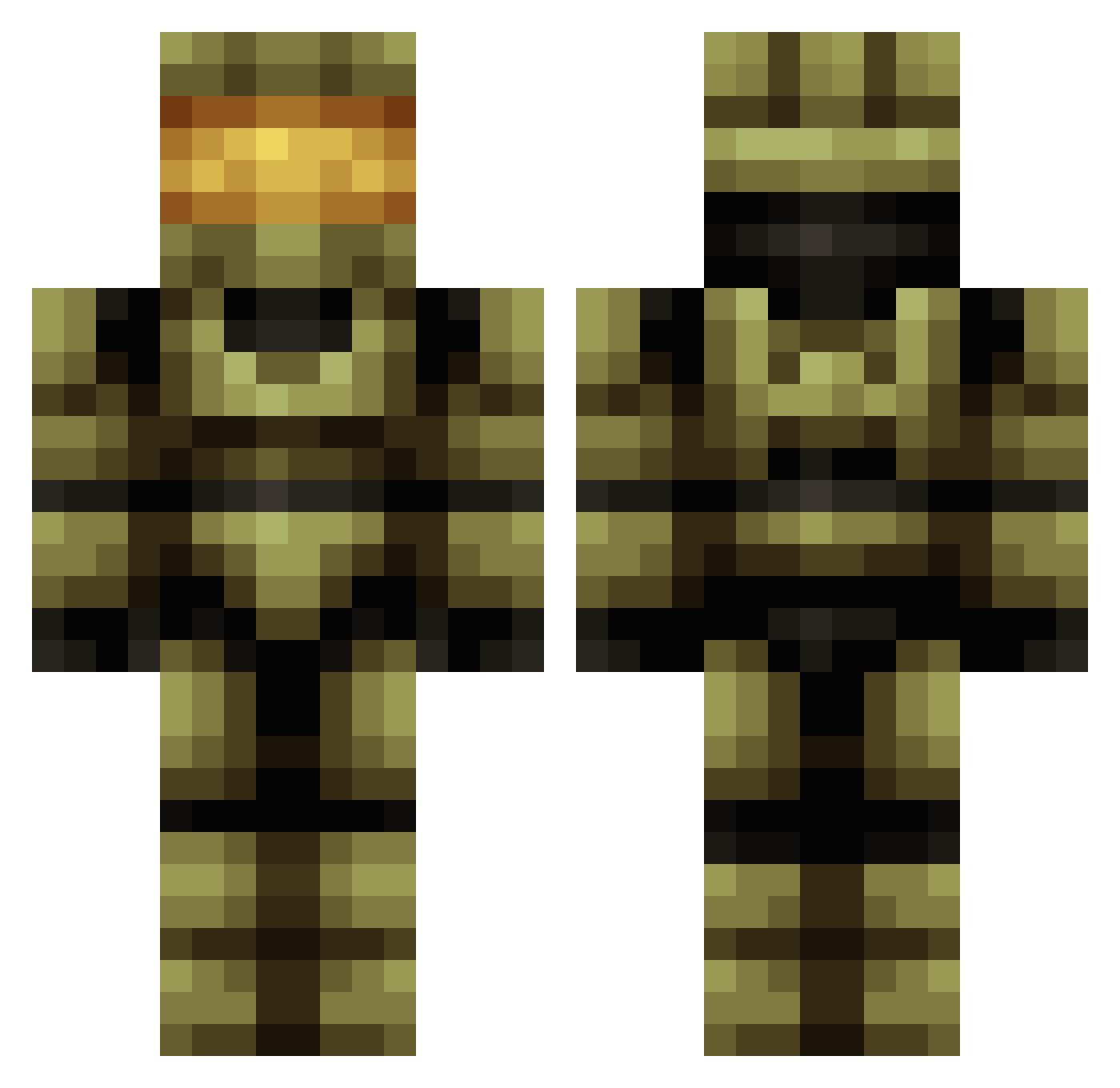
Current Minecraft skin of the player Tsblock123, loaded from the official Mojang API. Rotate the 3D model with your mouse or finger, then download the skin as a PNG file and use it in Minecraft: Bedrock Edition or Java Edition for free. When Tsblock123 changes their skin, this page updates automatically and the old skin stays in the history below.
Other players with this skin (683)
Tsblock123 was the 21st player we have seen with this skin, first spotted on 25.07.2026. The same skin was seen on these players. Open a nickname to see their current skin and skin history.
 Madsken Nelywastaken LeroyJenkins77 ONEbrazo corrupt0 neqio DX_PETER atdddd KevinVo000 Grombat Bossallu DarkSmoc s058433 Phanoongy Sc0ut104 Luca_0l omitom anit0p elflaco316 Steve122908 LifeofPabblo_94 Mosey97 mobfighter9 emoeller96 Desolate_Hybrid poi5847 halojan Shinnbob Diego621 jumjum0000 brokenlight72 ExemptedGuitar Giant_JT _char1z theorignaltlor12 FPS_DOUG Mr_Big_O Megamash zentharthegreat xavberry GamingGod1653 ShadowWolf1203 MinerMOAG RobX810 SaudFN TheGoobs77 DieBibel timmetjuuu Eskivo Luke1782 LOKSKI GEEKINSNEAKS3 RE41PER danmac97 Avarcy Kemp302 Snakeking237 Famne123 mrsir824 RecycleBen
More Master Chief Minecraft skins
See all 537 Master Chief skins
How to install the Tsblock123 skin
- Press the Download button above to save the skin as a PNG file.
- Minecraft: Bedrock Edition (PE): open the Dressing Room from the main menu (or tap your character → Edit Character), go to Classic Skins → Owned, press the + (new skin) button, choose the downloaded PNG and pick the Classic (Steve) model. Works on PC and mobile; consoles cannot import custom skins.
- Minecraft: Java Edition: open the Minecraft Launcher, go to the Skins tab, click New Skin, load the PNG, pick the Classic (Steve) model and press Save & Use. You can also upload it at minecraft.net → Profile → Change Skin.
The skin does not show up after import - what should I do?
Restart Minecraft and open the Dressing Room again - imported skins sometimes appear only after a restart. Also make sure you selected the imported skin and picked the Classic (Steve) model.
Which model should I choose, Classic or Slim?
This skin is designed for the Classic (Steve) model. If you pick the wrong model, the arms of the skin will look stretched or squeezed.
Is the skin of Tsblock123 free to download?
Yes. Press Download, save the PNG file and use it in Minecraft: Bedrock Edition or Java Edition - no payment or registration needed. The skin also works on multiplayer servers and Realms.
More skins
Looking for more? Go back to all Minecraft skins and check the top skins of the week, month and all time, or find any player's skin by nickname.