
Thommy_0987 - Minecraft Skins & Skin History
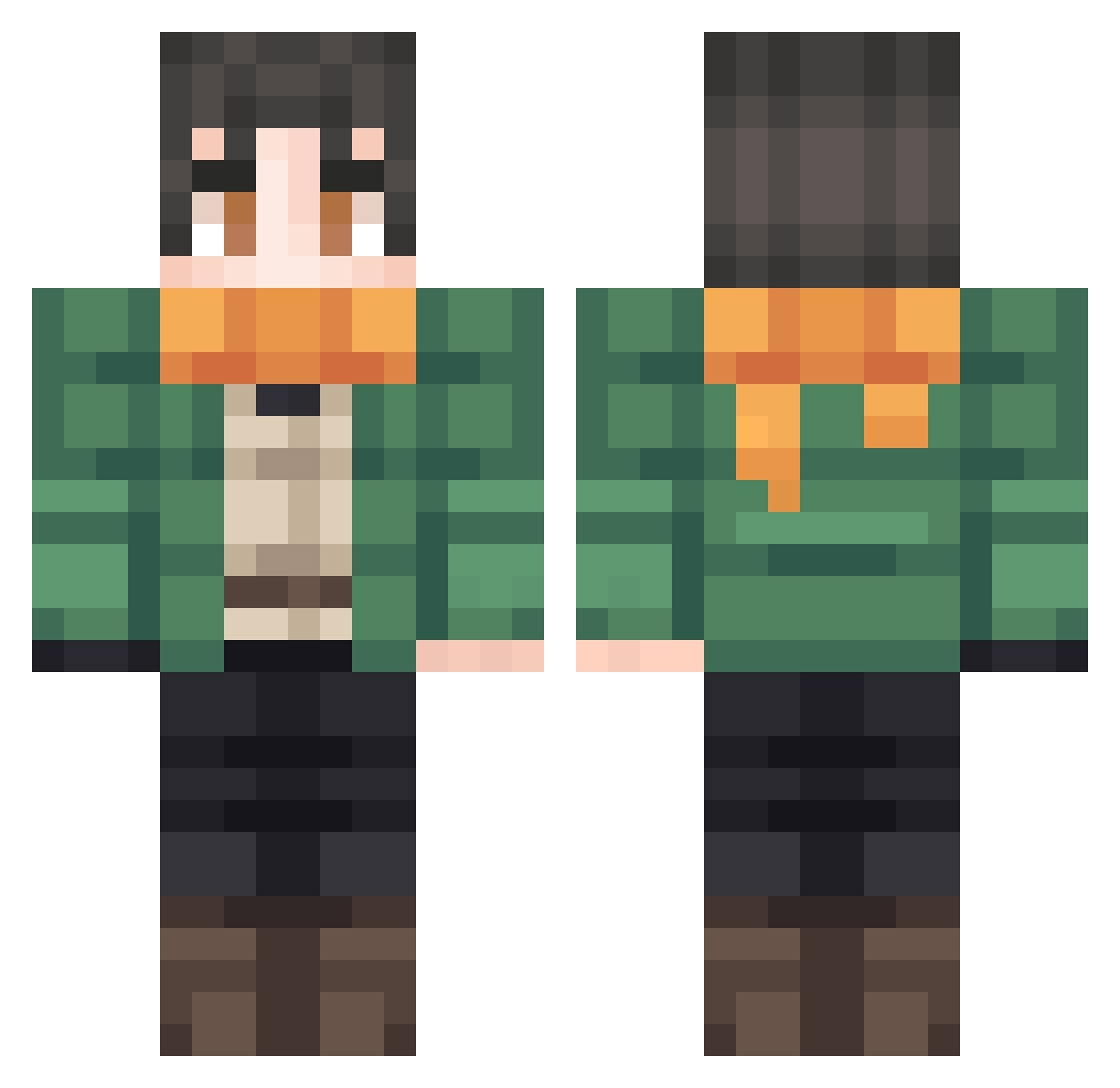
Current Minecraft skin of the player Thommy_0987, loaded from the official Mojang API. Rotate the 3D model with your mouse or finger, then download the skin as a PNG file and use it in Minecraft: Bedrock Edition or Java Edition for free. When Thommy_0987 changes their skin, this page updates automatically and the old skin stays in the history below.
Other players with this skin (110)
Thommy_0987 was the 91st player we have seen with this skin, first spotted on 18.10.2026. The same skin was seen on these players. Open a nickname to see their current skin and skin history.
 ElDRK KitsuIXI Caliburnn_ Nina0425 Kazam_Playz NEET_MC Alg4e_ R3X78 Omega_Joel Unknowyita NotFefe Jamy135 NhatClimbStairs lecat_butousky Kashdevi StraightTalker IAMmuin Conman635 Darshthe2n JONES5222 LazyBones889 mine_dude21 lolo1ol juliuswhat anXestor PupPeeter_ sbif daviwithoutd Leuu2 ChaseBlud Daniel4bc WixaE Helka_Hotelka Mu_Hx Apulian PrintChaff Flaco_Johnson Alikzxd spoknouba El_Mauris XxSavagePizza2xX TheRealBA Hunta126 orangestaple zRefthClaus FourthMarlin418 JoaoAlcantaraFer Domypunto MrShampp BoDoQuE08 Brooxx001 Santix9santix9 shinnsz Umpalumpa5241 Blo_odik abrasivemeow RogerThatKid ibbbbuuuuprofen Mmarggit CartooneurFox
Previous skins of Thommy_0987
Skins that Thommy_0987 wore before, newest first. Click a skin to open its page and download it.
How to install the Thommy_0987 skin
- Press the Download button above to save the skin as a PNG file.
- Minecraft: Bedrock Edition (PE): open the Dressing Room from the main menu (or tap your character → Edit Character), go to Classic Skins → Owned, press the + (new skin) button, choose the downloaded PNG and pick the Classic (Steve) model. Works on PC and mobile; consoles cannot import custom skins.
- Minecraft: Java Edition: open the Minecraft Launcher, go to the Skins tab, click New Skin, load the PNG, pick the Classic (Steve) model and press Save & Use. You can also upload it at minecraft.net → Profile → Change Skin.
The skin does not show up after import - what should I do?
Restart Minecraft and open the Dressing Room again - imported skins sometimes appear only after a restart. Also make sure you selected the imported skin and picked the Classic (Steve) model.
Which model should I choose, Classic or Slim?
This skin is designed for the Classic (Steve) model. If you pick the wrong model, the arms of the skin will look stretched or squeezed.
Is the skin of Thommy_0987 free to download?
Yes. Press Download, save the PNG file and use it in Minecraft: Bedrock Edition or Java Edition - no payment or registration needed. The skin also works on multiplayer servers and Realms.
More skins
Looking for more? Go back to all Minecraft skins and check the top skins of the week, month and all time, or find any player's skin by nickname.