
T3NNISBALL - Minecraft Skins & Skin History
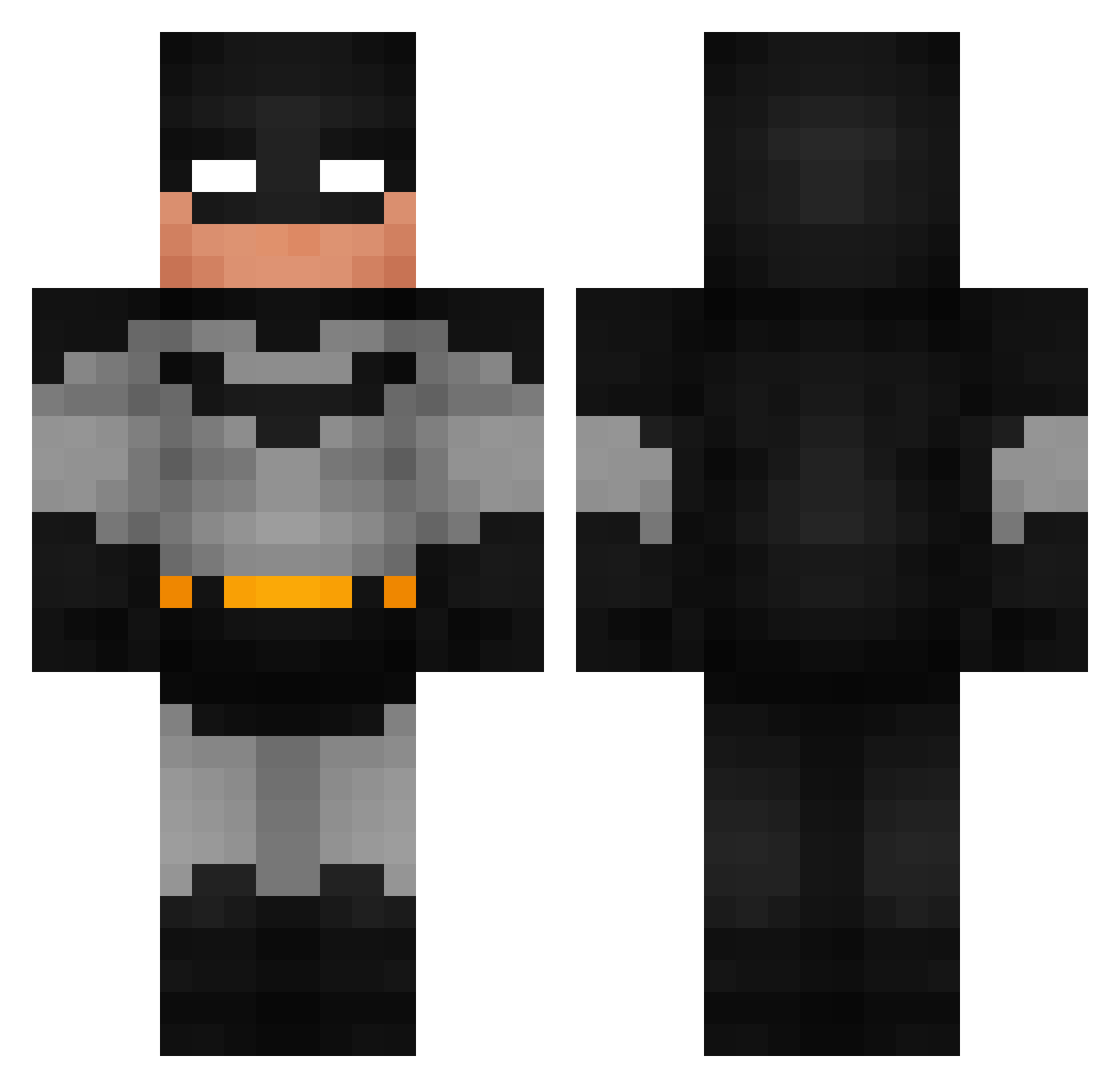
Current Minecraft skin of the player T3NNISBALL, loaded from the official Mojang API. Rotate the 3D model with your mouse or finger, then download the skin as a PNG file and use it in Minecraft: Bedrock Edition or Java Edition for free. When T3NNISBALL changes their skin, this page updates automatically and the old skin stays in the history below.
Other players with this skin (946)
T3NNISBALL was the 357th player we have seen with this skin, first spotted on 06.09.2026. The same skin was seen on these players. Open a nickname to see their current skin and skin history.
 Adlaurant13 DrDrippie
 lubiemleczko2137 0kayJacoob Paicou Quevvin MonkeyD_Chopper Legend1223 AlkuwaitiJackson Rajeevv25 Shark31770 Squiggle2207 EmiiDog capybara7235 Kxddy_ jerrinplays BeerEater Alebcay13 fartedmonkey NBB1 Alphaa123321 ZIGOZUUA Jopzil MnM_812 BalintOfficial spludder TheZepto tcb111703 yildizhs kongeinar uLPILtuLuPIL gillyfish122 Traylo AnderBM12 UwUBaba RaskeBriller skawaa Slinning_ Serveres_Kald marvinmartin78 Asnipee Capo9 MaxJelger kittyknip Itsmohamm batmansidechick TacticalAce581 puddiyavenya bxbxyxw mikeltxi2 KillaGhostRider dfeisty9 Thomso_007 luchopaay LeBobBon MarioTomey vTNz10 krooky Warmeur pala3807
More Batman Minecraft skins
How to install the T3NNISBALL skin
- Press the Download button above to save the skin as a PNG file.
- Minecraft: Bedrock Edition (PE): open the Dressing Room from the main menu (or tap your character → Edit Character), go to Classic Skins → Owned, press the + (new skin) button, choose the downloaded PNG and pick the Classic (Steve) model. Works on PC and mobile; consoles cannot import custom skins.
- Minecraft: Java Edition: open the Minecraft Launcher, go to the Skins tab, click New Skin, load the PNG, pick the Classic (Steve) model and press Save & Use. You can also upload it at minecraft.net → Profile → Change Skin.
The skin does not show up after import - what should I do?
Restart Minecraft and open the Dressing Room again - imported skins sometimes appear only after a restart. Also make sure you selected the imported skin and picked the Classic (Steve) model.
Which model should I choose, Classic or Slim?
This skin is designed for the Classic (Steve) model. If you pick the wrong model, the arms of the skin will look stretched or squeezed.
Is the skin of T3NNISBALL free to download?
Yes. Press Download, save the PNG file and use it in Minecraft: Bedrock Edition or Java Edition - no payment or registration needed. The skin also works on multiplayer servers and Realms.
More skins
Looking for more? Go back to all Minecraft skins and check the top skins of the week, month and all time, or find any player's skin by nickname.