
Spahgoot - Minecraft Skins & Skin History
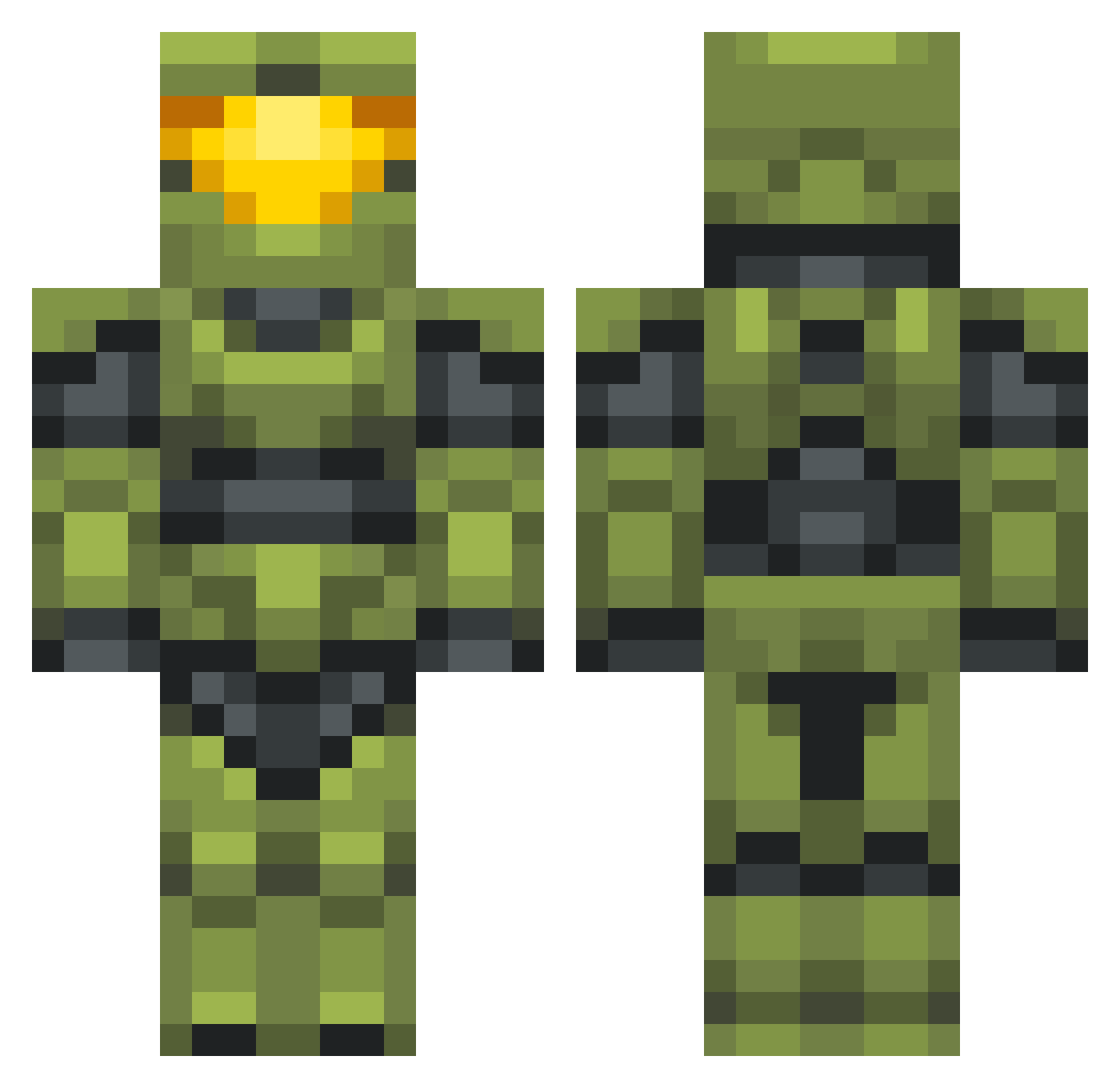
Current Minecraft skin of the player Spahgoot, loaded from the official Mojang API. Rotate the 3D model with your mouse or finger, then download the skin as a PNG file and use it in Minecraft: Bedrock Edition or Java Edition for free. When Spahgoot changes their skin, this page updates automatically and the old skin stays in the history below.
Other players with this skin (702)
Spahgoot was the 421st player we have seen with this skin, first spotted on 01.10.2026. The same skin was seen on these players. Open a nickname to see their current skin and skin history.
 SiRFraGstaR Astolanis that4znkid rozdogjr2 TheDecs Brooen heeadsoup xd_Spartan117 Huntaahhhh GamesWizard Risico79 Soprano4145 DekuDaka HolyHannibal Skybuilder2015 xFamine Overkill TearlessBike547 IReload95 Luxhalcyon Bosstwinn b4xq Explicid1799 talpathy moardots111 Noics Kotor13e Monkeslol KaHoWong Widell killerbacon99 Jooby_ GearSpartan Sacred_Code 1V1MeInHalo SprayAndPray360 delay_onion Sebhax21 KnightHero117 TheDevilD lekvaroska kraudemars __Reed__ Ivartastic majesticgreek ThatGuyWhoLagz Borgan66 Coral_Polyps Mincemeater JBrock117 Bryan469 IGNASIOCG Dolan_356 worldowner BJLAFLARE Asetre5 kveza Frankenweenie69 Gump23 Charliecheeser
More Master Chief Minecraft skins
See all 538 Master Chief skins
How to install the Spahgoot skin
- Press the Download button above to save the skin as a PNG file.
- Minecraft: Bedrock Edition (PE): open the Dressing Room from the main menu (or tap your character → Edit Character), go to Classic Skins → Owned, press the + (new skin) button, choose the downloaded PNG and pick the Classic (Steve) model. Works on PC and mobile; consoles cannot import custom skins.
- Minecraft: Java Edition: open the Minecraft Launcher, go to the Skins tab, click New Skin, load the PNG, pick the Classic (Steve) model and press Save & Use. You can also upload it at minecraft.net → Profile → Change Skin.
The skin does not show up after import - what should I do?
Restart Minecraft and open the Dressing Room again - imported skins sometimes appear only after a restart. Also make sure you selected the imported skin and picked the Classic (Steve) model.
Which model should I choose, Classic or Slim?
This skin is designed for the Classic (Steve) model. If you pick the wrong model, the arms of the skin will look stretched or squeezed.
Is the skin of Spahgoot free to download?
Yes. Press Download, save the PNG file and use it in Minecraft: Bedrock Edition or Java Edition - no payment or registration needed. The skin also works on multiplayer servers and Realms.
More skins
Looking for more? Go back to all Minecraft skins and check the top skins of the week, month and all time, or find any player's skin by nickname.