
SleeplesS00 - Minecraft Skins & Skin History
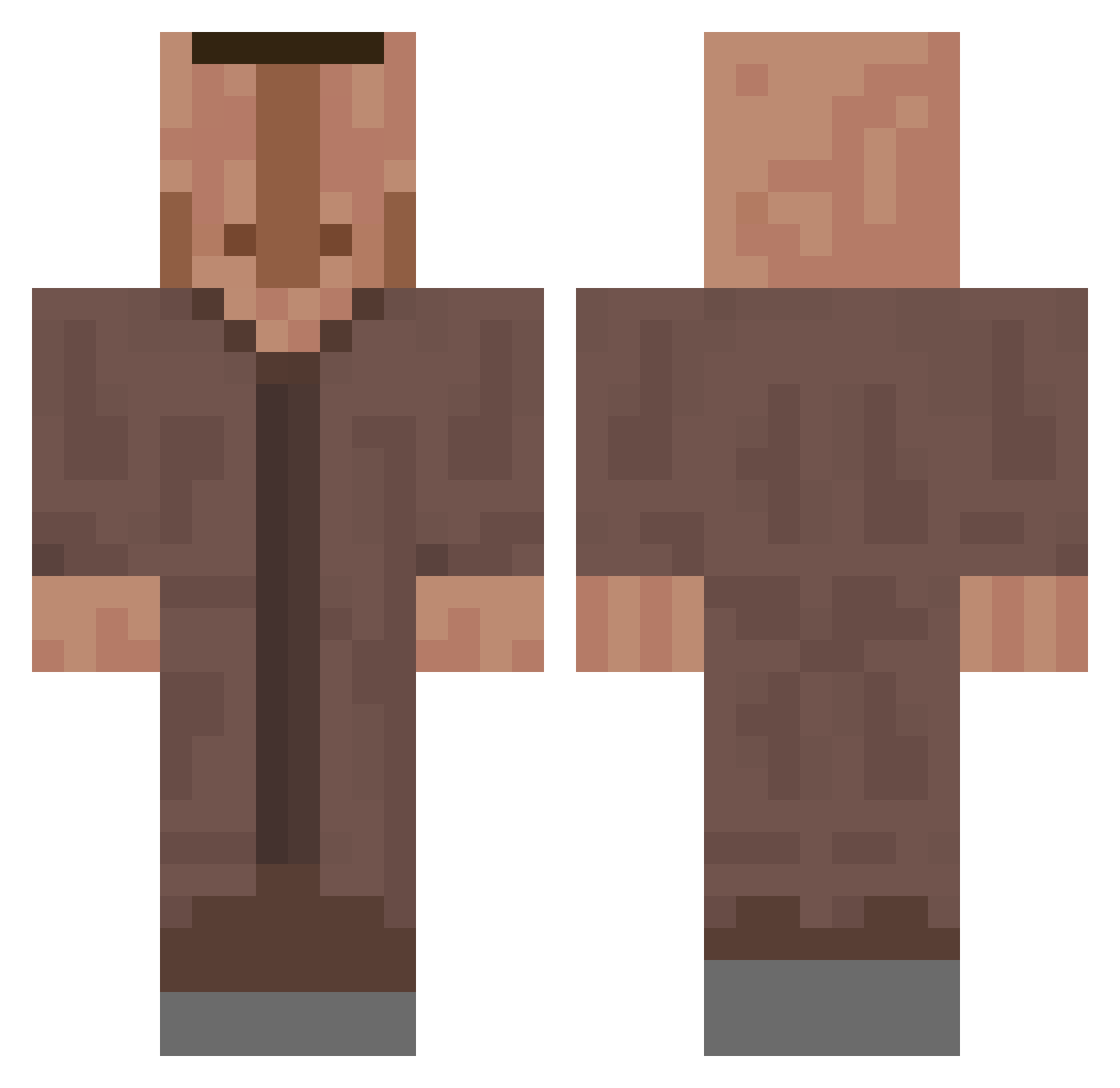
Current Minecraft skin of the player SleeplesS00, loaded from the official Mojang API. Rotate the 3D model with your mouse or finger, then download the skin as a PNG file and use it in Minecraft: Bedrock Edition or Java Edition for free. When SleeplesS00 changes their skin, this page updates automatically and the old skin stays in the history below.
Other players with this skin (635)
SleeplesS00 was the 122nd player we have seen with this skin, first spotted on 17.08.2026. The same skin was seen on these players. Open a nickname to see their current skin and skin history.
 KTKGG Nicht_Mattis ImScraPix SethOzer PaRaDd0X DubiDani Kaczi2702 Aloman4ik teppeisensei Fifers007 pafiloy DinoSAN5035 mlimli OfficialSeeStyx Smallshep Perestroica gustavoznx7 XOX10011 Lakatos_George Silaskn bigchungus2344 GamePlay2011 TheKarolux Patresant beckhem28 IIIIIl1 HugeBeaner111 Senna013 LukasVSS Wicked_Endo rosteek DavidHameleh OGHamzoui semxynick DenverD3007 Tristilii xxrequisxx Merdowski
 shoulouw sylvester123456 Arkos16 Gohwk OyunKing 4tla2 p0f_ CacaAguadita Fashistas
 Termo0 BigBroLux 30cc das_fynn White_DogCZ Delaymen Petivok2774 exploTNTsive aerion_06 wangjiahao6666 jimiitv Pompourous
 bombastik41
More Villager Minecraft skins
How to install the SleeplesS00 skin
- Press the Download button above to save the skin as a PNG file.
- Minecraft: Bedrock Edition (PE): open the Dressing Room from the main menu (or tap your character → Edit Character), go to Classic Skins → Owned, press the + (new skin) button, choose the downloaded PNG and pick the Classic (Steve) model. Works on PC and mobile; consoles cannot import custom skins.
- Minecraft: Java Edition: open the Minecraft Launcher, go to the Skins tab, click New Skin, load the PNG, pick the Classic (Steve) model and press Save & Use. You can also upload it at minecraft.net → Profile → Change Skin.
The skin does not show up after import - what should I do?
Restart Minecraft and open the Dressing Room again - imported skins sometimes appear only after a restart. Also make sure you selected the imported skin and picked the Classic (Steve) model.
Which model should I choose, Classic or Slim?
This skin is designed for the Classic (Steve) model. If you pick the wrong model, the arms of the skin will look stretched or squeezed.
Is the skin of SleeplesS00 free to download?
Yes. Press Download, save the PNG file and use it in Minecraft: Bedrock Edition or Java Edition - no payment or registration needed. The skin also works on multiplayer servers and Realms.
More skins
Looking for more? Go back to all Minecraft skins and check the top skins of the week, month and all time, or find any player's skin by nickname.