
Sir_Spamalot - Minecraft Skins & Skin History
Current Minecraft skin of the player Sir_Spamalot, loaded from the official Mojang API. Rotate the 3D model with your mouse or finger, then download the skin as a PNG file and use it in Minecraft: Bedrock Edition or Java Edition for free. When Sir_Spamalot changes their skin, this page updates automatically and the old skin stays in the history below.
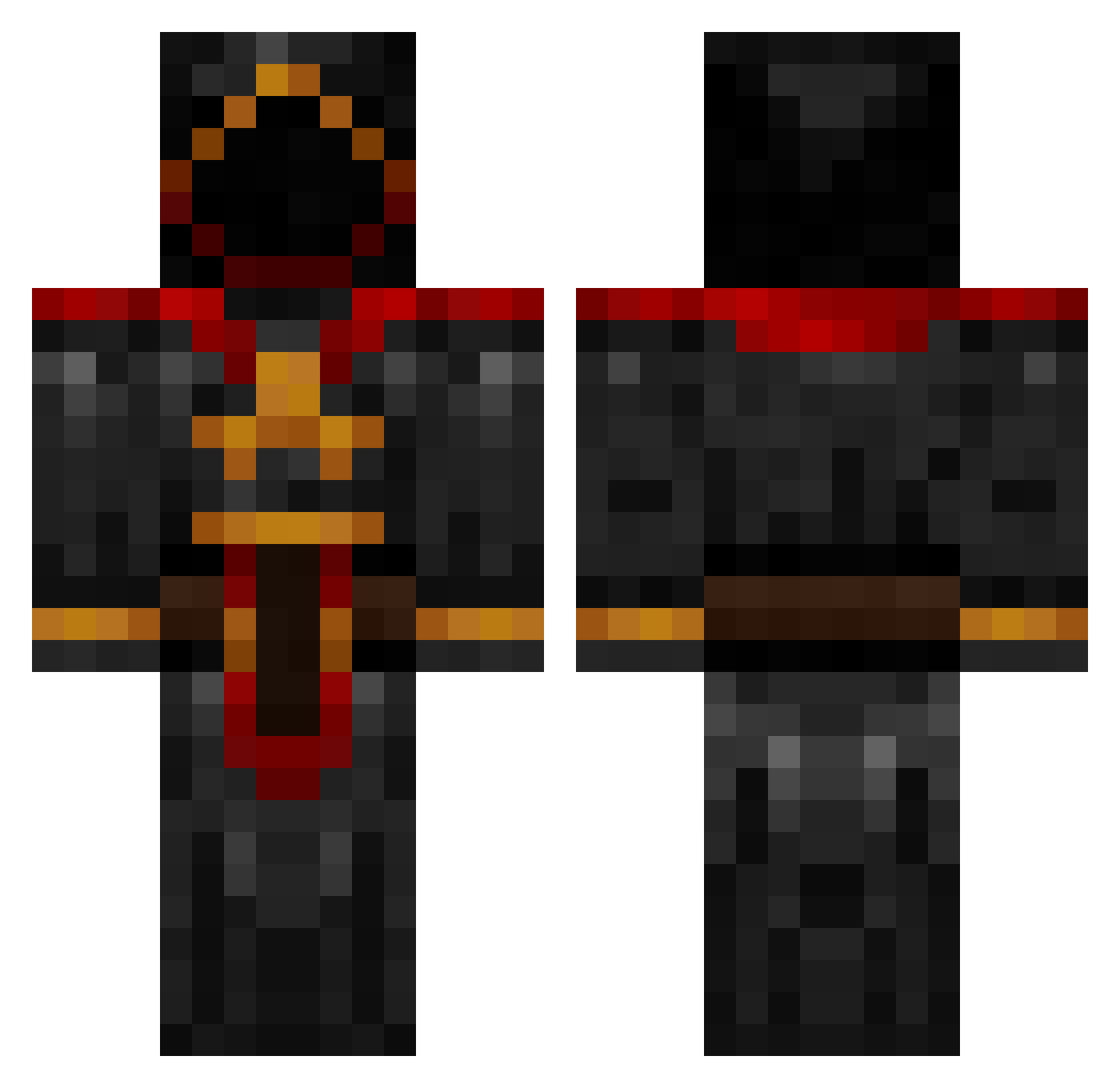
Other players with this skin (885)
Sir_Spamalot was the 648th player we have seen with this skin, first spotted on 11.10.2026. The same skin was seen on these players. Open a nickname to see their current skin and skin history.
 xflashcraftx Ununoctium Oxyy7 IRideDodos GreyWarden1992 CyXandrix WayneTrain17 uNexty SkZ3r0 axel44 xfaceless1x MiniFrodo Duffkess Lyneus TiringJoel Tepkunset alistaira PenguinAlt50 Enfo papermongoloid SuperSearcher bd70846 Anahkiasen 1Nitro PappaPurps Ducky811 mikefitz888 ItmsI MadMax1997 xan59 worms39 itsLuke2000 THEblindWIZARD KoiFish68 Death33x xkryticalshotx Nova080307 adromero Sardakaur stag23180 DoubleGoblin Krigvarg InsaneCyrik thijsjek KingFuryan bigmommashouse MrrglMrrgl blisz Yannik_S00 joeyhens Dementiddemon PeskyPlaysMc THE_DARK_REDHOOD ripcoder davejensch27 B0rgmeister PhoenixVDP Yuigg Lngsc HypnoPandaRAWR
More Cultist Minecraft skins
How to install the Sir_Spamalot skin
- Press the Download button above to save the skin as a PNG file.
- Minecraft: Bedrock Edition (PE): open the Dressing Room from the main menu (or tap your character → Edit Character), go to Classic Skins → Owned, press the + (new skin) button, choose the downloaded PNG and pick the Classic (Steve) model. Works on PC and mobile; consoles cannot import custom skins.
- Minecraft: Java Edition: open the Minecraft Launcher, go to the Skins tab, click New Skin, load the PNG, pick the Classic (Steve) model and press Save & Use. You can also upload it at minecraft.net → Profile → Change Skin.
The skin does not show up after import - what should I do?
Restart Minecraft and open the Dressing Room again - imported skins sometimes appear only after a restart. Also make sure you selected the imported skin and picked the Classic (Steve) model.
Which model should I choose, Classic or Slim?
This skin is designed for the Classic (Steve) model. If you pick the wrong model, the arms of the skin will look stretched or squeezed.
Is the skin of Sir_Spamalot free to download?
Yes. Press Download, save the PNG file and use it in Minecraft: Bedrock Edition or Java Edition - no payment or registration needed. The skin also works on multiplayer servers and Realms.
More skins
Looking for more? Go back to all Minecraft skins and check the top skins of the week, month and all time, or find any player's skin by nickname.