
Shadow54734 - Minecraft Skins & Skin History
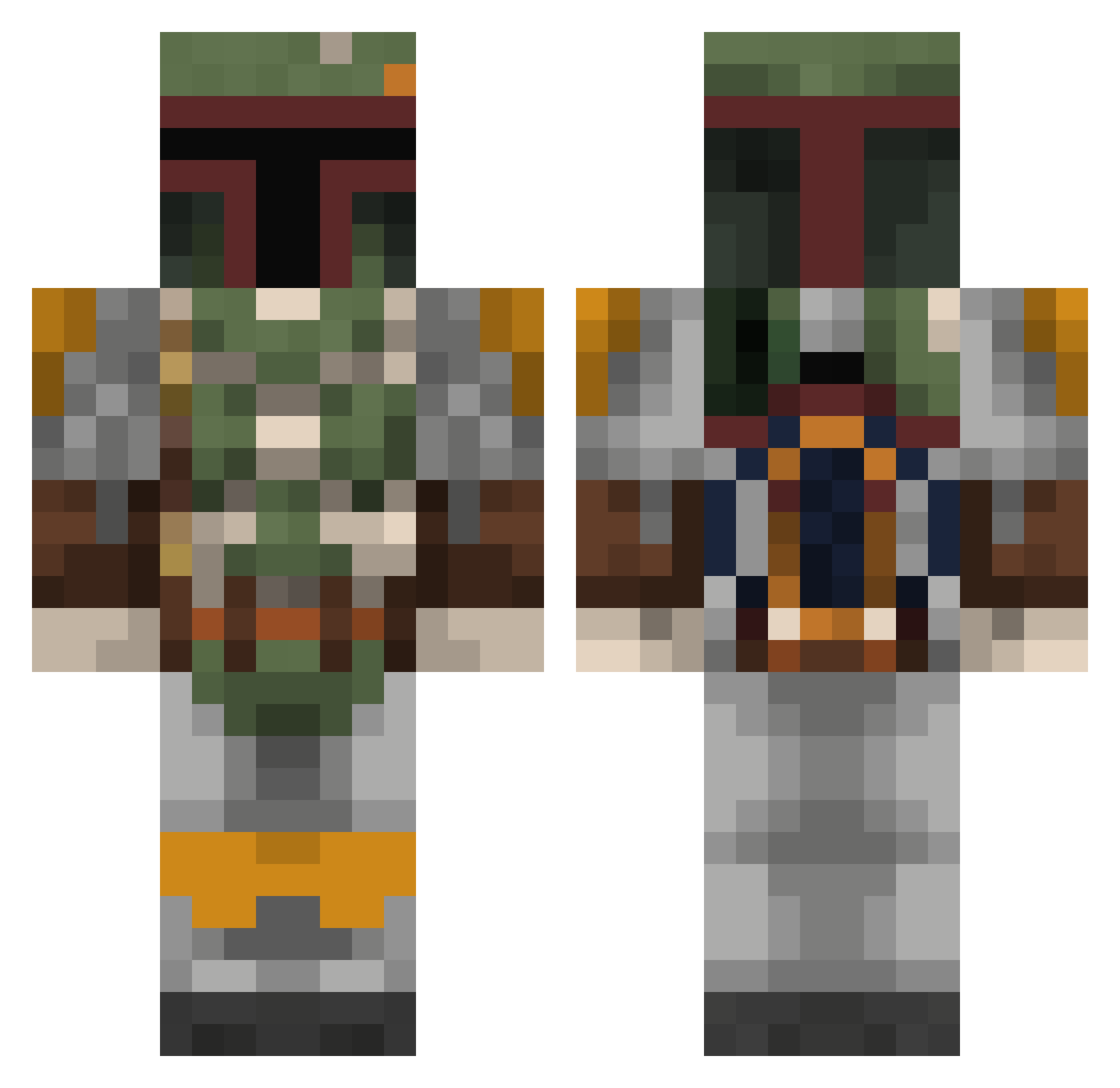
Current Minecraft skin of the player Shadow54734, loaded from the official Mojang API. Rotate the 3D model with your mouse or finger, then download the skin as a PNG file and use it in Minecraft: Bedrock Edition or Java Edition for free. When Shadow54734 changes their skin, this page updates automatically and the old skin stays in the history below.
Other players with this skin (803)
Shadow54734 was the 44th player we have seen with this skin, first spotted on 30.07.2026. The same skin was seen on these players. Open a nickname to see their current skin and skin history.
 Geahren bunther Rocotech jrgcastro Spacar totalboss24 Hamdizzle13 LeapingSloth hypergravity Valyns Xander18657 icarusmax Absurdity115 JPhoenix Warwolfyt Thrice1337 dawsonrshaw Cap_Reynolds Matich911 naker456 woofffie Saibot26 Samweise chrisdi123 MandoPete dirtyi tobiasgideon AFallingObject HuntsMart Ed_carz corvette_guyMT Mut389 JerehSad Nabelmon Patrick_0001 Thefluffybunny arcasensio snoopiey Stat1138 MissMandalorian SendIt_steve badori Zurazi sack555 Nesar ThaHigh nodnal94 Jizm0 Rezzul HeyJoshWud Babblan maageman aGRUNTKILLER JackSoph HappyHooch tw_womble CrY_BadRock_ poopnuggets233 theboss2141 BRINELAX
More Boba Fett Minecraft skins
How to install the Shadow54734 skin
- Press the Download button above to save the skin as a PNG file.
- Minecraft: Bedrock Edition (PE): open the Dressing Room from the main menu (or tap your character → Edit Character), go to Classic Skins → Owned, press the + (new skin) button, choose the downloaded PNG and pick the Classic (Steve) model. Works on PC and mobile; consoles cannot import custom skins.
- Minecraft: Java Edition: open the Minecraft Launcher, go to the Skins tab, click New Skin, load the PNG, pick the Classic (Steve) model and press Save & Use. You can also upload it at minecraft.net → Profile → Change Skin.
The skin does not show up after import - what should I do?
Restart Minecraft and open the Dressing Room again - imported skins sometimes appear only after a restart. Also make sure you selected the imported skin and picked the Classic (Steve) model.
Which model should I choose, Classic or Slim?
This skin is designed for the Classic (Steve) model. If you pick the wrong model, the arms of the skin will look stretched or squeezed.
Is the skin of Shadow54734 free to download?
Yes. Press Download, save the PNG file and use it in Minecraft: Bedrock Edition or Java Edition - no payment or registration needed. The skin also works on multiplayer servers and Realms.
More skins
Looking for more? Go back to all Minecraft skins and check the top skins of the week, month and all time, or find any player's skin by nickname.