
RubyCrayon123 - Minecraft Skins & Skin History
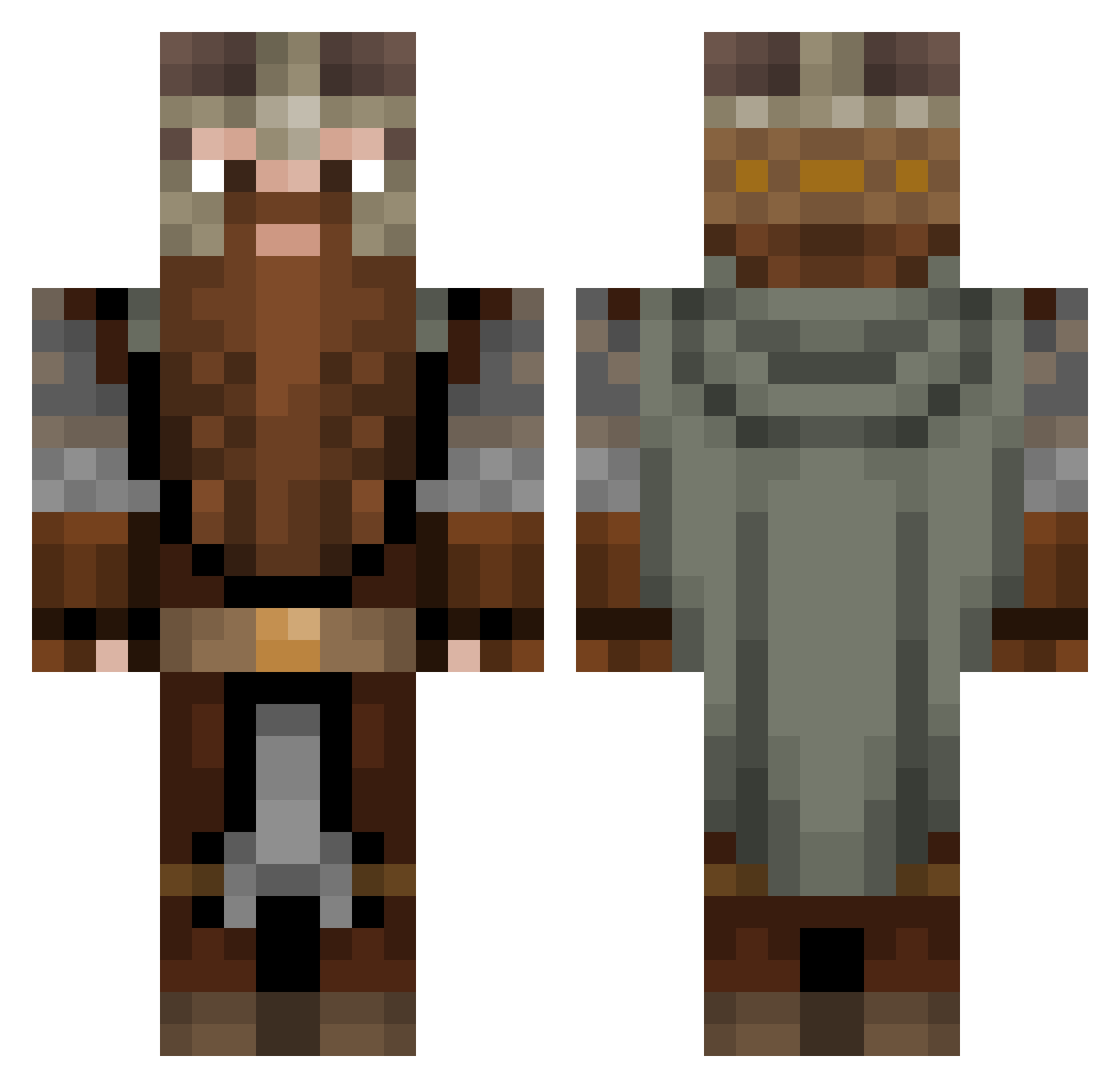
Current Minecraft skin of the player RubyCrayon123, loaded from the official Mojang API. Rotate the 3D model with your mouse or finger, then download the skin as a PNG file and use it in Minecraft: Bedrock Edition or Java Edition for free. When RubyCrayon123 changes their skin, this page updates automatically and the old skin stays in the history below.
Other players with this skin (1082)
RubyCrayon123 was the 585th player we have seen with this skin, first spotted on 23.09.2026. The same skin was seen on these players. Open a nickname to see their current skin and skin history.
 Palxor Sazk1 Arny518 SirDaedrax 1XILL1 DxL3927 MrAfroman xNachux Kotikonnut Cocomatona Nickjuve FlyingWrench SirGangho Uncleloops Viperstrike4699 OlczuuK sneez2 Aquintes CaptainAthiss Jerandix ItsJiks Braxton_Maxwell Gangeek TheRealHipro Lightw0lf Murlis Trutox RetIRL Samem5454 Pay_Dey FatKid6942069 BIG_T5 JustRenzy Siemens1118 Boterkruiden Fayown _Raw_Toast_ COSMICCATLORD Szybki7 Dietrich0021 NickGuzzy BrotherBenning Torweres Groundoss Grazz25 Agent_Weebowski Valinoir Behelial93 StewProductions KenKambexi GreenLinkin Notival Olisters milky_scent poluccio EarMan15 SirRoland_ Rawr2198 RuBo022 Paprota4
More Dwarf Minecraft skins
How to install the RubyCrayon123 skin
- Press the Download button above to save the skin as a PNG file.
- Minecraft: Bedrock Edition (PE): open the Dressing Room from the main menu (or tap your character → Edit Character), go to Classic Skins → Owned, press the + (new skin) button, choose the downloaded PNG and pick the Classic (Steve) model. Works on PC and mobile; consoles cannot import custom skins.
- Minecraft: Java Edition: open the Minecraft Launcher, go to the Skins tab, click New Skin, load the PNG, pick the Classic (Steve) model and press Save & Use. You can also upload it at minecraft.net → Profile → Change Skin.
The skin does not show up after import - what should I do?
Restart Minecraft and open the Dressing Room again - imported skins sometimes appear only after a restart. Also make sure you selected the imported skin and picked the Classic (Steve) model.
Which model should I choose, Classic or Slim?
This skin is designed for the Classic (Steve) model. If you pick the wrong model, the arms of the skin will look stretched or squeezed.
Is the skin of RubyCrayon123 free to download?
Yes. Press Download, save the PNG file and use it in Minecraft: Bedrock Edition or Java Edition - no payment or registration needed. The skin also works on multiplayer servers and Realms.
More skins
Looking for more? Go back to all Minecraft skins and check the top skins of the week, month and all time, or find any player's skin by nickname.