
Pr1m3r0 - Minecraft Skins & Skin History
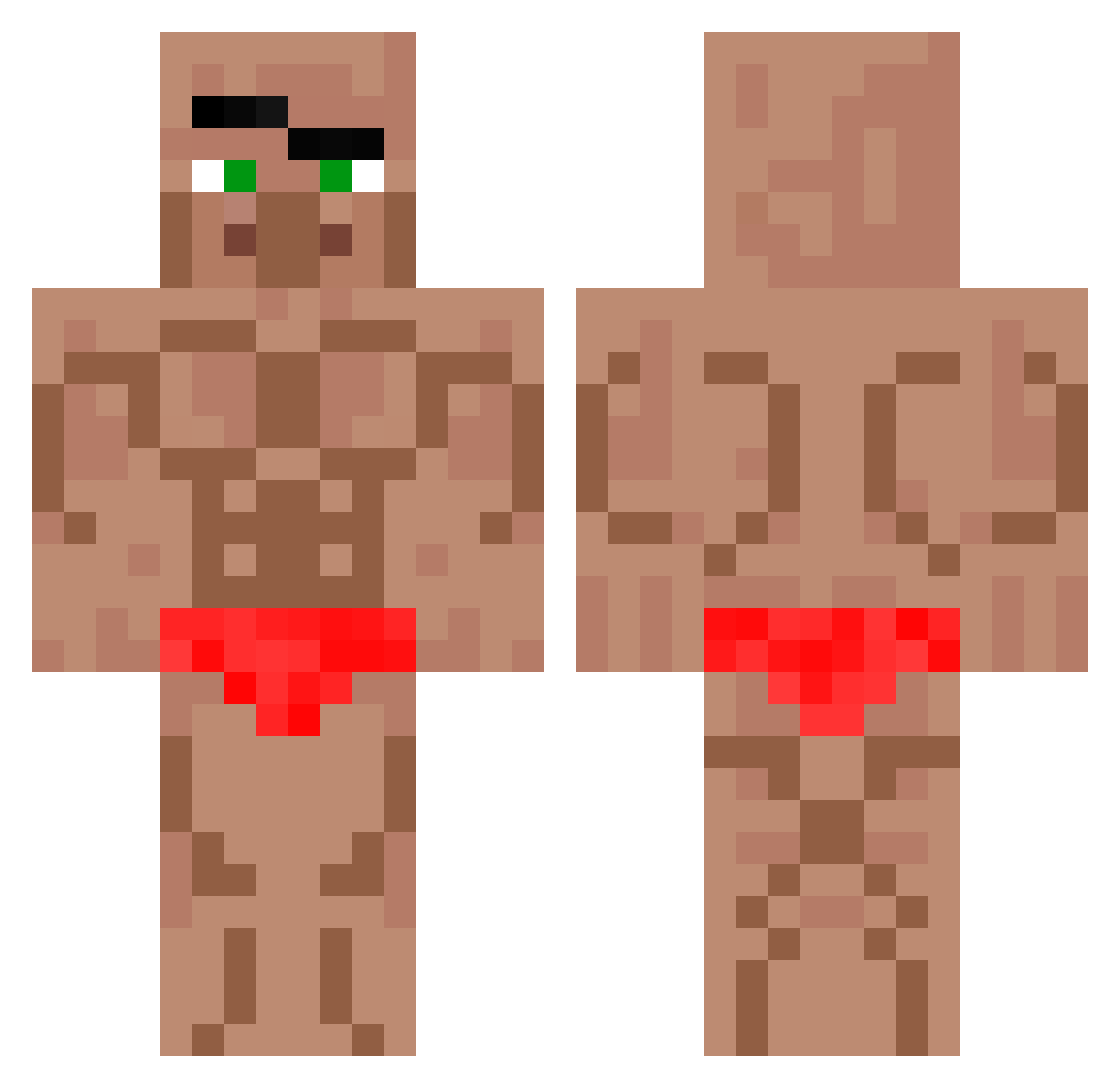
Current Minecraft skin of the player Pr1m3r0, loaded from the official Mojang API. Rotate the 3D model with your mouse or finger, then download the skin as a PNG file and use it in Minecraft: Bedrock Edition or Java Edition for free. When Pr1m3r0 changes their skin, this page updates automatically and the old skin stays in the history below.
Other players with this skin (552)
Pr1m3r0 was the 73rd player we have seen with this skin, first spotted on 04.08.2026. The same skin was seen on these players. Open a nickname to see their current skin and skin history.
 pableto7 Castigante bananaking0830 LagPixl swordas15 La_Huiss rvletaa ZyroX92 Pendaikho BadToggled Lennow RustMorfPuZo EvoOnTop mignola xX_Mamoudzou_Xx spaghetti363 TitanicToast DeGieLULW PunPun_77 DonkeyWang123 Wladdd15 kabob111 Fangle_fun KeK3800 Godofreda sabundettol WishedCave lnwZaKana 2006hondaCR_V c1y1x1 Karpiczek NIBARUS T1mb3rB345t Azitro JohanDa17 TrexReal1337 fly0122 Dragon0102234 Lazydoodle123 ElUri1209 JackieChunky I_eat_hackers Ax254el corhead97 DeathXNafiul ChickenJockey130 Vaskular patato_007 KleinYoda Nirema Deadsharm
 nezumi21 DogShtMiner
 N_I_ROXO jakubko321 PelosiPitsDOTGov roz_805 Semih_06 ZexnnEU Nordton
More Buff Minecraft skins
How to install the Pr1m3r0 skin
- Press the Download button above to save the skin as a PNG file.
- Minecraft: Bedrock Edition (PE): open the Dressing Room from the main menu (or tap your character → Edit Character), go to Classic Skins → Owned, press the + (new skin) button, choose the downloaded PNG and pick the Classic (Steve) model. Works on PC and mobile; consoles cannot import custom skins.
- Minecraft: Java Edition: open the Minecraft Launcher, go to the Skins tab, click New Skin, load the PNG, pick the Classic (Steve) model and press Save & Use. You can also upload it at minecraft.net → Profile → Change Skin.
The skin does not show up after import - what should I do?
Restart Minecraft and open the Dressing Room again - imported skins sometimes appear only after a restart. Also make sure you selected the imported skin and picked the Classic (Steve) model.
Which model should I choose, Classic or Slim?
This skin is designed for the Classic (Steve) model. If you pick the wrong model, the arms of the skin will look stretched or squeezed.
Is the skin of Pr1m3r0 free to download?
Yes. Press Download, save the PNG file and use it in Minecraft: Bedrock Edition or Java Edition - no payment or registration needed. The skin also works on multiplayer servers and Realms.
More skins
Looking for more? Go back to all Minecraft skins and check the top skins of the week, month and all time, or find any player's skin by nickname.