
PanKrabos - Minecraft Skins & Skin History
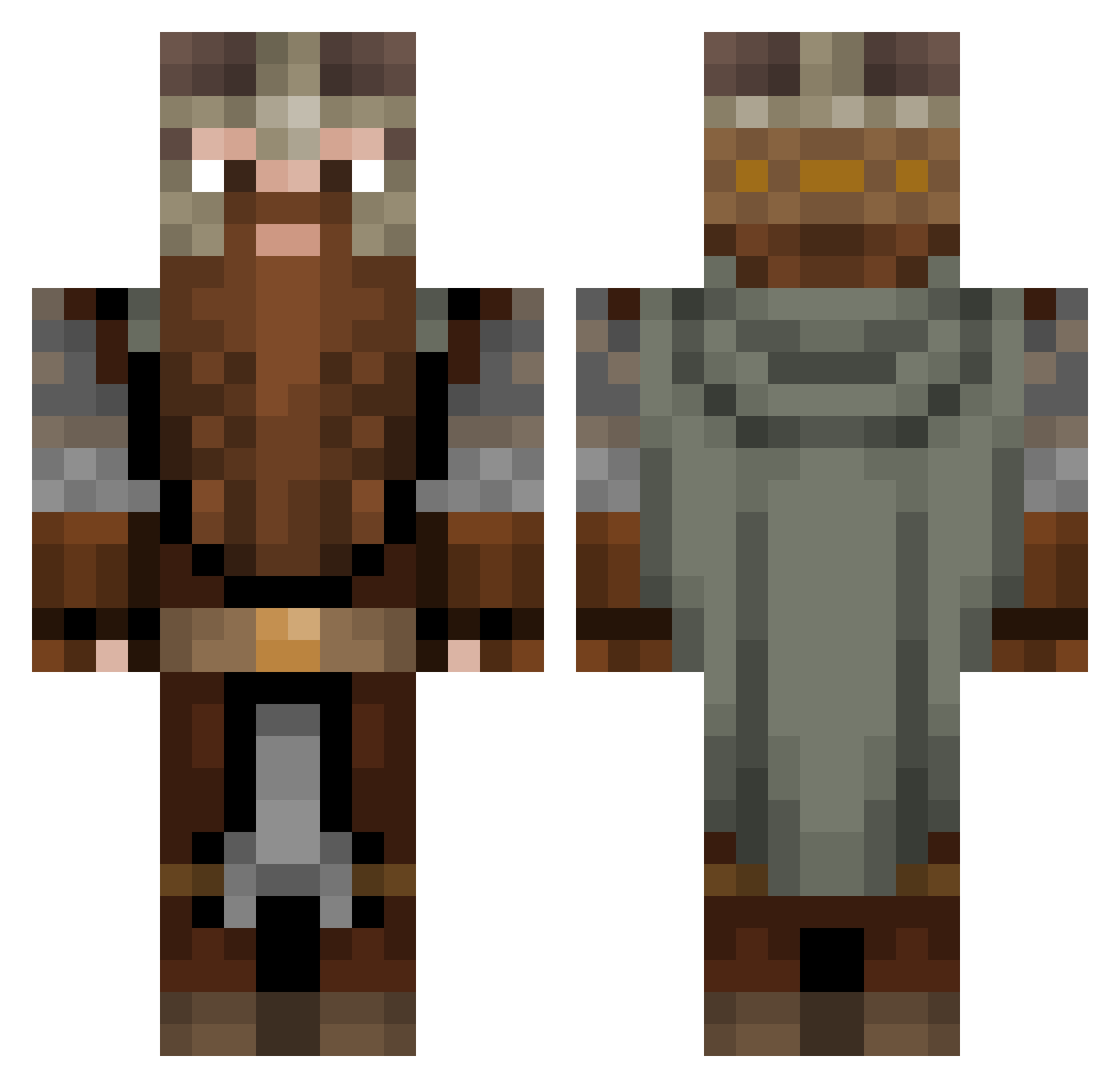
Current Minecraft skin of the player PanKrabos, loaded from the official Mojang API. Rotate the 3D model with your mouse or finger, then download the skin as a PNG file and use it in Minecraft: Bedrock Edition or Java Edition for free. When PanKrabos changes their skin, this page updates automatically and the old skin stays in the history below.
Other players with this skin (1082)
PanKrabos was the 694th player we have seen with this skin, first spotted on 01.10.2026. The same skin was seen on these players. Open a nickname to see their current skin and skin history.
 VitoM13 SaltedPork117 TheMiddleOne2 Rudivoll killertrolly Kiwi_Phoenix luijigamer02 Unreal11 guigreen Asxerisdd Liamooooo santiagodaniel BATTLEM4STER LuxNihilo AlexanderVK Lsdacobra gabrielpadron Bernardinatti Nairod98 GnuGRUB Hamboi890 ChallenJer Toukkas Bodrak44 Garuud MishakCZ nismochildzx Hootkins Dragonheardt_Leo cyancodon adag Lukewicko xUncreativeNamex VVitya SiiL06 jeckk95 MrMannik kornelius25 Dwarf_miner01 Shadowcow56 Bubagus Aizen2809 PandaBearIsFat Ruric1 JJaromir Kuro_Rakurai Soolkeeper Davikar MrTerdii OaCCoSMoS Lisior ConnorZx GitFunked LordScromble mikey5579 Smoove_Tonic Qzak502 Roasted_Goat Shipples Thrigg
More Dwarf Minecraft skins
How to install the PanKrabos skin
- Press the Download button above to save the skin as a PNG file.
- Minecraft: Bedrock Edition (PE): open the Dressing Room from the main menu (or tap your character → Edit Character), go to Classic Skins → Owned, press the + (new skin) button, choose the downloaded PNG and pick the Classic (Steve) model. Works on PC and mobile; consoles cannot import custom skins.
- Minecraft: Java Edition: open the Minecraft Launcher, go to the Skins tab, click New Skin, load the PNG, pick the Classic (Steve) model and press Save & Use. You can also upload it at minecraft.net → Profile → Change Skin.
The skin does not show up after import - what should I do?
Restart Minecraft and open the Dressing Room again - imported skins sometimes appear only after a restart. Also make sure you selected the imported skin and picked the Classic (Steve) model.
Which model should I choose, Classic or Slim?
This skin is designed for the Classic (Steve) model. If you pick the wrong model, the arms of the skin will look stretched or squeezed.
Is the skin of PanKrabos free to download?
Yes. Press Download, save the PNG file and use it in Minecraft: Bedrock Edition or Java Edition - no payment or registration needed. The skin also works on multiplayer servers and Realms.
More skins
Looking for more? Go back to all Minecraft skins and check the top skins of the week, month and all time, or find any player's skin by nickname.