
POINOTE - Minecraft Skins & Skin History
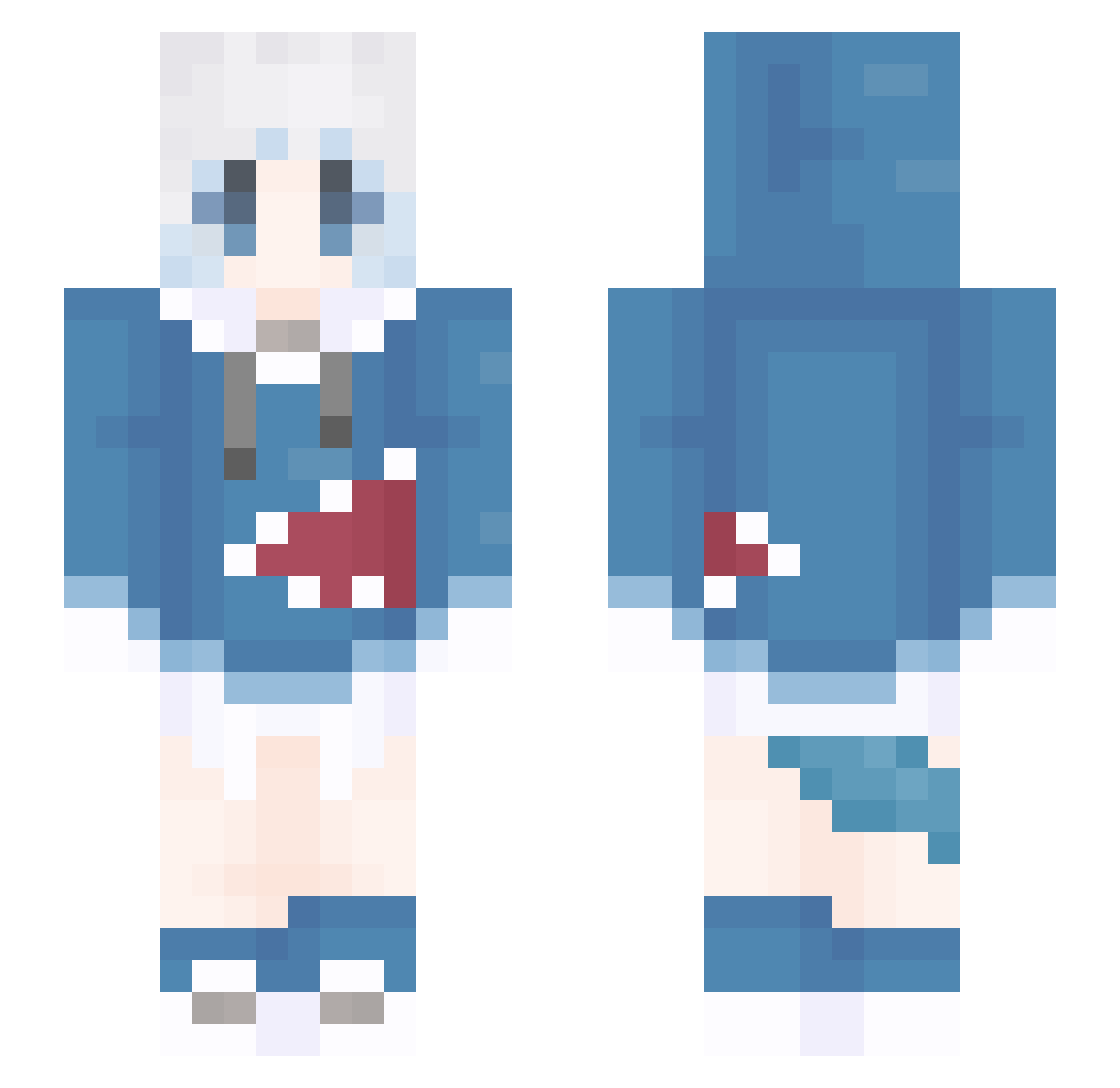
Current Minecraft skin of the player POINOTE, loaded from the official Mojang API. Rotate the 3D model with your mouse or finger, then download the skin as a PNG file and use it in Minecraft: Bedrock Edition or Java Edition for free. When POINOTE changes their skin, this page updates automatically and the old skin stays in the history below.
Other players with this skin (1309)
POINOTE was the 127th player we have seen with this skin, first spotted on 04.08.2026. The same skin was seen on these players. Open a nickname to see their current skin and skin history.
 Death4Soul XiaoChai09 ledi233 litsir A_Don Ark_Huangxi oyy_hyh December88
 muxiaoan Klein_love69 meisang sanliushui BlackJack878 Longleaf2580 LogicMount Zinin__ Gurha pqzjason
 Solryne
 EndChain chenming6 byf669 0u0_XL Luqiqi sozin88 langge2077 guhuo_233 Rain_fell lainccb lvatory Shiro_Doragon914 Amrnkok Christmas_Eve211 CHZZElias kayilr Heavl
 FluffigeWolke Cupstars flypig6987 sanmeshi AkornMann aoieng ManhattanCafekya _AL_1S__ ehjtjet seokyeeking Whatever0_o trashgrace binggou Pedro_pedrarias GwnYn ava09098
 YMJ002 k25600 xi_thor JuneW7 MUAmiao DIO_____ VelPro_L Palpitation_L
More Gawr Gura Minecraft skins
How to install the POINOTE skin
- Press the Download button above to save the skin as a PNG file.
- Minecraft: Bedrock Edition (PE): open the Dressing Room from the main menu (or tap your character → Edit Character), go to Classic Skins → Owned, press the + (new skin) button, choose the downloaded PNG and pick the Slim (Alex) model. Works on PC and mobile; consoles cannot import custom skins.
- Minecraft: Java Edition: open the Minecraft Launcher, go to the Skins tab, click New Skin, load the PNG, pick the Slim (Alex) model and press Save & Use. You can also upload it at minecraft.net → Profile → Change Skin.
The skin does not show up after import - what should I do?
Restart Minecraft and open the Dressing Room again - imported skins sometimes appear only after a restart. Also make sure you selected the imported skin and picked the Slim (Alex) model.
Which model should I choose, Classic or Slim?
This skin is designed for the Slim (Alex) model. If you pick the wrong model, the arms of the skin will look stretched or squeezed.
Is the skin of POINOTE free to download?
Yes. Press Download, save the PNG file and use it in Minecraft: Bedrock Edition or Java Edition - no payment or registration needed. The skin also works on multiplayer servers and Realms.
More skins
Looking for more? Go back to all Minecraft skins and check the top skins of the week, month and all time, or find any player's skin by nickname.