
Oznee23 - Minecraft Skins & Skin History
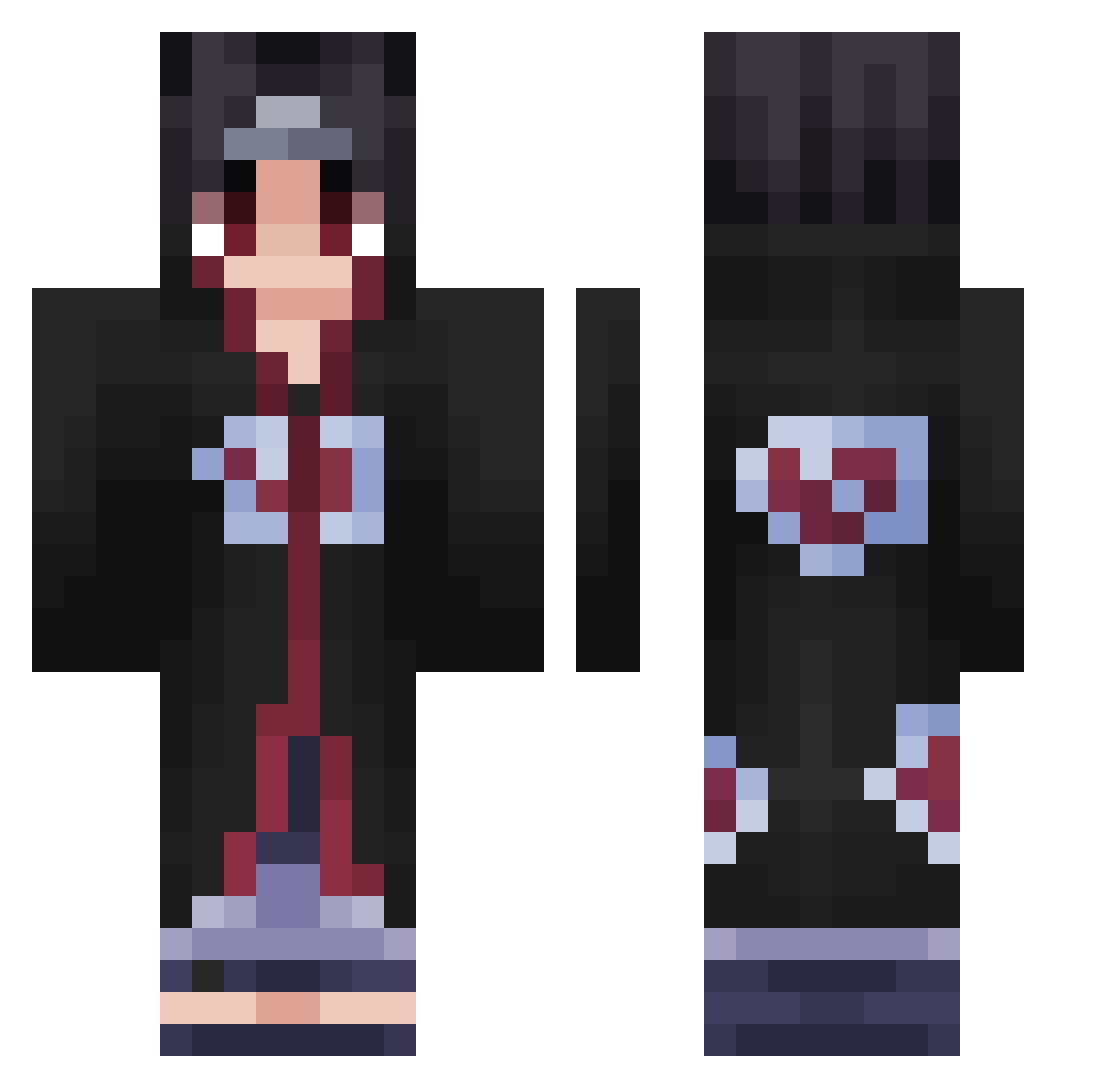
Current Minecraft skin of the player Oznee23, loaded from the official Mojang API. Rotate the 3D model with your mouse or finger, then download the skin as a PNG file and use it in Minecraft: Bedrock Edition or Java Edition for free. When Oznee23 changes their skin, this page updates automatically and the old skin stays in the history below.
Other players with this skin (424)
Oznee23 was the 355th player we have seen with this skin, first spotted on 09.10.2026. The same skin was seen on these players. Open a nickname to see their current skin and skin history.
 MysteryGuy110 DECK34 luc2227 MikeDeath CashKiiiD CER8_LarKy AlistairMiner SqdRezUmi ___Davide__ Keitamine chustryhard SasukeUchiaaaH evilrandy IdAskLoyds sebylamouche Elzasuke ellisc423 BalaiEtagere01 magmav2_ Chrisfrmdawoods TheoBoy1 SNFOR305 pedrobent0 Malora177 Itachi_D_Uchiha Agionni1 Eramii88 Dani3l3 PiXeL_LPT TheBestIs_RTH Kayroxxxx flexmingo Aeopteryx ImmatureArtist Neyrory Bassly Ajay9 Enderfiin mattbritez Samuelinhoo10 Pimpek77 TlTaNe Racc223 Gravarno turtle121221 Holzbusch Puss9_Hunter69 Soren0905 ZynnQ jaskaisen microhaed Thommy_Mayo Ven356 AstralFN Dxsiiire DrSaltnViniguh TALIBANALT41 AJ059 iiZokar aqu1nox21
More Itachi Uchiha Minecraft skins
See all 320 Itachi Uchiha skins
How to install the Oznee23 skin
- Press the Download button above to save the skin as a PNG file.
- Minecraft: Bedrock Edition (PE): open the Dressing Room from the main menu (or tap your character → Edit Character), go to Classic Skins → Owned, press the + (new skin) button, choose the downloaded PNG and pick the Classic (Steve) model. Works on PC and mobile; consoles cannot import custom skins.
- Minecraft: Java Edition: open the Minecraft Launcher, go to the Skins tab, click New Skin, load the PNG, pick the Classic (Steve) model and press Save & Use. You can also upload it at minecraft.net → Profile → Change Skin.
The skin does not show up after import - what should I do?
Restart Minecraft and open the Dressing Room again - imported skins sometimes appear only after a restart. Also make sure you selected the imported skin and picked the Classic (Steve) model.
Which model should I choose, Classic or Slim?
This skin is designed for the Classic (Steve) model. If you pick the wrong model, the arms of the skin will look stretched or squeezed.
Is the skin of Oznee23 free to download?
Yes. Press Download, save the PNG file and use it in Minecraft: Bedrock Edition or Java Edition - no payment or registration needed. The skin also works on multiplayer servers and Realms.
More skins
Looking for more? Go back to all Minecraft skins and check the top skins of the week, month and all time, or find any player's skin by nickname.