
OddLow646 - Minecraft Skins & Skin History
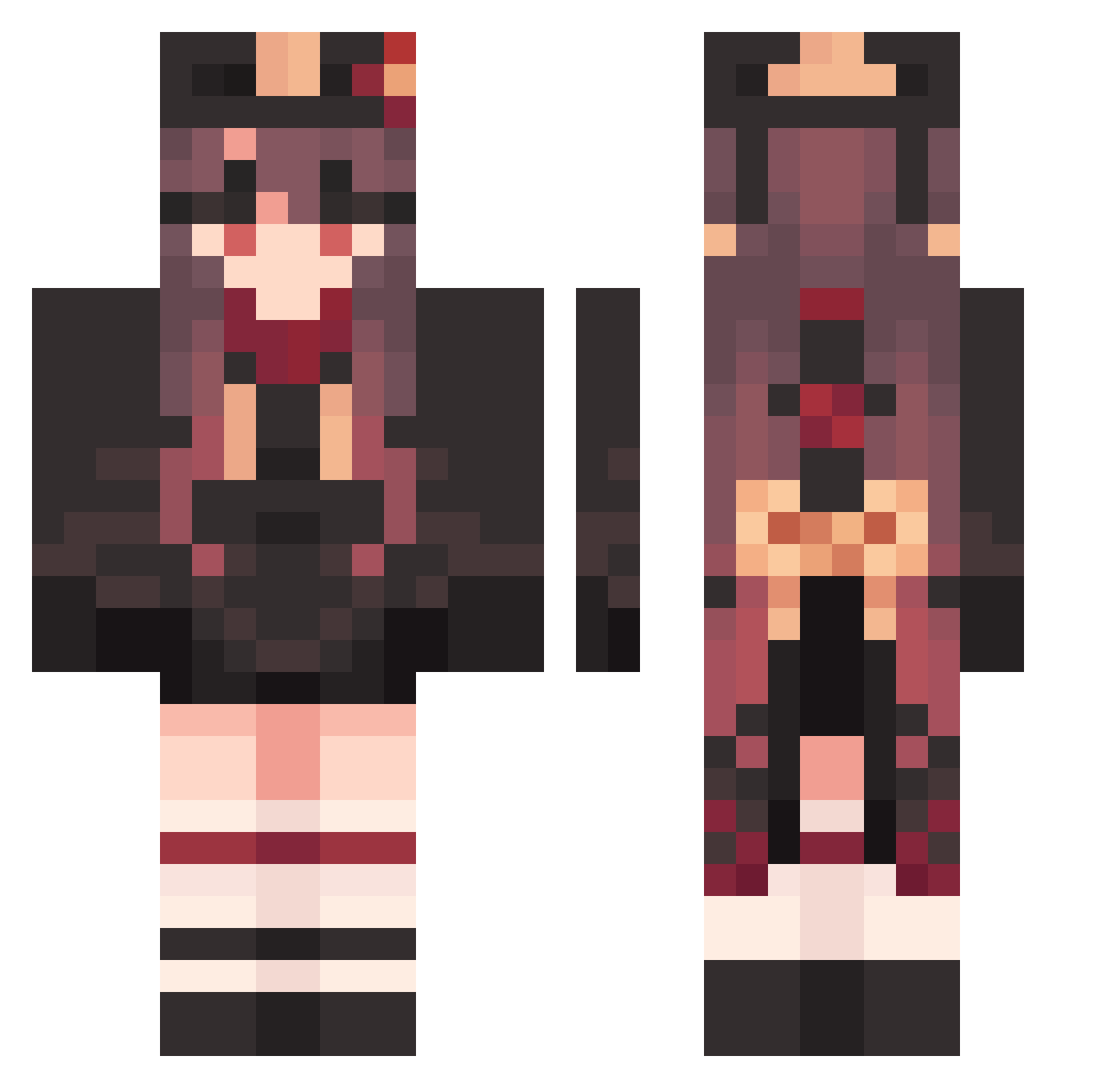
Current Minecraft skin of the player OddLow646, loaded from the official Mojang API. Rotate the 3D model with your mouse or finger, then download the skin as a PNG file and use it in Minecraft: Bedrock Edition or Java Edition for free. When OddLow646 changes their skin, this page updates automatically and the old skin stays in the history below.
Other players with this skin (1585)
OddLow646 was the 50th player we have seen with this skin, first spotted on 28.07.2026. The same skin was seen on these players. Open a nickname to see their current skin and skin history.
 AdamantGoofy932 DrabSquealing761 SuperHandsome402 Asuk8895 xiaolinghan ItchyConfused608 SincereLavish190 Vypyr42 AbaftGorgeous167 tes015 ta_hao Hutao_EOMsQza510
 rdiangelo FearlessOvert794 _Li_Ming Hutao_ATLWpYI359 ProudAbortive733 Hutao_fVAnfLg233 MagentaAbject877 GarrulousGrey801 Hutao_Vkt154 GiddyMadly166 ExcitingGusty854 DazzlingEqual487 Hutao_PHoYSMI252 rerei6666 nue648 Redstone777 LushDependent472 DapperDashing239 Hutao_SEhJgte259 Themage114514
 SkyeLynae SuMeng1234 LargeConcerned80 VerdantBrainy763 Hutao_KTWPJYY253 SkinnyAwesome990 Poginss whL887 EwE958 ayim33 czI821 Hutao_JAwYGDr322 SdToWN_
 Eluise CalmWholesale555 BloodyAnnoyed875 PeriheIi0n GroovyUnarmed295 vtI854 EarlyGrieving805 ucE953 urlirl ClosedCrowded243 Runkasu WoodenZealous827 AcceptableProud7 kanon07 Hutao_TgFlbPw416
More Hu Tao Minecraft skins
How to install the OddLow646 skin
- Press the Download button above to save the skin as a PNG file.
- Minecraft: Bedrock Edition (PE): open the Dressing Room from the main menu (or tap your character → Edit Character), go to Classic Skins → Owned, press the + (new skin) button, choose the downloaded PNG and pick the Classic (Steve) model. Works on PC and mobile; consoles cannot import custom skins.
- Minecraft: Java Edition: open the Minecraft Launcher, go to the Skins tab, click New Skin, load the PNG, pick the Classic (Steve) model and press Save & Use. You can also upload it at minecraft.net → Profile → Change Skin.
The skin does not show up after import - what should I do?
Restart Minecraft and open the Dressing Room again - imported skins sometimes appear only after a restart. Also make sure you selected the imported skin and picked the Classic (Steve) model.
Which model should I choose, Classic or Slim?
This skin is designed for the Classic (Steve) model. If you pick the wrong model, the arms of the skin will look stretched or squeezed.
Is the skin of OddLow646 free to download?
Yes. Press Download, save the PNG file and use it in Minecraft: Bedrock Edition or Java Edition - no payment or registration needed. The skin also works on multiplayer servers and Realms.
More skins
Looking for more? Go back to all Minecraft skins and check the top skins of the week, month and all time, or find any player's skin by nickname.