
Nickn0204 - Minecraft Skins & Skin History
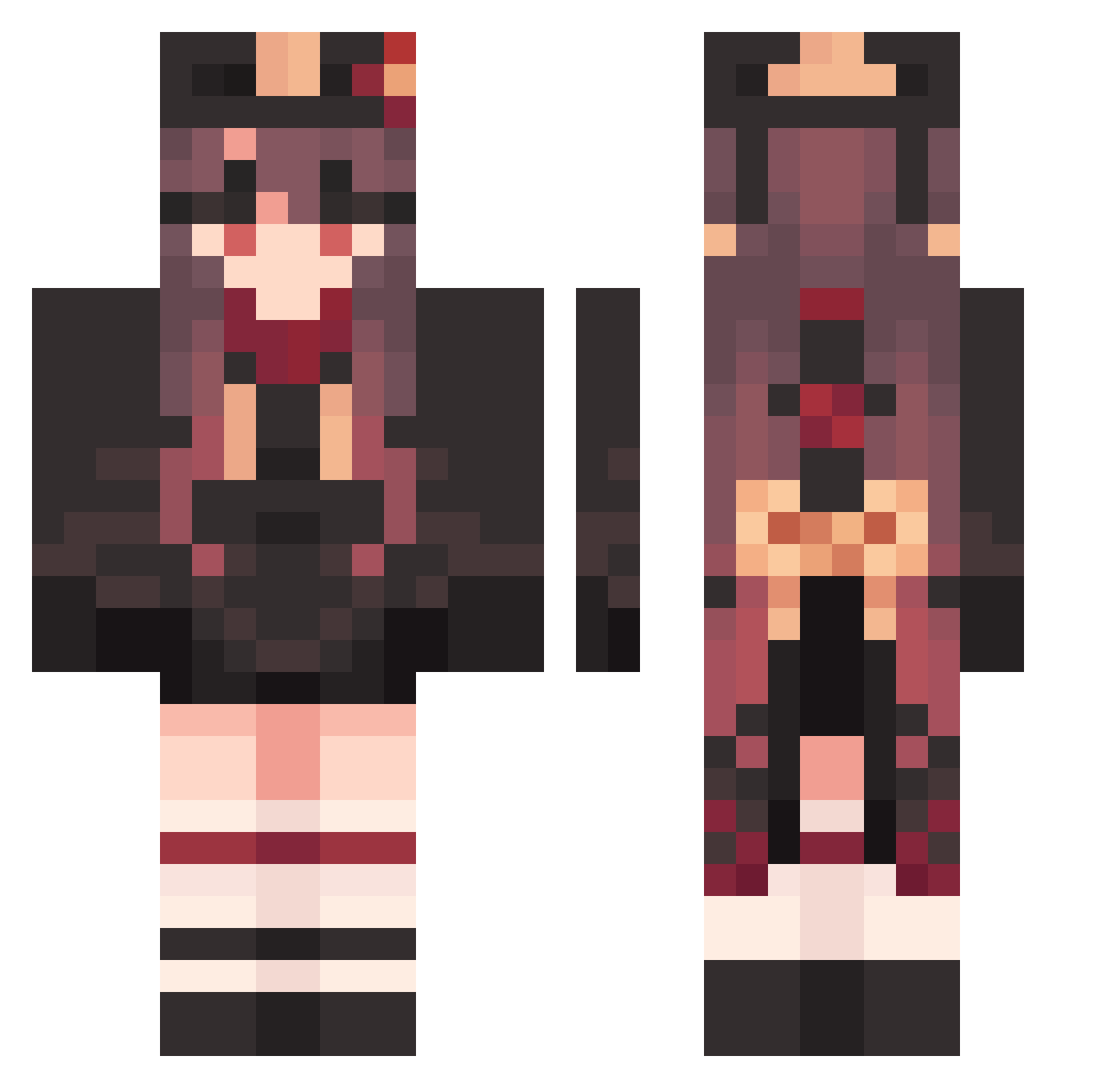
Current Minecraft skin of the player Nickn0204, loaded from the official Mojang API. Rotate the 3D model with your mouse or finger, then download the skin as a PNG file and use it in Minecraft: Bedrock Edition or Java Edition for free. When Nickn0204 changes their skin, this page updates automatically and the old skin stays in the history below.
Other players with this skin (1585)
Nickn0204 was the 181st player we have seen with this skin, first spotted on 06.08.2026. The same skin was seen on these players. Open a nickname to see their current skin and skin history.
 UNk411 ht4566 GratisBrave975 UntidyMagical401 EqualAnimated113 Hutao_TYXuOQq164 Apzzygz Hades140207 JaggedWaiting539 Yzy_EZm486 xqZ535 V10ALTY PhobicRainy242 FrequentGreat591 GentleFurtive629 Hutao_NCN462 Hutao_bjRZBIz224 ProfuseSleepy151 superjasper2009 Hutao_ZbuOmys856 Jxsee0305 JuliusThe1st FurryDiligent175 Hutao_afYSrgJ325 Hutao_bkzTylf321 MistyPleasant156 FancyNine PresentChief41 Grimora47 DUa70 DisturbedKind816
 Whaleeeee2 XUSZ8 jhlee7798 Evekids_ TARLYOR Hutao_ReIKWeU299 sadvtg Hutao_NuOnyfC424 MeltedSincere565 GoodGreen53 ObservantCraven9 AbusiveOld580 SmoothDynamic899 Yzy_jHR992 Hutao_rXdhviM300
 PuffyOrdinary262 Hutao_cOZVbHk424 LovingCold524 dgg805 SafeRighteous604 linxuxuan AmbiguousPoor432 SweetEducated570 mtqet Hutao_ipUvyQI957 SeparateNutty968 PriceyUsed492 Lexus_ Hutao_odHezWU413
More Hu Tao Minecraft skins
How to install the Nickn0204 skin
- Press the Download button above to save the skin as a PNG file.
- Minecraft: Bedrock Edition (PE): open the Dressing Room from the main menu (or tap your character → Edit Character), go to Classic Skins → Owned, press the + (new skin) button, choose the downloaded PNG and pick the Classic (Steve) model. Works on PC and mobile; consoles cannot import custom skins.
- Minecraft: Java Edition: open the Minecraft Launcher, go to the Skins tab, click New Skin, load the PNG, pick the Classic (Steve) model and press Save & Use. You can also upload it at minecraft.net → Profile → Change Skin.
The skin does not show up after import - what should I do?
Restart Minecraft and open the Dressing Room again - imported skins sometimes appear only after a restart. Also make sure you selected the imported skin and picked the Classic (Steve) model.
Which model should I choose, Classic or Slim?
This skin is designed for the Classic (Steve) model. If you pick the wrong model, the arms of the skin will look stretched or squeezed.
Is the skin of Nickn0204 free to download?
Yes. Press Download, save the PNG file and use it in Minecraft: Bedrock Edition or Java Edition - no payment or registration needed. The skin also works on multiplayer servers and Realms.
More skins
Looking for more? Go back to all Minecraft skins and check the top skins of the week, month and all time, or find any player's skin by nickname.