
NeuTr0x_Trava - Minecraft Skins & Skin History
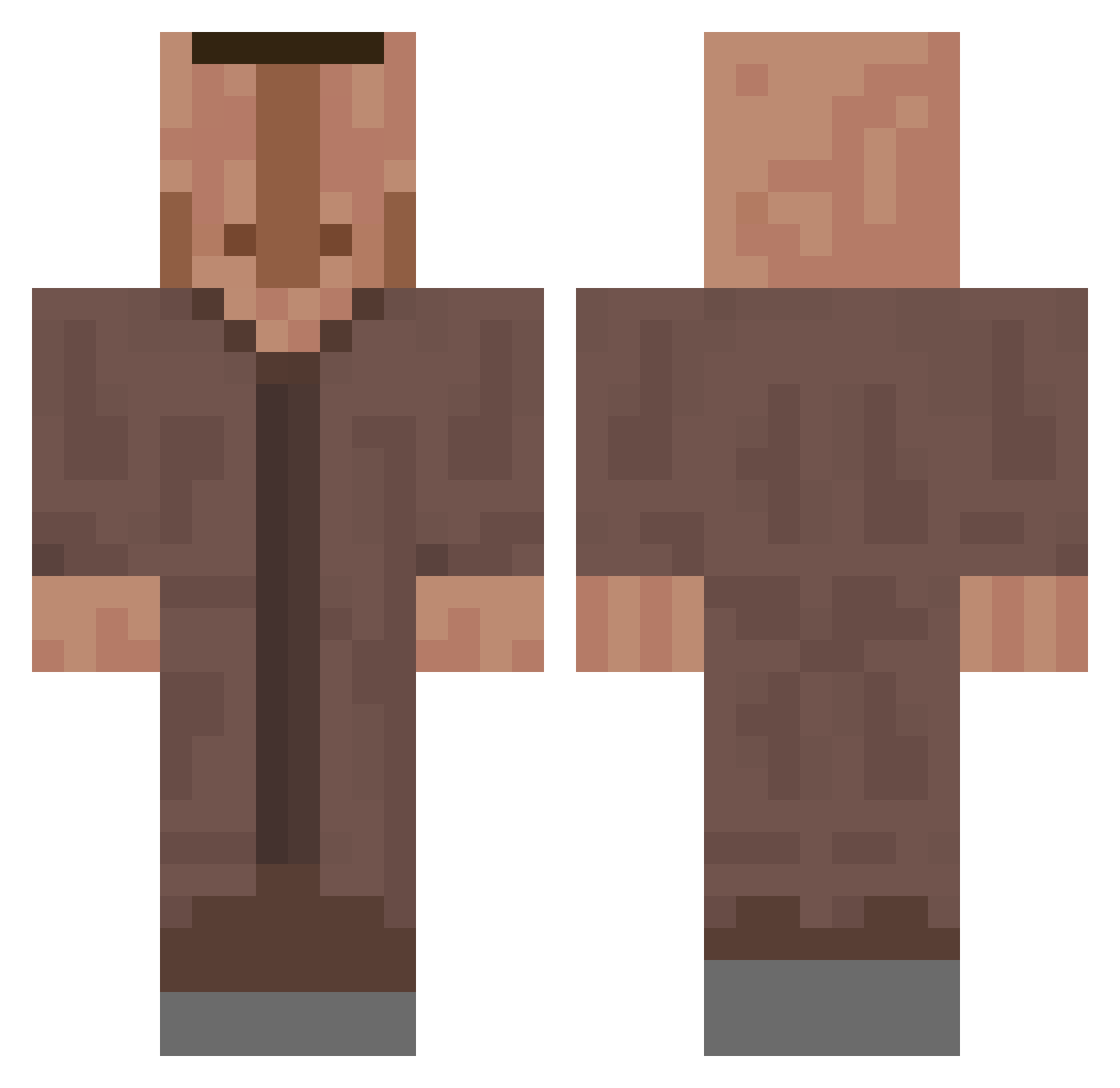
Current Minecraft skin of the player NeuTr0x_Trava, loaded from the official Mojang API. Rotate the 3D model with your mouse or finger, then download the skin as a PNG file and use it in Minecraft: Bedrock Edition or Java Edition for free. When NeuTr0x_Trava changes their skin, this page updates automatically and the old skin stays in the history below.
Other players with this skin (636)
NeuTr0x_Trava was the 34th player we have seen with this skin, first spotted on 30.07.2026. The same skin was seen on these players. Open a nickname to see their current skin and skin history.
 bonkedguy AdmaX96
 tomatenii pidrpro123 MafiaBoss7628 MangoBasil Clonewache Hancre33 respect4210 Abdisvensson100 CharlotteDicker BUBBA4490 ZABEEXV Big_Brain_Flo Namethy wasiczkoj zalluzeIII R_bii Spooky_Potato Cat14127 XxSwaggyboi2005x Jxn0803 XDvapor juliusSchwein Phu_22 warpShoppen Poopybuttfart872 DonkeyNoDong Gulz
 yiiirt The_Guy31 ShadowixLol BerkeBlr LOLOL222 AceKinkajou3395 SeveralBoot2520 Suis__ meepsterz1234 myminecraftacc20 xLeon0666 xxhejhejxx Emperialt Xaekos pphant0mm Bajuszmester ttv_salts ComoTanMuchachoO EugeneKraabs
 Grifferu Bundi_910 AlphaAyu12 xTo750 GROISS Hyreks ItzBossuPVPRO ManMangoingcrazy
 DanielDaBoy Zypherus123 ZaronSG Borninamine1
More Villager Minecraft skins
How to install the NeuTr0x_Trava skin
- Press the Download button above to save the skin as a PNG file.
- Minecraft: Bedrock Edition (PE): open the Dressing Room from the main menu (or tap your character → Edit Character), go to Classic Skins → Owned, press the + (new skin) button, choose the downloaded PNG and pick the Classic (Steve) model. Works on PC and mobile; consoles cannot import custom skins.
- Minecraft: Java Edition: open the Minecraft Launcher, go to the Skins tab, click New Skin, load the PNG, pick the Classic (Steve) model and press Save & Use. You can also upload it at minecraft.net → Profile → Change Skin.
The skin does not show up after import - what should I do?
Restart Minecraft and open the Dressing Room again - imported skins sometimes appear only after a restart. Also make sure you selected the imported skin and picked the Classic (Steve) model.
Which model should I choose, Classic or Slim?
This skin is designed for the Classic (Steve) model. If you pick the wrong model, the arms of the skin will look stretched or squeezed.
Is the skin of NeuTr0x_Trava free to download?
Yes. Press Download, save the PNG file and use it in Minecraft: Bedrock Edition or Java Edition - no payment or registration needed. The skin also works on multiplayer servers and Realms.
More skins
Looking for more? Go back to all Minecraft skins and check the top skins of the week, month and all time, or find any player's skin by nickname.