
Nagol8154 - Minecraft Skins & Skin History
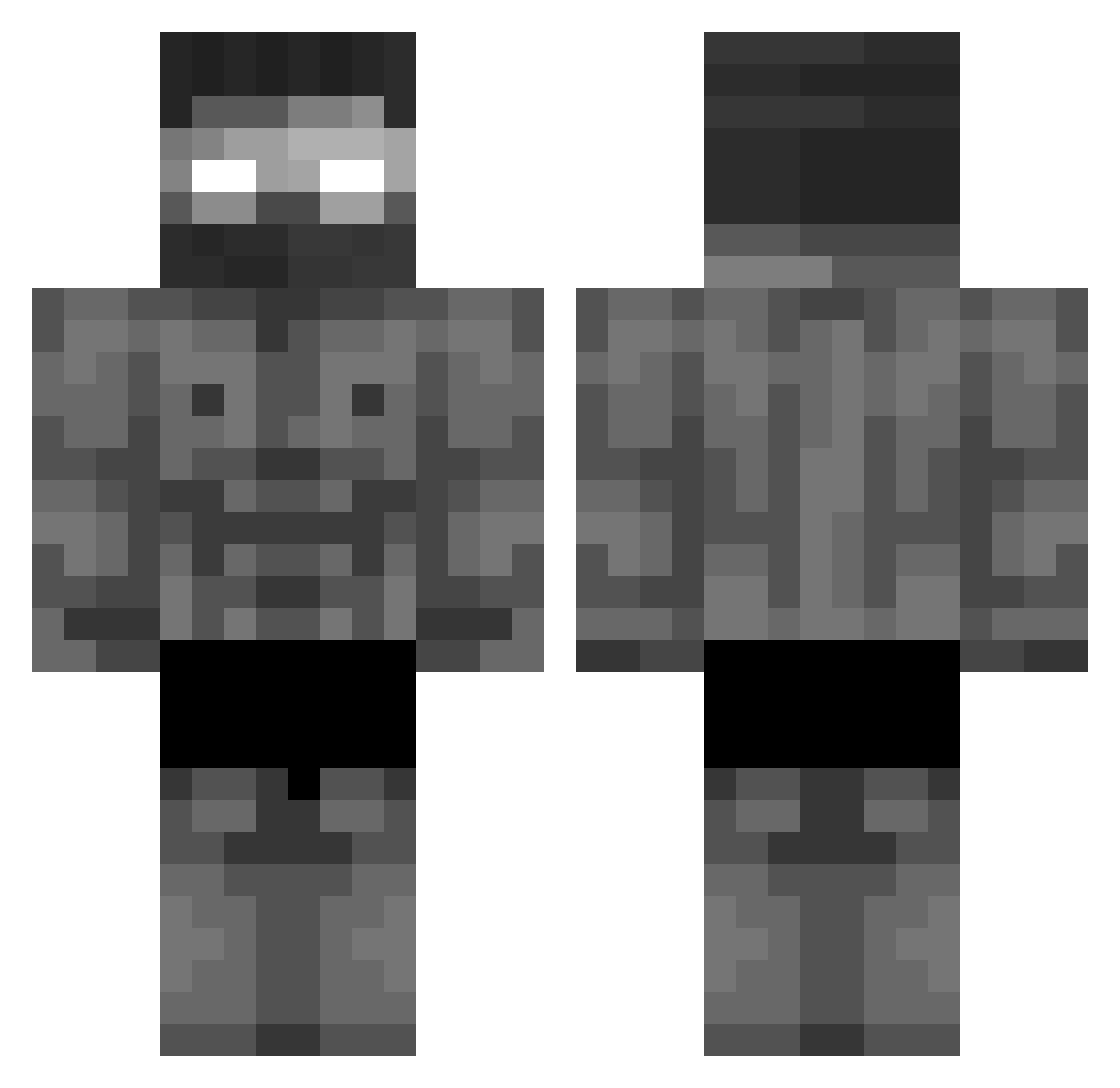
Current Minecraft skin of the player Nagol8154, loaded from the official Mojang API. Rotate the 3D model with your mouse or finger, then download the skin as a PNG file and use it in Minecraft: Bedrock Edition or Java Edition for free. When Nagol8154 changes their skin, this page updates automatically and the old skin stays in the history below.
Other players with this skin (418)
Nagol8154 was the 101st player we have seen with this skin, first spotted on 16.08.2026. The same skin was seen on these players. Open a nickname to see their current skin and skin history.
 bartholomy83 shadeking747 plntue verbaast Faulpelz_ BrunoGysin Powl999B Tonongames DanielCZ8 bombou33 KingPT19 Sozerczatel Nynox DIORdbz MiniRoyale
 Typial ZYX_spectre Fiovikings JedIKS msddn Asuyz Aspisek JurnTheBews GGFUGJ mmmnah keremtopg MisterGigaSigma
 Lkaisme YASUKE888 eatableuni Diaselik22 TTAADDYY Far1d GravePower45782 Samuka4742 Celbx _BockiKnacker007 SrFast353 hackergamer108 23luj FuegoChaotic CalebC Boomzy00 GuedesRX Ajaxy14 MrHunterBright Kriper9z Fischkov
 kisali Atomicx135 daunisimo zUzI42 SsouWou420 Alexmaster030 hanyuop sarpx Terro4ka mAmicuTiJebem SuperSlash88 alpte_KING
More Buff Minecraft skins
How to install the Nagol8154 skin
- Press the Download button above to save the skin as a PNG file.
- Minecraft: Bedrock Edition (PE): open the Dressing Room from the main menu (or tap your character → Edit Character), go to Classic Skins → Owned, press the + (new skin) button, choose the downloaded PNG and pick the Classic (Steve) model. Works on PC and mobile; consoles cannot import custom skins.
- Minecraft: Java Edition: open the Minecraft Launcher, go to the Skins tab, click New Skin, load the PNG, pick the Classic (Steve) model and press Save & Use. You can also upload it at minecraft.net → Profile → Change Skin.
The skin does not show up after import - what should I do?
Restart Minecraft and open the Dressing Room again - imported skins sometimes appear only after a restart. Also make sure you selected the imported skin and picked the Classic (Steve) model.
Which model should I choose, Classic or Slim?
This skin is designed for the Classic (Steve) model. If you pick the wrong model, the arms of the skin will look stretched or squeezed.
Is the skin of Nagol8154 free to download?
Yes. Press Download, save the PNG file and use it in Minecraft: Bedrock Edition or Java Edition - no payment or registration needed. The skin also works on multiplayer servers and Realms.
More skins
Looking for more? Go back to all Minecraft skins and check the top skins of the week, month and all time, or find any player's skin by nickname.