
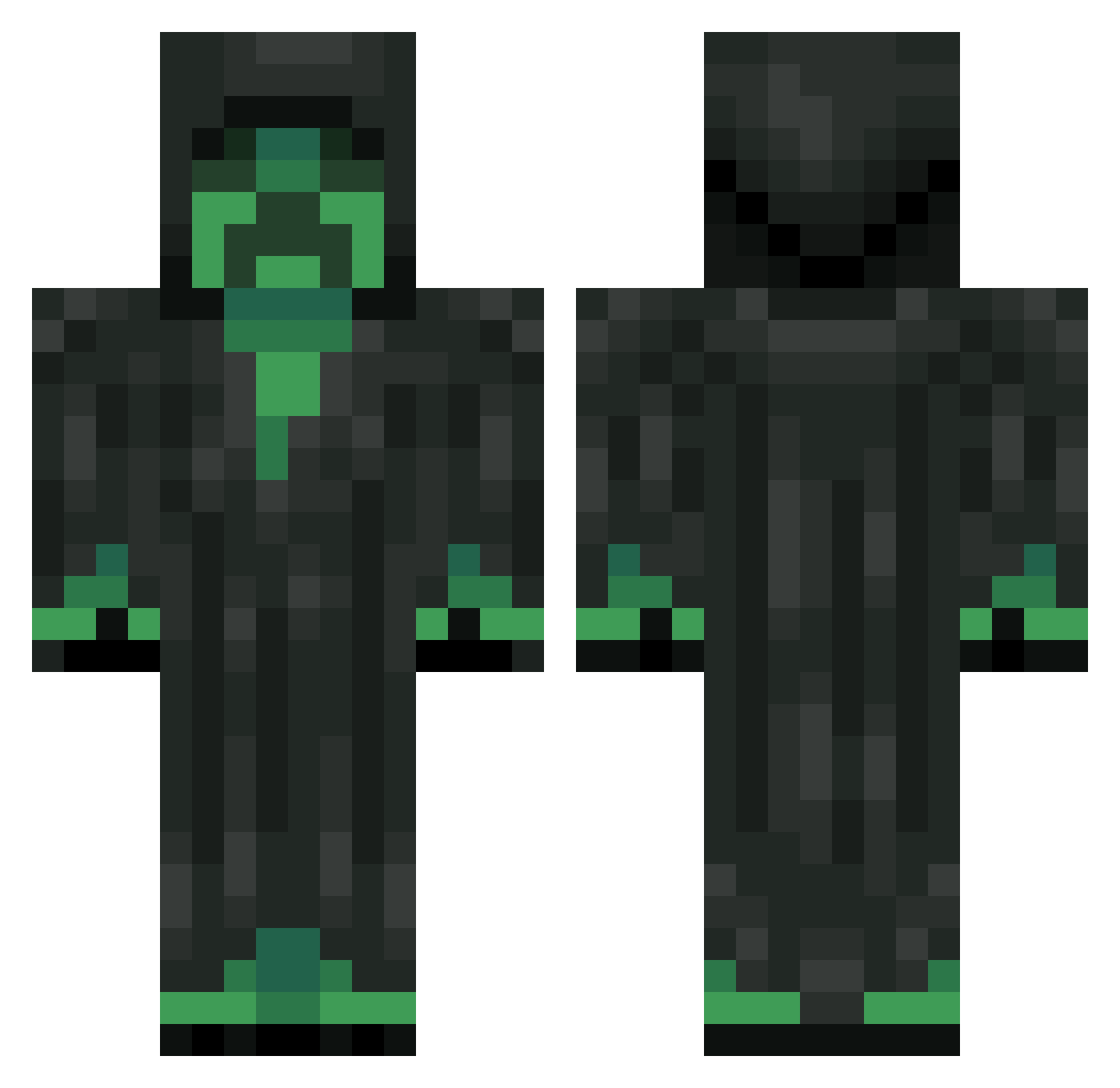
Current Minecraft skin of the player MrShyGuy624, loaded from the official Mojang API. Rotate the 3D model with your mouse or finger, then download the skin as a PNG file and use it in Minecraft: Bedrock Edition or Java Edition for free. When MrShyGuy624 changes their skin, this page updates automatically and the old skin stays in the history below.
Other players with this skin (251)
MrShyGuy624 was the 71st player we have seen with this skin, first spotted on 22.08.2026. The same skin was seen on these players. Open a nickname to see their current skin and skin history.
 DeadCreeperBT nazgul666 X_bow_212 del_jeconiah Tubis xZlOlZx calebthecat500 TheGrimCreeeper rcmp90 Tuffy_06 TheGuiltyKiller MarcusTheJoker SteelerKing101 Flippo2 justinmccormick K1LLME3D bran7233 21DarkStar21 salvayys polleoPotion_ RancidChief Zaurien TrippyTripster Qaja MrVelet_PvP WhysoMaxx AugustNic evilhaloman NeiderDK orest_fpp Anton_rbk iAlanxC TheLEGOBros rjn714 MaltheGeil Artemeis calvin7229 IceShoni AJ_Wellinghoff Vin_Cere joey5060 ahs001 Gorechylde almarhoum rcald2000 FrankieNC breakingyou neuralrock5 LuckyPalma siemen4 grassel M1ngie MentalChicken17 toinev koekiemonster0 LlamadaAlpaca17 amartoccia sempausu damianeq2 mustie010
More Grim Reaper Minecraft skins
How to install the MrShyGuy624 skin
- Press the Download button above to save the skin as a PNG file.
- Minecraft: Bedrock Edition (PE): open the Dressing Room from the main menu (or tap your character → Edit Character), go to Classic Skins → Owned, press the + (new skin) button, choose the downloaded PNG and pick the Classic (Steve) model. Works on PC and mobile; consoles cannot import custom skins.
- Minecraft: Java Edition: open the Minecraft Launcher, go to the Skins tab, click New Skin, load the PNG, pick the Classic (Steve) model and press Save & Use. You can also upload it at minecraft.net → Profile → Change Skin.
The skin does not show up after import - what should I do?
Restart Minecraft and open the Dressing Room again - imported skins sometimes appear only after a restart. Also make sure you selected the imported skin and picked the Classic (Steve) model.
Which model should I choose, Classic or Slim?
This skin is designed for the Classic (Steve) model. If you pick the wrong model, the arms of the skin will look stretched or squeezed.
Is the skin of MrShyGuy624 free to download?
Yes. Press Download, save the PNG file and use it in Minecraft: Bedrock Edition or Java Edition - no payment or registration needed. The skin also works on multiplayer servers and Realms.
More skins
Looking for more? Go back to all Minecraft skins and check the top skins of the week, month and all time, or find any player's skin by nickname.