
MrJedidiah - Minecraft Skins & Skin History
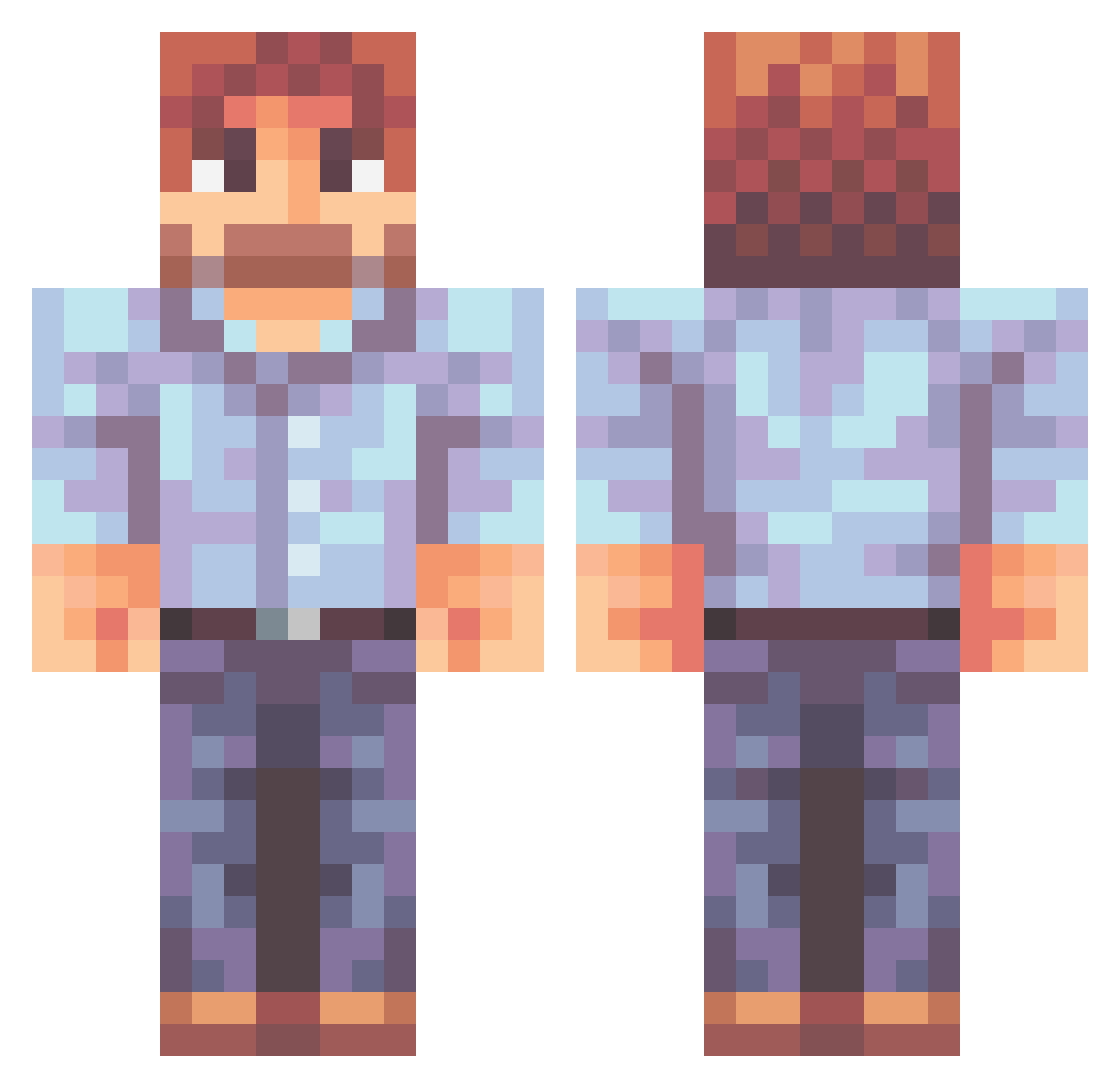
Current Minecraft skin of the player MrJedidiah, loaded from the official Mojang API. Rotate the 3D model with your mouse or finger, then download the skin as a PNG file and use it in Minecraft: Bedrock Edition or Java Edition for free. When MrJedidiah changes their skin, this page updates automatically and the old skin stays in the history below.
Other players with this skin (470)
MrJedidiah was the 438th player we have seen with this skin, first spotted on 15.10.2026. The same skin was seen on these players. Open a nickname to see their current skin and skin history.
 Ross_Bob Njall Yobyot Srooney42 cr1ng3y Xulam Swas1 smpahor mala9Dypa Vegetoid yunmingo Trevilian Poggers_Malone Evilrekless Marnf CovMcNugget wknight007 TarPalantir Hitchy127 ShayneLussier QuestHunter dit00 Erorrinio DrankZappa chefPabl0 Icefoxes99 pflynn285 Saydrick stardustmn11 Sneepz Meinnard pukiki Churroooos rodicaopfer Hacketau AnthonyJohnson NauticaBot8 RRAB0510 Sabineeeee SoddenMarcus WebbyGIGACHAD mexpe I_am_Poptart m_spruce Coma0 RxCatDad Saphieros Kurzed_ToKe Wubblerss kaporal86 Spicy_Oxi_Clean cogsspawn Birdheim Nesbitt viridimedusa Loons01 ferun_0910 IamSlimShady Frazzthepi BoxOfParadox
More Beard Minecraft skins
How to install the MrJedidiah skin
- Press the Download button above to save the skin as a PNG file.
- Minecraft: Bedrock Edition (PE): open the Dressing Room from the main menu (or tap your character → Edit Character), go to Classic Skins → Owned, press the + (new skin) button, choose the downloaded PNG and pick the Classic (Steve) model. Works on PC and mobile; consoles cannot import custom skins.
- Minecraft: Java Edition: open the Minecraft Launcher, go to the Skins tab, click New Skin, load the PNG, pick the Classic (Steve) model and press Save & Use. You can also upload it at minecraft.net → Profile → Change Skin.
The skin does not show up after import - what should I do?
Restart Minecraft and open the Dressing Room again - imported skins sometimes appear only after a restart. Also make sure you selected the imported skin and picked the Classic (Steve) model.
Which model should I choose, Classic or Slim?
This skin is designed for the Classic (Steve) model. If you pick the wrong model, the arms of the skin will look stretched or squeezed.
Is the skin of MrJedidiah free to download?
Yes. Press Download, save the PNG file and use it in Minecraft: Bedrock Edition or Java Edition - no payment or registration needed. The skin also works on multiplayer servers and Realms.
More skins
Looking for more? Go back to all Minecraft skins and check the top skins of the week, month and all time, or find any player's skin by nickname.