
Monkeys4life21 - Minecraft Skins & Skin History
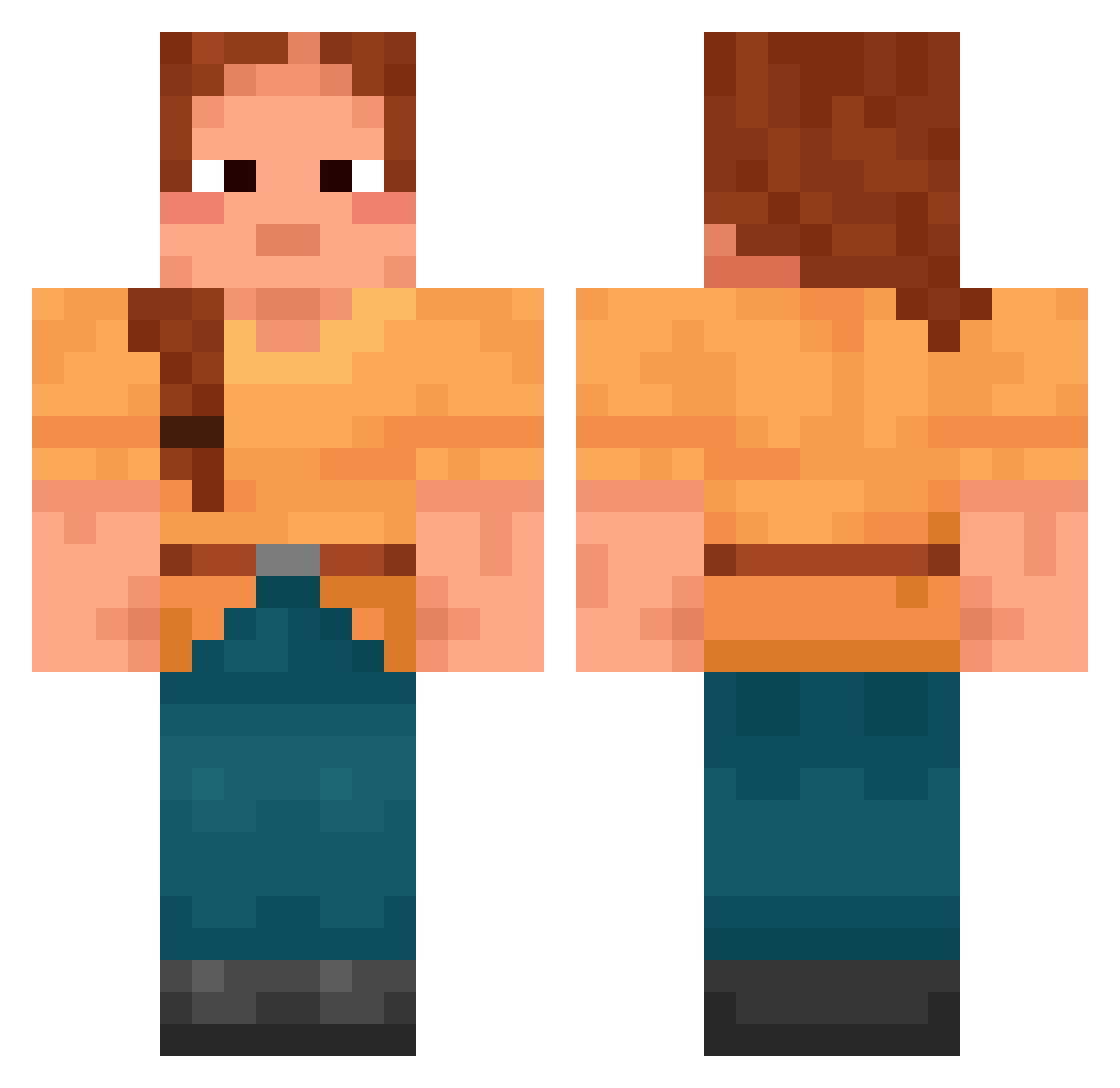
Current Minecraft skin of the player Monkeys4life21, loaded from the official Mojang API. Rotate the 3D model with your mouse or finger, then download the skin as a PNG file and use it in Minecraft: Bedrock Edition or Java Edition for free. When Monkeys4life21 changes their skin, this page updates automatically and the old skin stays in the history below.
Other players with this skin (1416)
Monkeys4life21 was the 439th player we have seen with this skin, first spotted on 21.08.2026. The same skin was seen on these players. Open a nickname to see their current skin and skin history.
 beehives whitestone apatheia Berkowitz Tansee hello_jisu emmetropy JujuPandinha 00an 47cpds Myrmidon Shor invasiveness Fishlord136 Topper Iwo111Iwo pillow_princess5 ach_keine_ahnung BlackJackIng IcyPlant YooMatt SpiderSteve1012 ChieFish Nargim_zanx9 Just4like TinuvielX
 kasf AltarPiece Soulless_ kinnikinnick VilaFer milkshop Hadalus Warped_Films UNDECK circlet Nico1983 croore vacuate
 kukabeludo123234 impostersus69420 Handspring ROBOTIZATION Istuinir
 Beladiva jemsq LeMerlan _KillerMuffin_ seenu
 MLSe7en Swallowtailed Jennibenniee Noters semiotic TheShtFisherman shewer Urtica Speckless
 cwalgamer kraaling
More Cottagecore Minecraft skins
See all 5597 Cottagecore skins
How to install the Monkeys4life21 skin
- Press the Download button above to save the skin as a PNG file.
- Minecraft: Bedrock Edition (PE): open the Dressing Room from the main menu (or tap your character → Edit Character), go to Classic Skins → Owned, press the + (new skin) button, choose the downloaded PNG and pick the Classic (Steve) model. Works on PC and mobile; consoles cannot import custom skins.
- Minecraft: Java Edition: open the Minecraft Launcher, go to the Skins tab, click New Skin, load the PNG, pick the Classic (Steve) model and press Save & Use. You can also upload it at minecraft.net → Profile → Change Skin.
The skin does not show up after import - what should I do?
Restart Minecraft and open the Dressing Room again - imported skins sometimes appear only after a restart. Also make sure you selected the imported skin and picked the Classic (Steve) model.
Which model should I choose, Classic or Slim?
This skin is designed for the Classic (Steve) model. If you pick the wrong model, the arms of the skin will look stretched or squeezed.
Is the skin of Monkeys4life21 free to download?
Yes. Press Download, save the PNG file and use it in Minecraft: Bedrock Edition or Java Edition - no payment or registration needed. The skin also works on multiplayer servers and Realms.
More skins
Looking for more? Go back to all Minecraft skins and check the top skins of the week, month and all time, or find any player's skin by nickname.