
MaTTtheGaMER212 - Minecraft Skins & Skin History
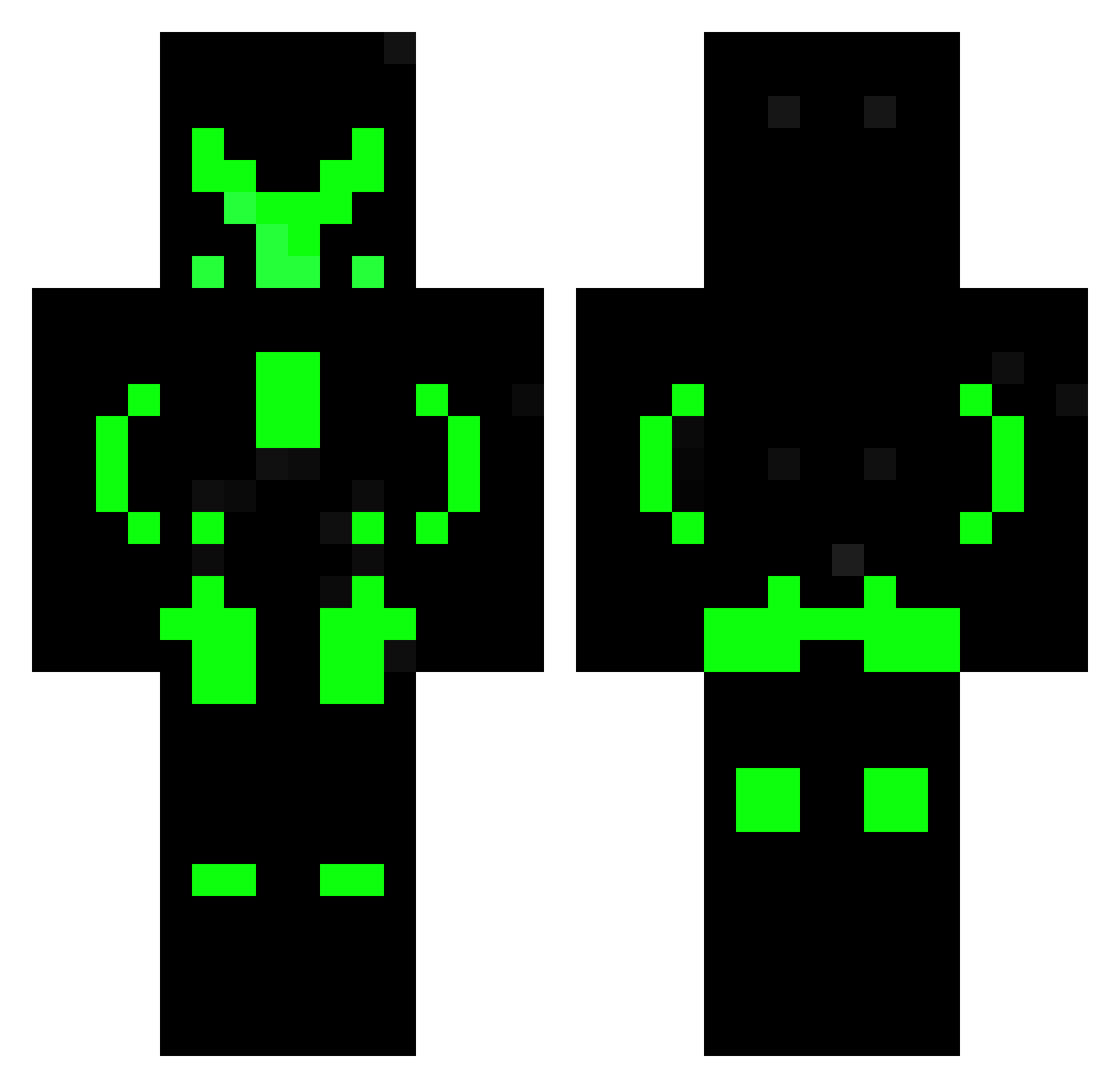
Current Minecraft skin of the player MaTTtheGaMER212, loaded from the official Mojang API. Rotate the 3D model with your mouse or finger, then download the skin as a PNG file and use it in Minecraft: Bedrock Edition or Java Edition for free. When MaTTtheGaMER212 changes their skin, this page updates automatically and the old skin stays in the history below.
Other players with this skin (461)
MaTTtheGaMER212 was the 85th player we have seen with this skin, first spotted on 10.08.2026. The same skin was seen on these players. Open a nickname to see their current skin and skin history.
 rickydragon804 CNNRDVD GAMER47509 69being tomderou lazyEggs3 SkeletonDeath2 ALER1 Y_Sunflower BLACK_MUMBA12 JOLO_JANNIK DerSchattenlord MeltedMitten750 ExpectedHD Secret_Clash SalemTheKiller Brian41 HessMonsters ryeguys25 charmanderist wh1t3_5higam1 Pedruc0897 Torbentudse Shubarios Emporior
 Embow10 HonorEye CometCoder ake22j_ Sheldron Bazooka88 _tentypek_ Gregbryce55
 David20120 DarknessYunus Nightracer473 RweiQAQ shadowdeath490 HiIamQueng2654 RamirezKun Silentsvi Seuzero SuperNovaYKY FirePeaGamer raphoodd2 NarutoBR PinguKiller30 YStefanT
 MArGOSnipeR Brisingr128 soulreaper12131 sesila addison1024 Darky31 SrMackenzie StokierSnake05 thuongpc456 BadKarma906 xn27 Zeratok
More Neon Armor Minecraft skins
How to install the MaTTtheGaMER212 skin
- Press the Download button above to save the skin as a PNG file.
- Minecraft: Bedrock Edition (PE): open the Dressing Room from the main menu (or tap your character → Edit Character), go to Classic Skins → Owned, press the + (new skin) button, choose the downloaded PNG and pick the Classic (Steve) model. Works on PC and mobile; consoles cannot import custom skins.
- Minecraft: Java Edition: open the Minecraft Launcher, go to the Skins tab, click New Skin, load the PNG, pick the Classic (Steve) model and press Save & Use. You can also upload it at minecraft.net → Profile → Change Skin.
The skin does not show up after import - what should I do?
Restart Minecraft and open the Dressing Room again - imported skins sometimes appear only after a restart. Also make sure you selected the imported skin and picked the Classic (Steve) model.
Which model should I choose, Classic or Slim?
This skin is designed for the Classic (Steve) model. If you pick the wrong model, the arms of the skin will look stretched or squeezed.
Is the skin of MaTTtheGaMER212 free to download?
Yes. Press Download, save the PNG file and use it in Minecraft: Bedrock Edition or Java Edition - no payment or registration needed. The skin also works on multiplayer servers and Realms.
More skins
Looking for more? Go back to all Minecraft skins and check the top skins of the week, month and all time, or find any player's skin by nickname.