
MC_Zer0_ - Minecraft Skins & Skin History
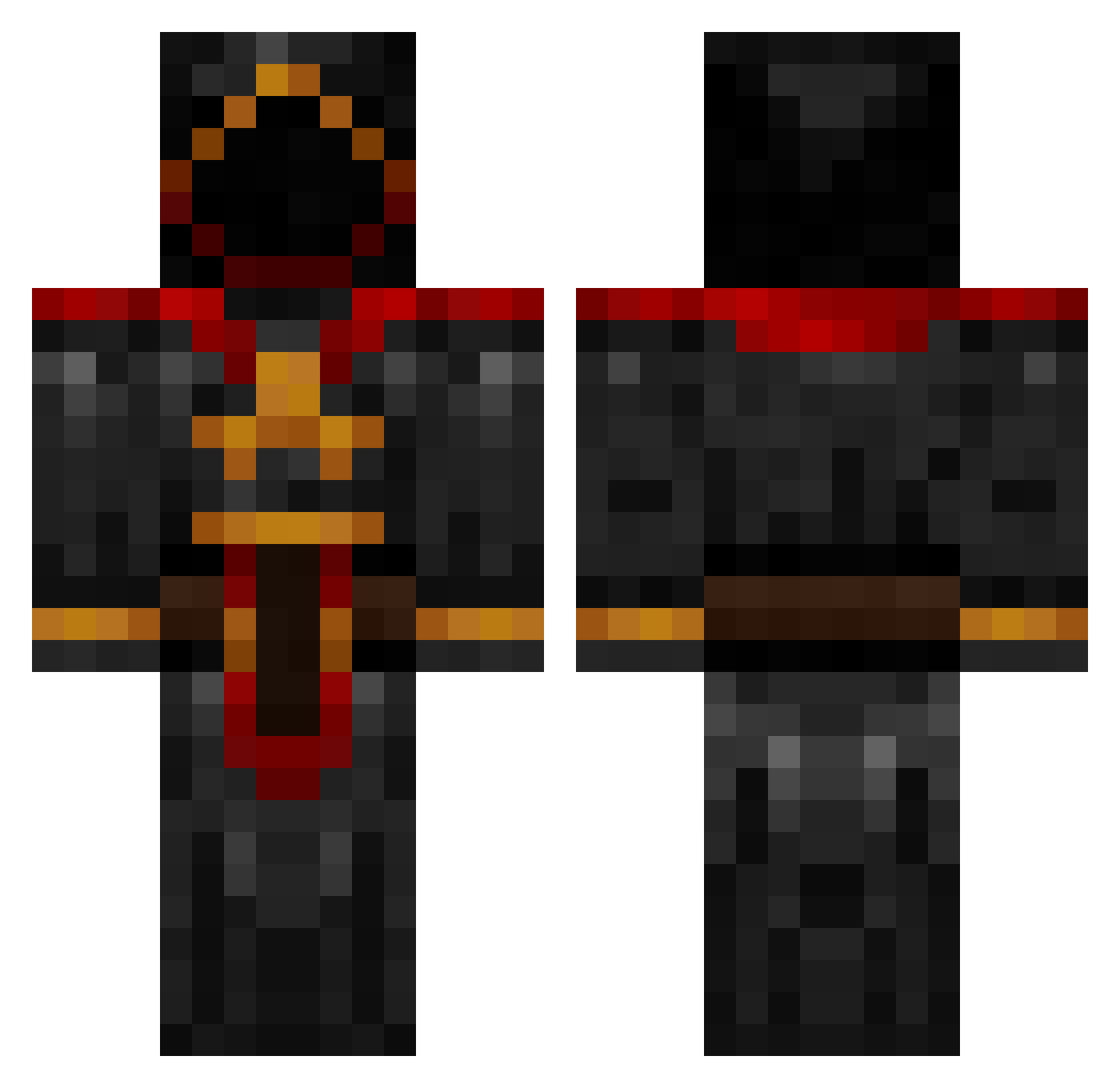
Current Minecraft skin of the player MC_Zer0_, loaded from the official Mojang API. Rotate the 3D model with your mouse or finger, then download the skin as a PNG file and use it in Minecraft: Bedrock Edition or Java Edition for free. When MC_Zer0_ changes their skin, this page updates automatically and the old skin stays in the history below.
Other players with this skin (885)
MC_Zer0_ was the 373rd player we have seen with this skin, first spotted on 08.09.2026. The same skin was seen on these players. Open a nickname to see their current skin and skin history.
 ImTanking_ MistahWeez Icrafteverything VoxInferi timt_3011 Aenoyaa Reforger umadbro5802 _Igneus_ JuicyElf QxCurse bossman0225 Krez567 Soulrift mTas_Do Blind_Prophet21 SurgeGaming Alpheus1 L0stKeys Diehardcoolkid Mr_Moon16 themythyx mell127 benbob165 Hendsa rompandrea Bobby1333 Vanhout2 parka0208 PetiPapp David_EA Sorenbane NexusDeity Belowzero14 ninjastar93 kylevandyk Lazylion Bane2Barrels rynoshreder WarrenWong Inferno_Draconis killjoy232 DSparilDE simon4700 EmilJEX trevisslag Nehano whitenight487 mawawoo Kyuubeyz daniellastking CinderMagus Cyber_Blades EyeGore22 Chugalooga Trex_Gaming TheShavocado matthias5116 EnchantedAnvil Akane54
More Cultist Minecraft skins
How to install the MC_Zer0_ skin
- Press the Download button above to save the skin as a PNG file.
- Minecraft: Bedrock Edition (PE): open the Dressing Room from the main menu (or tap your character → Edit Character), go to Classic Skins → Owned, press the + (new skin) button, choose the downloaded PNG and pick the Classic (Steve) model. Works on PC and mobile; consoles cannot import custom skins.
- Minecraft: Java Edition: open the Minecraft Launcher, go to the Skins tab, click New Skin, load the PNG, pick the Classic (Steve) model and press Save & Use. You can also upload it at minecraft.net → Profile → Change Skin.
The skin does not show up after import - what should I do?
Restart Minecraft and open the Dressing Room again - imported skins sometimes appear only after a restart. Also make sure you selected the imported skin and picked the Classic (Steve) model.
Which model should I choose, Classic or Slim?
This skin is designed for the Classic (Steve) model. If you pick the wrong model, the arms of the skin will look stretched or squeezed.
Is the skin of MC_Zer0_ free to download?
Yes. Press Download, save the PNG file and use it in Minecraft: Bedrock Edition or Java Edition - no payment or registration needed. The skin also works on multiplayer servers and Realms.
More skins
Looking for more? Go back to all Minecraft skins and check the top skins of the week, month and all time, or find any player's skin by nickname.