
Kai_Trix117 - Minecraft Skins & Skin History
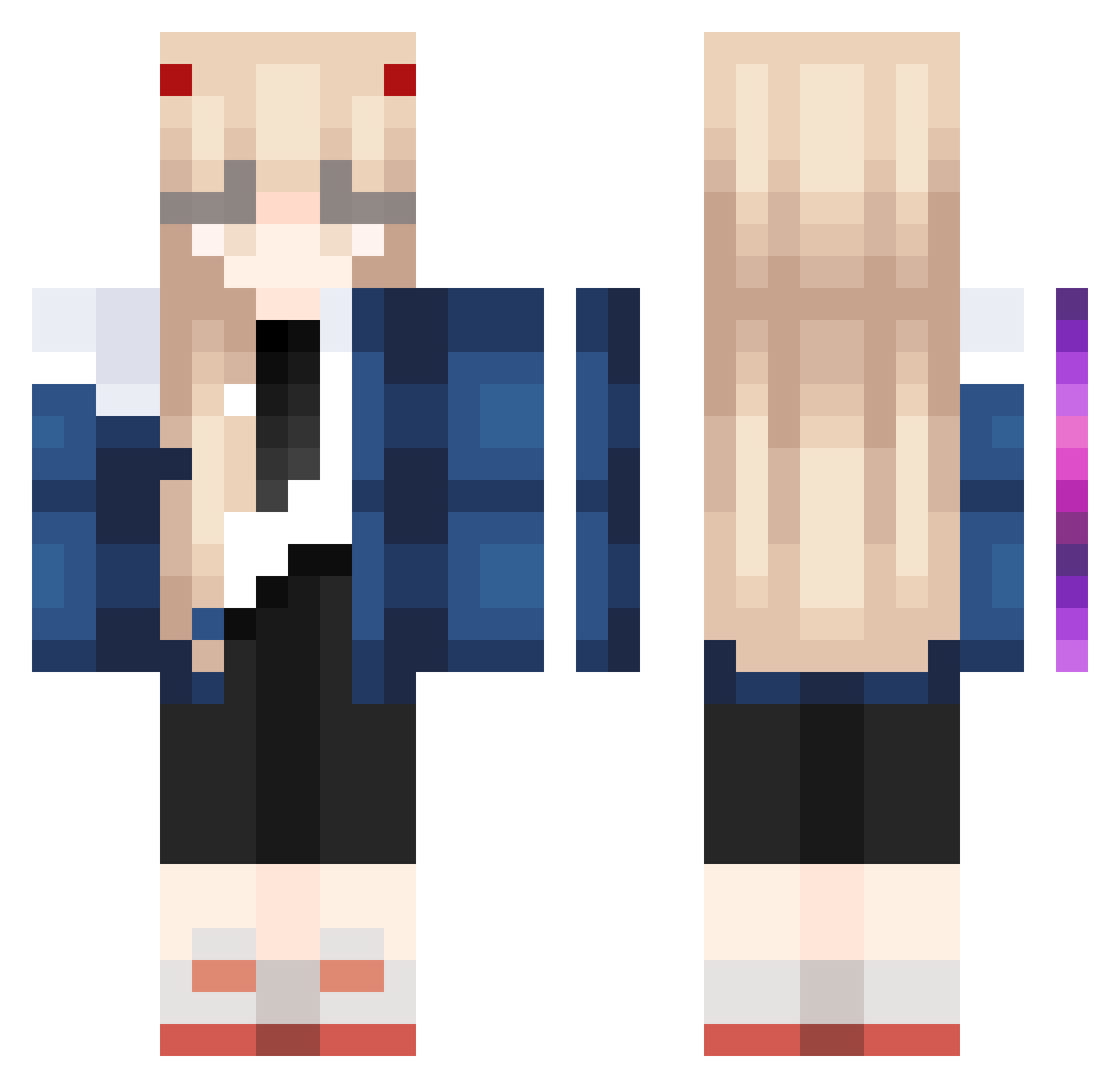
Current Minecraft skin of the player Kai_Trix117, loaded from the official Mojang API. Rotate the 3D model with your mouse or finger, then download the skin as a PNG file and use it in Minecraft: Bedrock Edition or Java Edition for free. When Kai_Trix117 changes their skin, this page updates automatically and the old skin stays in the history below.
Other players with this skin (995)
Kai_Trix117 was the 768th player we have seen with this skin, first spotted on 13.10.2026. The same skin was seen on these players. Open a nickname to see their current skin and skin history.
 RyuKi_67 Dubhe33 ROC_Lin yuanlk Greybaa chorizo2 nymphj AEON1EN MOMORE1996 operfect JiuYue7 SARITAXD Avril581 SamSamFlo GreenG80M3 Chargefruil FreeThrowMerch Hatikuji_Mayoi Mariah_Mac MissTiffanyJinx golemeater pirezita zzqouo Novice01 biskeey gunwoo_0806 ej_909 violetNanpro yuhong0803 YuHuiY TP_Mac markchobo12 ClumsyYetii Mwi_Rang Princess_Yoru Gogojie Alinochka_myau Markeloff11 gandalpeu tnn161 LucaKawaii0325 sommtem An1meshn1K_ VoidKitten13 Yukilele Kation55 alicekery snow_white_snow ANTIVIRUS_C Beayemi Maerthaa little_wich DreamDiana melumagu milkcassette lilpetsi mon820 Azurite12 whereiskiki terrorusa
More Zero Two Minecraft skins
How to install the Kai_Trix117 skin
- Press the Download button above to save the skin as a PNG file.
- Minecraft: Bedrock Edition (PE): open the Dressing Room from the main menu (or tap your character → Edit Character), go to Classic Skins → Owned, press the + (new skin) button, choose the downloaded PNG and pick the Classic (Steve) model. Works on PC and mobile; consoles cannot import custom skins.
- Minecraft: Java Edition: open the Minecraft Launcher, go to the Skins tab, click New Skin, load the PNG, pick the Classic (Steve) model and press Save & Use. You can also upload it at minecraft.net → Profile → Change Skin.
The skin does not show up after import - what should I do?
Restart Minecraft and open the Dressing Room again - imported skins sometimes appear only after a restart. Also make sure you selected the imported skin and picked the Classic (Steve) model.
Which model should I choose, Classic or Slim?
This skin is designed for the Classic (Steve) model. If you pick the wrong model, the arms of the skin will look stretched or squeezed.
Is the skin of Kai_Trix117 free to download?
Yes. Press Download, save the PNG file and use it in Minecraft: Bedrock Edition or Java Edition - no payment or registration needed. The skin also works on multiplayer servers and Realms.
More skins
Looking for more? Go back to all Minecraft skins and check the top skins of the week, month and all time, or find any player's skin by nickname.