
Julia2201 - Minecraft Skins & Skin History
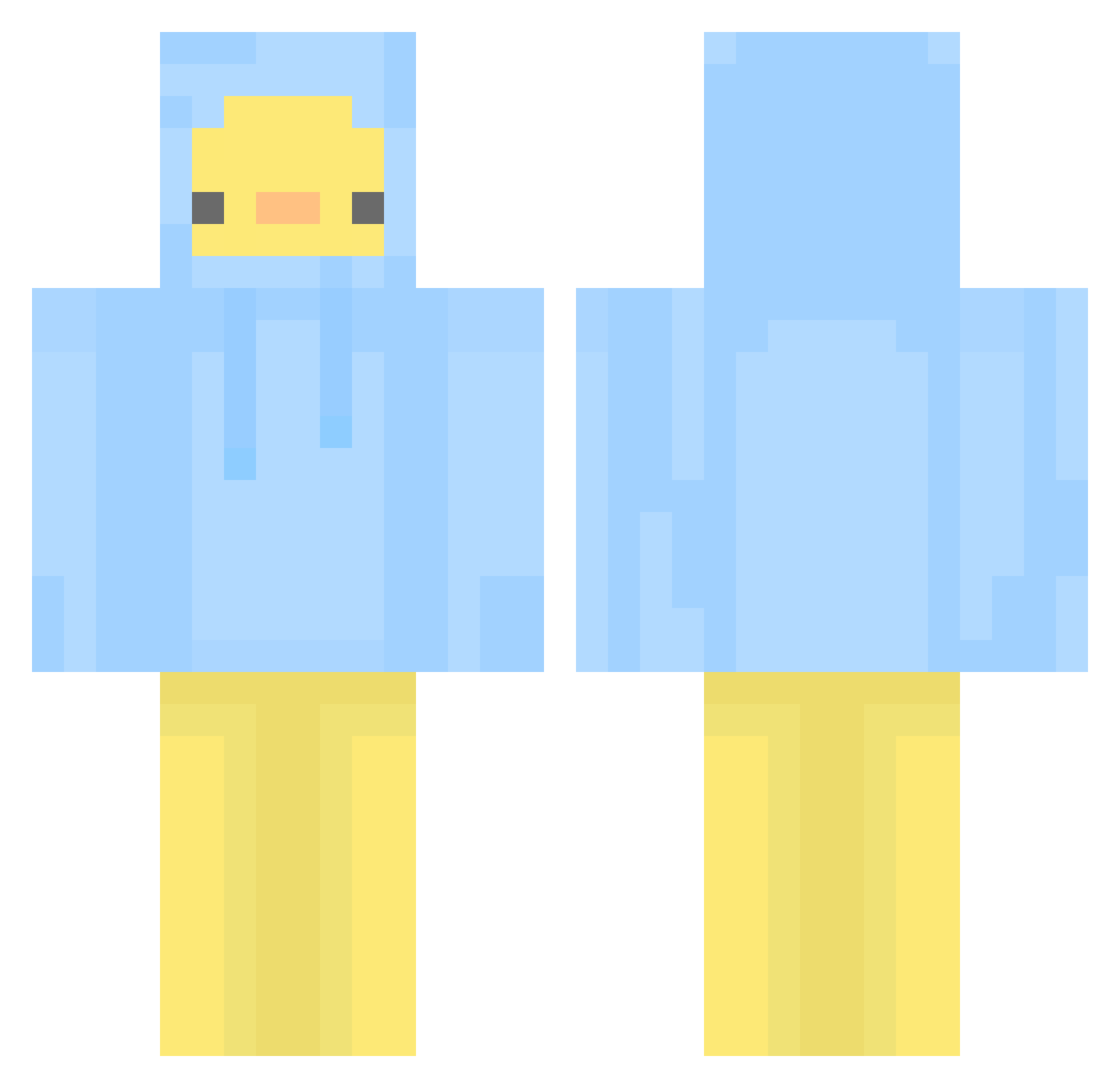
Current Minecraft skin of the player Julia2201, loaded from the official Mojang API. Rotate the 3D model with your mouse or finger, then download the skin as a PNG file and use it in Minecraft: Bedrock Edition or Java Edition for free. When Julia2201 changes their skin, this page updates automatically and the old skin stays in the history below.
Other players with this skin (436)
Julia2201 was the 100th player we have seen with this skin, first spotted on 15.08.2026. The same skin was seen on these players. Open a nickname to see their current skin and skin history.
 FieLuLove Tree18 cometary one23and4 C0ralin3 Trof Iso95 Mizuno_kokyu woyaochirenrou Mtail J0L30 hardkor000 Sayuri001 stocking0617 Zach_zzang Eveyle Prophyr PHING19 _weirdar SadPlace LaVal519 CuteBunnie1239 dw0611 dbf12 duegoz fede12345 ddori5959 Pokari_k Impro579 wannaone151 _JinSoL randomblonde1243 Weni0415 _timezzz Re_mi01 qoxop1015 tunorojo candela0806 BabyDack rin415 Taninah yunggi0317 Pelpox KIMSEUL__ heeju_zzang xDijiN qxdes ItzYellowduck10_ uhyeon_n
 ruubanchou BishGetOnMyLevel jedinwza Lor911 qExotlier Claybo1234 ARMES15 pigmg12 dknycindy INKY4NYA HoneyL3monade
More Duck Minecraft skins
How to install the Julia2201 skin
- Press the Download button above to save the skin as a PNG file.
- Minecraft: Bedrock Edition (PE): open the Dressing Room from the main menu (or tap your character → Edit Character), go to Classic Skins → Owned, press the + (new skin) button, choose the downloaded PNG and pick the Classic (Steve) model. Works on PC and mobile; consoles cannot import custom skins.
- Minecraft: Java Edition: open the Minecraft Launcher, go to the Skins tab, click New Skin, load the PNG, pick the Classic (Steve) model and press Save & Use. You can also upload it at minecraft.net → Profile → Change Skin.
The skin does not show up after import - what should I do?
Restart Minecraft and open the Dressing Room again - imported skins sometimes appear only after a restart. Also make sure you selected the imported skin and picked the Classic (Steve) model.
Which model should I choose, Classic or Slim?
This skin is designed for the Classic (Steve) model. If you pick the wrong model, the arms of the skin will look stretched or squeezed.
Is the skin of Julia2201 free to download?
Yes. Press Download, save the PNG file and use it in Minecraft: Bedrock Edition or Java Edition - no payment or registration needed. The skin also works on multiplayer servers and Realms.
More skins
Looking for more? Go back to all Minecraft skins and check the top skins of the week, month and all time, or find any player's skin by nickname.