
Jessquaw - Minecraft Skins & Skin History
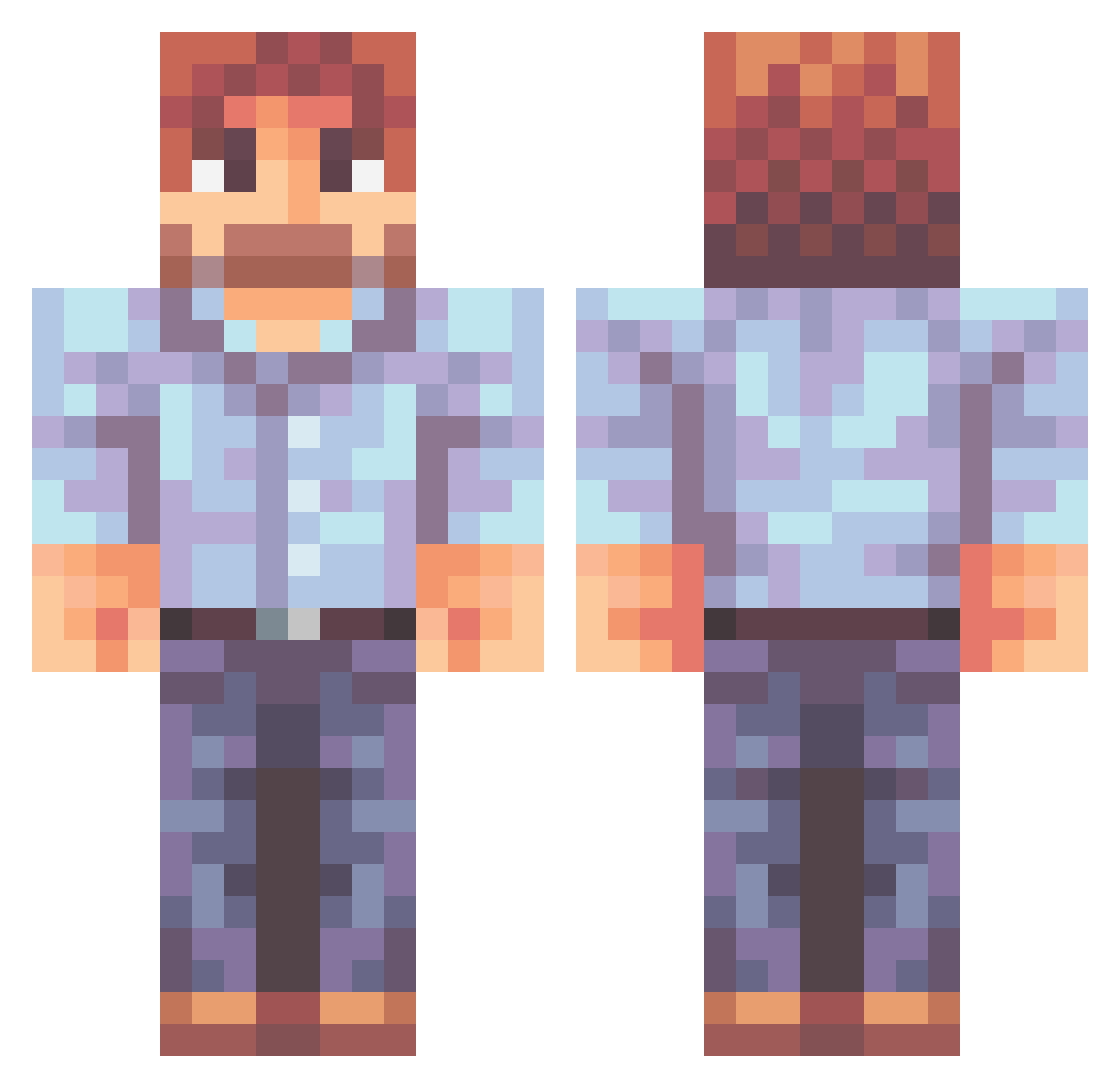
Current Minecraft skin of the player Jessquaw, loaded from the official Mojang API. Rotate the 3D model with your mouse or finger, then download the skin as a PNG file and use it in Minecraft: Bedrock Edition or Java Edition for free. When Jessquaw changes their skin, this page updates automatically and the old skin stays in the history below.
Other players with this skin (471)
Jessquaw was the 338th player we have seen with this skin, first spotted on 28.09.2026. The same skin was seen on these players. Open a nickname to see their current skin and skin history.
 jacoolb02 mindjamluke Sir_Shrubber Chzzz1337 8reeze stopracismnow SupremeNip HollysBabyDaddy7 Travis_T gert_alert Eugene_Poez Tv_unlucky_JD Bagel33 JakobPlaysBass ChadScavington Balucalli SneakySlurps Nerdagorn Jauques Rosenows vic1805 StrixStrixo mcfw22 DengusKhan MarcusM80 Triv2018 Nokappa1 bigroosterman12 Jinart SlickRick200 Stazonizuka 2ruedat Rufus007 brynmyster GRENXIVOLD Astral_Ranger Tonioperson uttamking KnockOff902 AlterSchwede47 sad10x PackedCrack slavbonde Malithus xElms Jorrii GamerBobRoss Chicagorusty SkipsteR0O Smexy_mexy benneyboy JamesJ78 szedig Kelpy_George dontgiv chjbg29 Sapria WIXR mack366 moody_gross
More Beard Minecraft skins
How to install the Jessquaw skin
- Press the Download button above to save the skin as a PNG file.
- Minecraft: Bedrock Edition (PE): open the Dressing Room from the main menu (or tap your character → Edit Character), go to Classic Skins → Owned, press the + (new skin) button, choose the downloaded PNG and pick the Classic (Steve) model. Works on PC and mobile; consoles cannot import custom skins.
- Minecraft: Java Edition: open the Minecraft Launcher, go to the Skins tab, click New Skin, load the PNG, pick the Classic (Steve) model and press Save & Use. You can also upload it at minecraft.net → Profile → Change Skin.
The skin does not show up after import - what should I do?
Restart Minecraft and open the Dressing Room again - imported skins sometimes appear only after a restart. Also make sure you selected the imported skin and picked the Classic (Steve) model.
Which model should I choose, Classic or Slim?
This skin is designed for the Classic (Steve) model. If you pick the wrong model, the arms of the skin will look stretched or squeezed.
Is the skin of Jessquaw free to download?
Yes. Press Download, save the PNG file and use it in Minecraft: Bedrock Edition or Java Edition - no payment or registration needed. The skin also works on multiplayer servers and Realms.
More skins
Looking for more? Go back to all Minecraft skins and check the top skins of the week, month and all time, or find any player's skin by nickname.