
JOJAWE_ - Minecraft Skins & Skin History
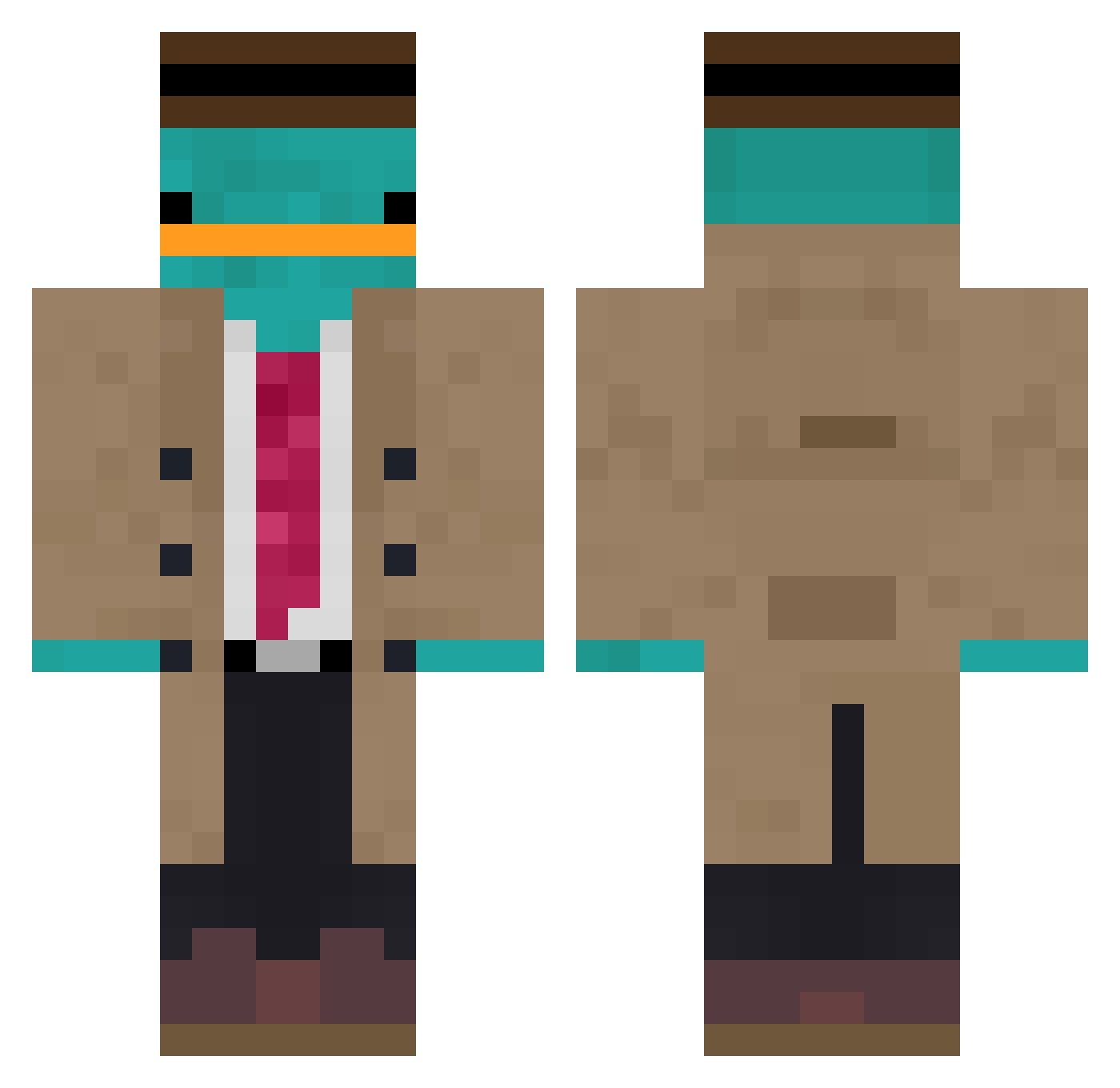
Current Minecraft skin of the player JOJAWE_, loaded from the official Mojang API. Rotate the 3D model with your mouse or finger, then download the skin as a PNG file and use it in Minecraft: Bedrock Edition or Java Edition for free. When JOJAWE_ changes their skin, this page updates automatically and the old skin stays in the history below.
Other players with this skin (891)
JOJAWE_ was the 551st player we have seen with this skin, first spotted on 24.09.2026. The same skin was seen on these players. Open a nickname to see their current skin and skin history.
 Aseret1093 qazward Nayesicc DoggyDoPaper sgtfusy steerman2001 Gabylesolo Infirti mr_phantastic_ VenialFle D3monxSlayer1 Lugosi Norman1894 Baffallo771 ItsVanish Macios10 BBredeyes sambuckers DJSYCHO Jaeger_Hunter bederend0 Hawkwarrior_Pvp CptBeko sir_sirius MOo0z Bananas_Splits DecorousWonder jessi1901 Revox_vL MrJoePerry nesteqq jaw_knee2020 Starman134 Untitled_Smuzy BongMeo Pandowski IPerisse xqCrypt1c Nori_PL NoTimeLuck PlasmaAki BrayanI kevinpark0610 seblezwiki UpsetPlatypus Forqiveme expiredwater70 Nackth Auxence09 MinceMite HoneyBunKing Sheamussy Net_hero Gkl1984 yesee IDS_NAVY SamuraiDaisho mamacita79 Mcpew21 FluffyXD___
More Platypus Minecraft skins
How to install the JOJAWE_ skin
- Press the Download button above to save the skin as a PNG file.
- Minecraft: Bedrock Edition (PE): open the Dressing Room from the main menu (or tap your character → Edit Character), go to Classic Skins → Owned, press the + (new skin) button, choose the downloaded PNG and pick the Classic (Steve) model. Works on PC and mobile; consoles cannot import custom skins.
- Minecraft: Java Edition: open the Minecraft Launcher, go to the Skins tab, click New Skin, load the PNG, pick the Classic (Steve) model and press Save & Use. You can also upload it at minecraft.net → Profile → Change Skin.
The skin does not show up after import - what should I do?
Restart Minecraft and open the Dressing Room again - imported skins sometimes appear only after a restart. Also make sure you selected the imported skin and picked the Classic (Steve) model.
Which model should I choose, Classic or Slim?
This skin is designed for the Classic (Steve) model. If you pick the wrong model, the arms of the skin will look stretched or squeezed.
Is the skin of JOJAWE_ free to download?
Yes. Press Download, save the PNG file and use it in Minecraft: Bedrock Edition or Java Edition - no payment or registration needed. The skin also works on multiplayer servers and Realms.
More skins
Looking for more? Go back to all Minecraft skins and check the top skins of the week, month and all time, or find any player's skin by nickname.