
HotdogSurfer16 - Minecraft Skins & Skin History
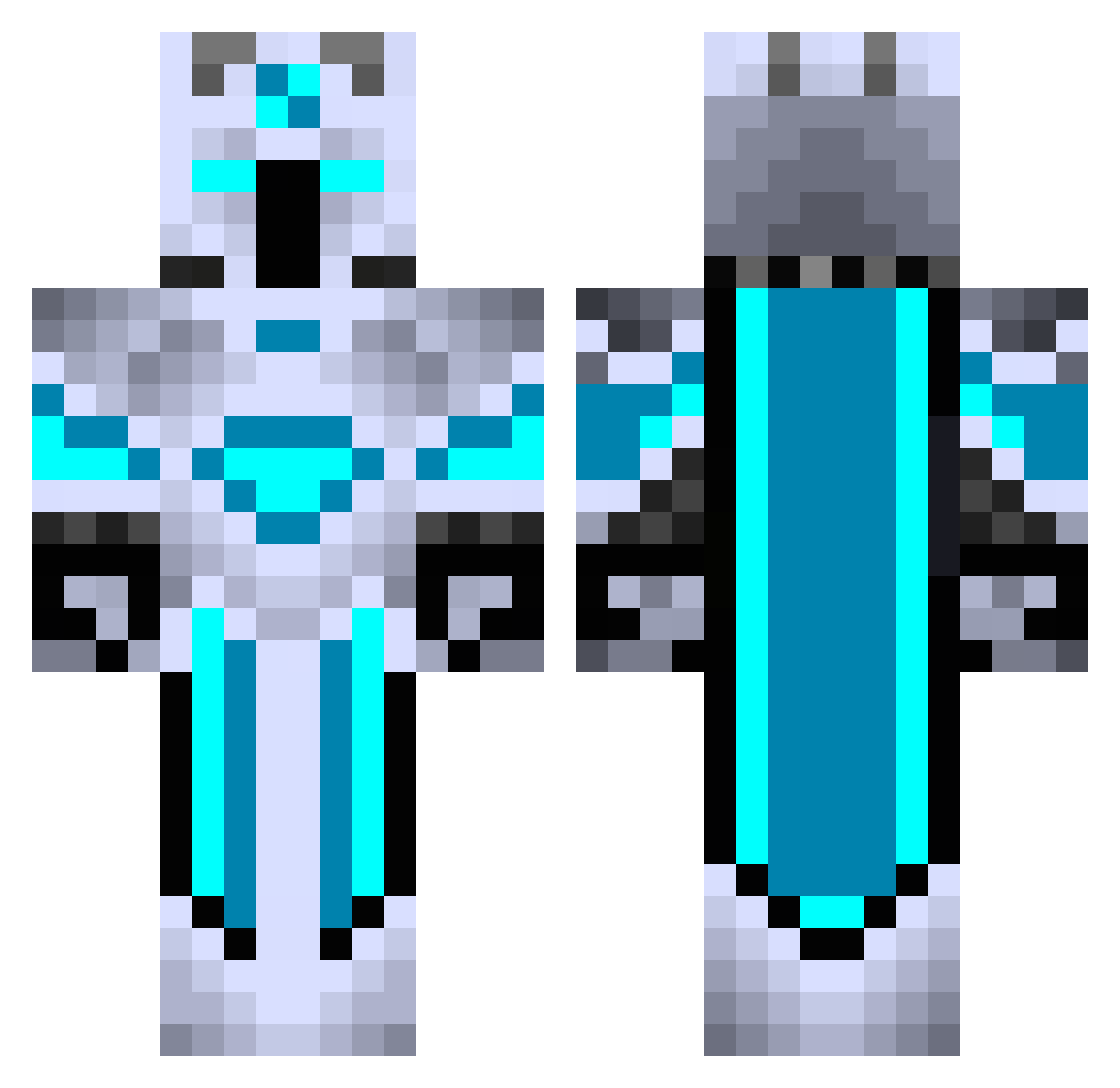
Current Minecraft skin of the player HotdogSurfer16, loaded from the official Mojang API. Rotate the 3D model with your mouse or finger, then download the skin as a PNG file and use it in Minecraft: Bedrock Edition or Java Edition for free. When HotdogSurfer16 changes their skin, this page updates automatically and the old skin stays in the history below.
Other players with this skin (440)
HotdogSurfer16 was the 45th player we have seen with this skin, first spotted on 03.08.2026. The same skin was seen on these players. Open a nickname to see their current skin and skin history.
 RyukuShido
 Ofizier CarlDaCat Cricketragic BlitzdKIKO spencer0817 BarredMarmot872 Eyma23
 Apollonos johnnis34 ogtracking NinjaMelker1 RT_KD Aces_McNasty StoneColdGamer01 oKharizma zion_black DementorHD Kurp1k Ice_Peak_ Liquid589 Lunelio Thunder_Dragon1 Ridgeblaster90 _Noz123 MisEspeon ggc7911 Allan1096 SnaguineWasTaken K__9527 Herr_Winter69 LordFrost01 Lacopa Ianisdep Karlan_pokemon Lepori Jarredaw Beacey24 Rb_Drache HerrDinoTT MightyFellow
 OCH23 sArkOt Logen625 YungAlduin Ondra09CZ Bostormm Snow31323 TearsFears1212 jobhgd Cold_MF Republic_City serpdaddy dorematt91 Crowmaa NukerGuy Gosthi DarkSideDK Jackathan Menemyz
More Glowing Minecraft skins
How to install the HotdogSurfer16 skin
- Press the Download button above to save the skin as a PNG file.
- Minecraft: Bedrock Edition (PE): open the Dressing Room from the main menu (or tap your character → Edit Character), go to Classic Skins → Owned, press the + (new skin) button, choose the downloaded PNG and pick the Classic (Steve) model. Works on PC and mobile; consoles cannot import custom skins.
- Minecraft: Java Edition: open the Minecraft Launcher, go to the Skins tab, click New Skin, load the PNG, pick the Classic (Steve) model and press Save & Use. You can also upload it at minecraft.net → Profile → Change Skin.
The skin does not show up after import - what should I do?
Restart Minecraft and open the Dressing Room again - imported skins sometimes appear only after a restart. Also make sure you selected the imported skin and picked the Classic (Steve) model.
Which model should I choose, Classic or Slim?
This skin is designed for the Classic (Steve) model. If you pick the wrong model, the arms of the skin will look stretched or squeezed.
Is the skin of HotdogSurfer16 free to download?
Yes. Press Download, save the PNG file and use it in Minecraft: Bedrock Edition or Java Edition - no payment or registration needed. The skin also works on multiplayer servers and Realms.
More skins
Looking for more? Go back to all Minecraft skins and check the top skins of the week, month and all time, or find any player's skin by nickname.