
Homas_Jah - Minecraft Skins & Skin History
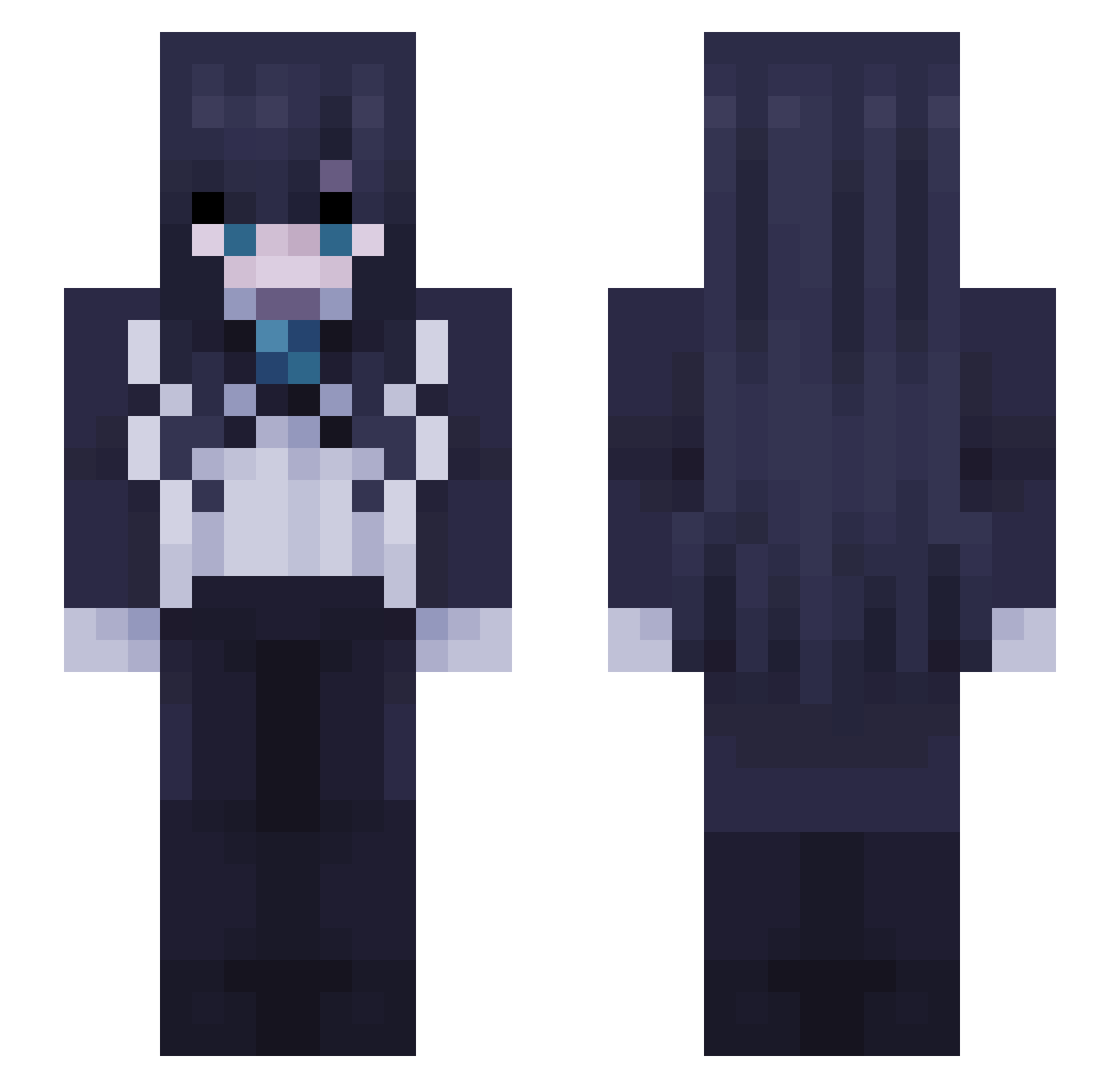
Current Minecraft skin of the player Homas_Jah, loaded from the official Mojang API. Rotate the 3D model with your mouse or finger, then download the skin as a PNG file and use it in Minecraft: Bedrock Edition or Java Edition for free. When Homas_Jah changes their skin, this page updates automatically and the old skin stays in the history below.
Other players with this skin (45)
Homas_Jah was the 25th player we have seen with this skin, first spotted on 08.09.2026. The same skin was seen on these players. Open a nickname to see their current skin and skin history.
 CitatapCitatap PoncikIVGnar Fairer_Ast Eggplant_Menace Just_Aidan_K Flashjohn_ KesitoHD iMexicaan rimumuu LaloG_1310 stars0ul_
 Kazuto_08 V0LT_T3MP3ST Cal1fornia1846 DitoLover HombreMcBuzo JimmyCactus ducc404 iloverobl0x Ouwintrr ado1024imoknp urbandove oeeu Mizak14 kevbutt7115 b3rserk13 RedCicada0225 LukeWaterBreath Gasparoska THERPERP 69minecraft _DogeZ_ Philipp_lol panasonic_123 adomins AdoEnjoyer_ z2rx Scoot_Boot_ AnonTokyoo Kabrith mtsku Suzuki_Chisato _KoKoa DRAGONSTONE31 DominikTZ
More Goth Minecraft skins
How to install the Homas_Jah skin
- Press the Download button above to save the skin as a PNG file.
- Minecraft: Bedrock Edition (PE): open the Dressing Room from the main menu (or tap your character → Edit Character), go to Classic Skins → Owned, press the + (new skin) button, choose the downloaded PNG and pick the Slim (Alex) model. Works on PC and mobile; consoles cannot import custom skins.
- Minecraft: Java Edition: open the Minecraft Launcher, go to the Skins tab, click New Skin, load the PNG, pick the Slim (Alex) model and press Save & Use. You can also upload it at minecraft.net → Profile → Change Skin.
The skin does not show up after import - what should I do?
Restart Minecraft and open the Dressing Room again - imported skins sometimes appear only after a restart. Also make sure you selected the imported skin and picked the Slim (Alex) model.
Which model should I choose, Classic or Slim?
This skin is designed for the Slim (Alex) model. If you pick the wrong model, the arms of the skin will look stretched or squeezed.
Is the skin of Homas_Jah free to download?
Yes. Press Download, save the PNG file and use it in Minecraft: Bedrock Edition or Java Edition - no payment or registration needed. The skin also works on multiplayer servers and Realms.
More skins
Looking for more? Go back to all Minecraft skins and check the top skins of the week, month and all time, or find any player's skin by nickname.