
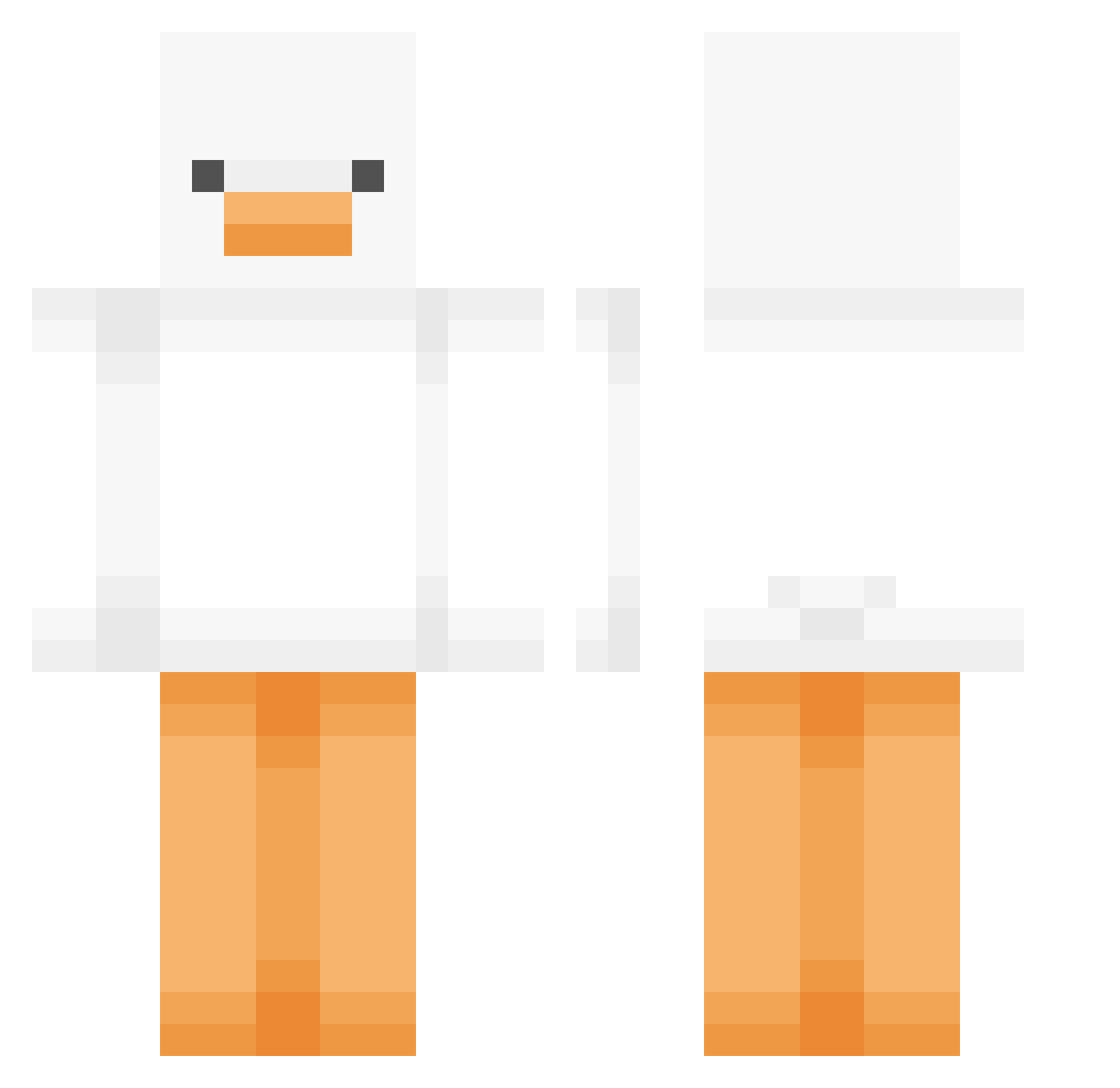
Current Minecraft skin of the player Heliwaka, loaded from the official Mojang API. Rotate the 3D model with your mouse or finger, then download the skin as a PNG file and use it in Minecraft: Bedrock Edition or Java Edition for free. When Heliwaka changes their skin, this page updates automatically and the old skin stays in the history below.
Other players with this skin (379)
Heliwaka was the 27th player we have seen with this skin, first spotted on 27.07.2026. The same skin was seen on these players. Open a nickname to see their current skin and skin history.
 Lv_1_rest seojin0329 SirJef Enaaa_ Li_pix Murasame0011 merongs OrtieBlue JimBeams Coastalwheat299 43chakra ikhouvankeanu1 ryzekn g3l4t1nn ritt_0110 cheolmin29 Pooge21 onion04 NickMung FunkMastaC Zippex u0814 raquka odder123 ropro2454 theravenswolf SpectreSouls polarbearking12 JeremyFit Norby_44 Braymann BBong2 Bumblebuzzz BINMAO syanyy KuKDLi NeneDeAvar1cia dksldksl123
 ToiletTerligi Emill_ GamMouse LuccaCool Chilliiiii Goosetastic
 LH_Lalou_76 micky1212 c4ttooo MineBrine doldol17 TTyoung YoRHa Shadow_Broer
 hotdogdaddy420 QuackZ_00 skidmark_420 Mok_a Dodogyuuun moru_3 Mi_manchi___ TheYeetinator
More Duck Minecraft skins
How to install the Heliwaka skin
- Press the Download button above to save the skin as a PNG file.
- Minecraft: Bedrock Edition (PE): open the Dressing Room from the main menu (or tap your character → Edit Character), go to Classic Skins → Owned, press the + (new skin) button, choose the downloaded PNG and pick the Classic (Steve) model. Works on PC and mobile; consoles cannot import custom skins.
- Minecraft: Java Edition: open the Minecraft Launcher, go to the Skins tab, click New Skin, load the PNG, pick the Classic (Steve) model and press Save & Use. You can also upload it at minecraft.net → Profile → Change Skin.
The skin does not show up after import - what should I do?
Restart Minecraft and open the Dressing Room again - imported skins sometimes appear only after a restart. Also make sure you selected the imported skin and picked the Classic (Steve) model.
Which model should I choose, Classic or Slim?
This skin is designed for the Classic (Steve) model. If you pick the wrong model, the arms of the skin will look stretched or squeezed.
Is the skin of Heliwaka free to download?
Yes. Press Download, save the PNG file and use it in Minecraft: Bedrock Edition or Java Edition - no payment or registration needed. The skin also works on multiplayer servers and Realms.
More skins
Looking for more? Go back to all Minecraft skins and check the top skins of the week, month and all time, or find any player's skin by nickname.