
Hamboi14 - Minecraft Skins & Skin History
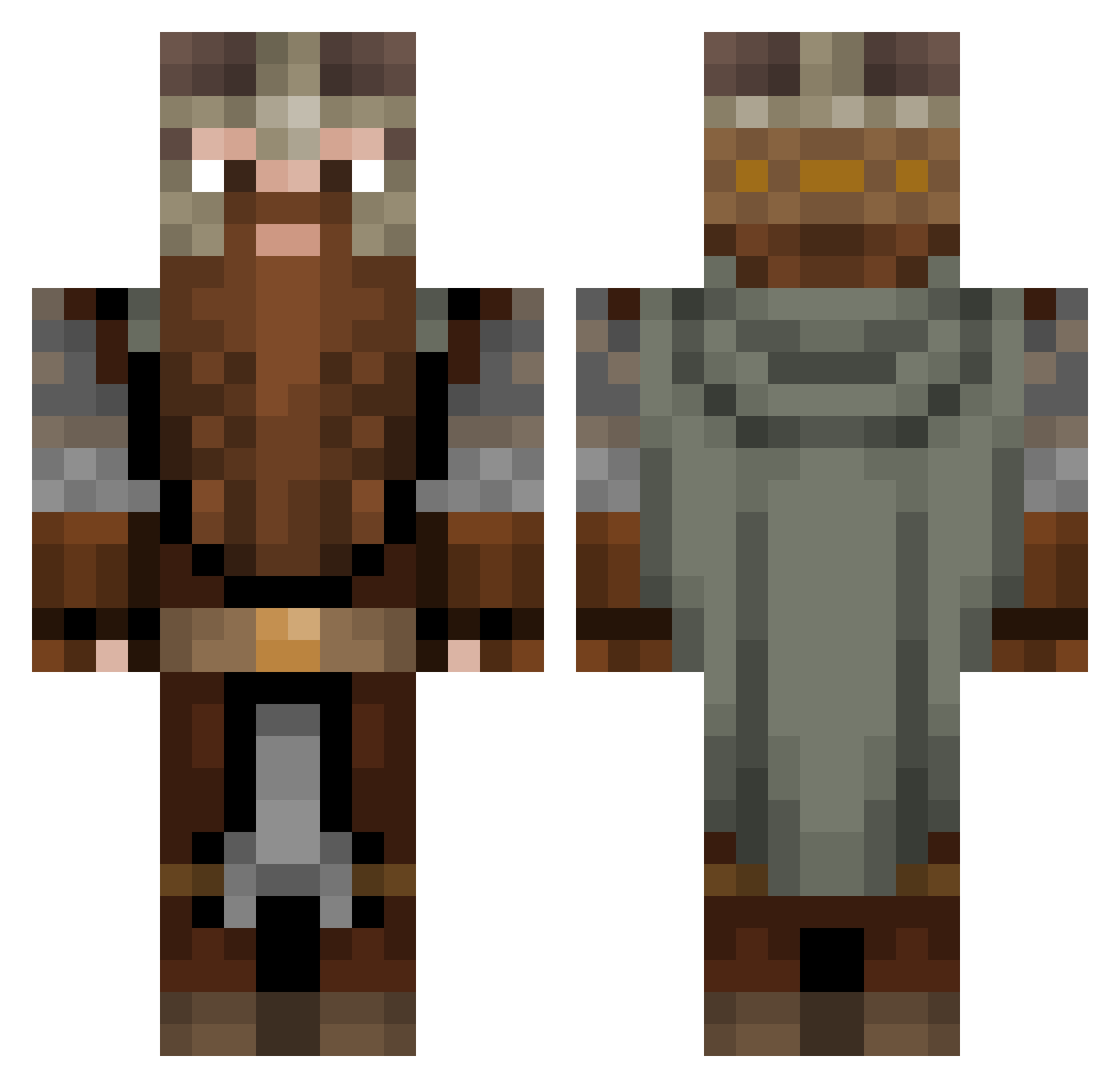
Current Minecraft skin of the player Hamboi14, loaded from the official Mojang API. Rotate the 3D model with your mouse or finger, then download the skin as a PNG file and use it in Minecraft: Bedrock Edition or Java Edition for free. When Hamboi14 changes their skin, this page updates automatically and the old skin stays in the history below.
Other players with this skin (1083)
Hamboi14 was the 497th player we have seen with this skin, first spotted on 15.09.2026. The same skin was seen on these players. Open a nickname to see their current skin and skin history.
 spiro9991 koppany2008 Yokidokie Tr0xicTV KillEmBlanks Gimli2023 Belivan Catrines _Durin_ DR_YALLA Thepody Nathanojoni UrbanLegend003 Fyrix Baptisteb83 AusDropBear Gastwirt Markus_Brutus momids1 colecoops WolfWithPwns Olleungen Necropontes welfsgaming Calenbor Thearcygron MANTICORE2K grass11 ElM0Ul Dimidan UpHellyAa BIGhobbit1 JsN00 Zer0nin Krydoe Crunchy_Cat_ FusselFresser Kataryniarzo_o Kadvar iopcito rodooc mega_mojo Lime_Energy129 _Lejon Cheflappentoui landrixx Matorg Xwollf990 Mikiz221 MrLunario Lupo_Brando laloojos ButteryToast3611 shawnyboy5000 El_Cordobes GulaschKevin63
 Milkmp3 Assdrubal THEEVILESTZIRO Rafiki96
More Dwarf Minecraft skins
How to install the Hamboi14 skin
- Press the Download button above to save the skin as a PNG file.
- Minecraft: Bedrock Edition (PE): open the Dressing Room from the main menu (or tap your character → Edit Character), go to Classic Skins → Owned, press the + (new skin) button, choose the downloaded PNG and pick the Classic (Steve) model. Works on PC and mobile; consoles cannot import custom skins.
- Minecraft: Java Edition: open the Minecraft Launcher, go to the Skins tab, click New Skin, load the PNG, pick the Classic (Steve) model and press Save & Use. You can also upload it at minecraft.net → Profile → Change Skin.
The skin does not show up after import - what should I do?
Restart Minecraft and open the Dressing Room again - imported skins sometimes appear only after a restart. Also make sure you selected the imported skin and picked the Classic (Steve) model.
Which model should I choose, Classic or Slim?
This skin is designed for the Classic (Steve) model. If you pick the wrong model, the arms of the skin will look stretched or squeezed.
Is the skin of Hamboi14 free to download?
Yes. Press Download, save the PNG file and use it in Minecraft: Bedrock Edition or Java Edition - no payment or registration needed. The skin also works on multiplayer servers and Realms.
More skins
Looking for more? Go back to all Minecraft skins and check the top skins of the week, month and all time, or find any player's skin by nickname.