
Greciaaa - Minecraft Skins & Skin History
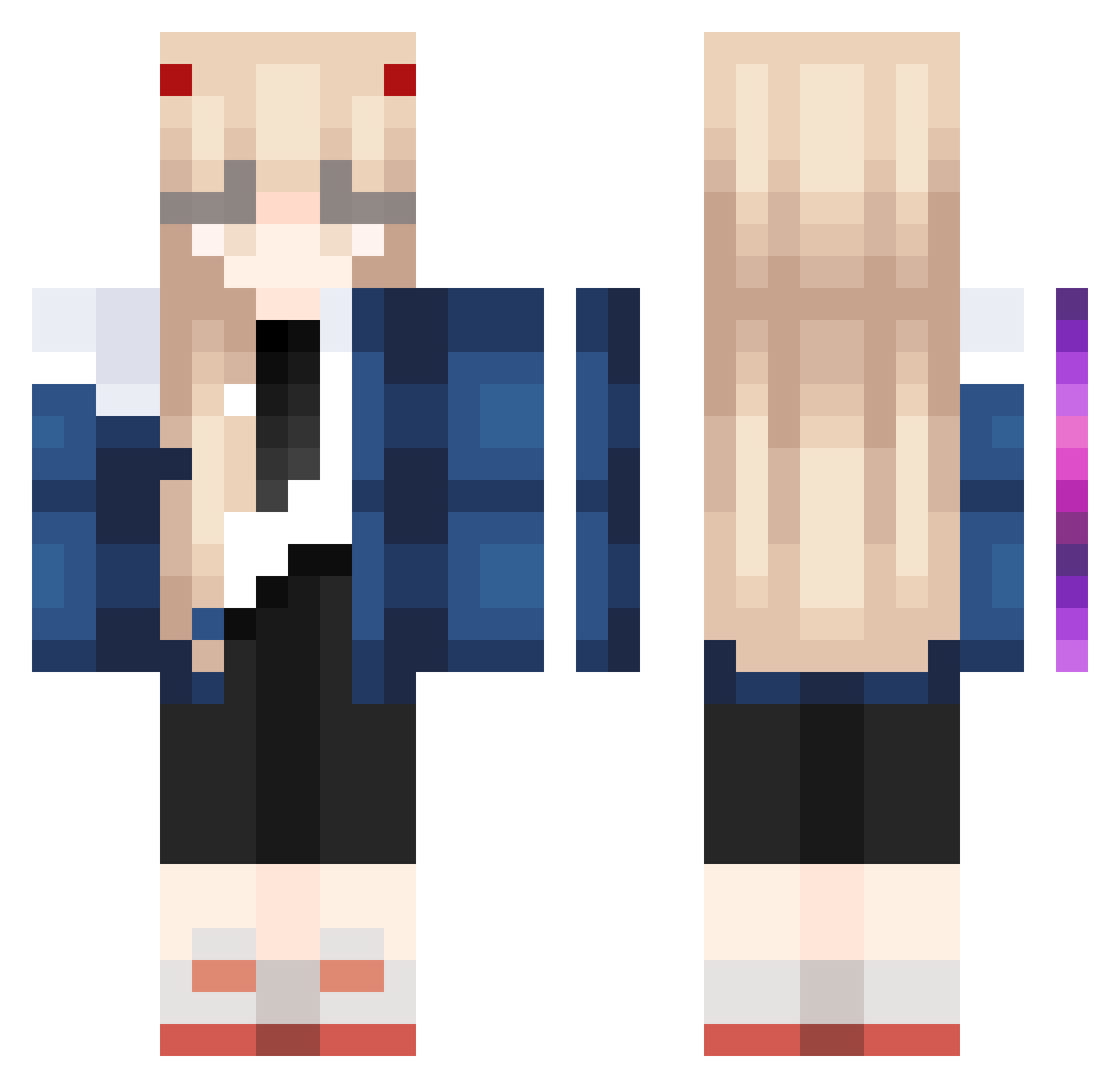
Current Minecraft skin of the player Greciaaa, loaded from the official Mojang API. Rotate the 3D model with your mouse or finger, then download the skin as a PNG file and use it in Minecraft: Bedrock Edition or Java Edition for free. When Greciaaa changes their skin, this page updates automatically and the old skin stays in the history below.
Other players with this skin (1023)
Greciaaa was the 558th player we have seen with this skin, first spotted on 25.09.2026. The same skin was seen on these players. Open a nickname to see their current skin and skin history.
 ander345 Tang_404 lring Rats420 ME_NAME_CHEF PosingPlanet335 LogicMew misopan2 Emile98 Old_KF Jinwoo2013 FattyGirl25 rottenkiido Teslye jini396 blodd5304 TamiMiller kkwangg Reioi Ymx0811 emmaaa12 pyroxsmile nahyun1121 Ai7rccc snzkise Gabify kuroyizu Super_Rei RiriSpark sohyuu Rasuk511 FearlesSHuman Qu1ao Carrot_Sticc 0v0xixii staryuki05 Akuw deidei23 Ancoora yuxxxxha Zukiix Remyy_mm Jxffrxyo Adam_xnm Emimiliio E_vn0566 Im_Not_a_Weeb Kimkibok jkk1468 noor_UwU Cruisearrow carol2515 LittleDIno414 L1nus_666 arai227 haya1215 Ulchzzz Nomao3o BY_M0M GOOD_RAUO
More Zero Two Minecraft skins
How to install the Greciaaa skin
- Press the Download button above to save the skin as a PNG file.
- Minecraft: Bedrock Edition (PE): open the Dressing Room from the main menu (or tap your character → Edit Character), go to Classic Skins → Owned, press the + (new skin) button, choose the downloaded PNG and pick the Classic (Steve) model. Works on PC and mobile; consoles cannot import custom skins.
- Minecraft: Java Edition: open the Minecraft Launcher, go to the Skins tab, click New Skin, load the PNG, pick the Classic (Steve) model and press Save & Use. You can also upload it at minecraft.net → Profile → Change Skin.
The skin does not show up after import - what should I do?
Restart Minecraft and open the Dressing Room again - imported skins sometimes appear only after a restart. Also make sure you selected the imported skin and picked the Classic (Steve) model.
Which model should I choose, Classic or Slim?
This skin is designed for the Classic (Steve) model. If you pick the wrong model, the arms of the skin will look stretched or squeezed.
Is the skin of Greciaaa free to download?
Yes. Press Download, save the PNG file and use it in Minecraft: Bedrock Edition or Java Edition - no payment or registration needed. The skin also works on multiplayer servers and Realms.
More skins
Looking for more? Go back to all Minecraft skins and check the top skins of the week, month and all time, or find any player's skin by nickname.