
Dingsdaniel - Minecraft Skins & Skin History
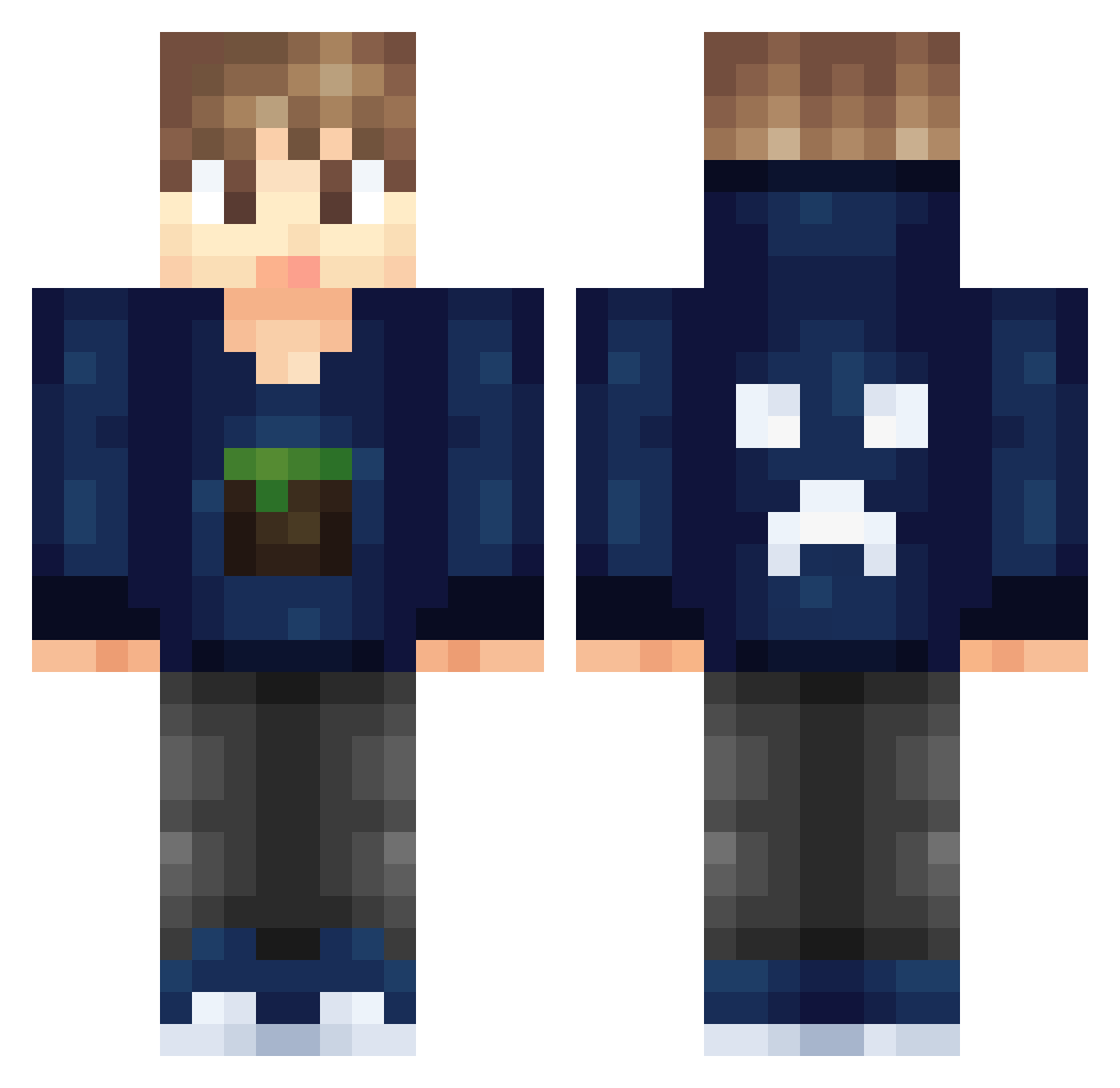
Current Minecraft skin of the player Dingsdaniel, loaded from the official Mojang API. Rotate the 3D model with your mouse or finger, then download the skin as a PNG file and use it in Minecraft: Bedrock Edition or Java Edition for free. When Dingsdaniel changes their skin, this page updates automatically and the old skin stays in the history below.
Other players with this skin (326)
Dingsdaniel was the 136th player we have seen with this skin, first spotted on 15.09.2026. The same skin was seen on these players. Open a nickname to see their current skin and skin history.
 Vazeb maxje187 AnitaMui_ Gear_gums OdoKentang PrinceOmar1 Drbugs98 coolgamerdude123 AbdoHassan jacobrhys2003 Htianqi MajkiGym brew__noh booey8282 mcgarry188814 dunkel322 lukeskyfaller123 Ekip_MusNation06 LiamPlaysMCPE jaapaap8 Tbone2008 SlimiiX_RxpRo AshWednesday SHUAI_Terry TheGreatOrange54 FTGAMER55 bonney12 freezepop5 olie123 dutchmen Rgames TheDominantMP aBaguette_ MizonGaming DX3_ CrushZone Breezerdk gumball09 Bim2001 XTAYLOR50X DairyTempest Noudra Dr_Awesome456 IceWhite101 Plinke YoneCraft ItsMeSteve PabloTheGamer06 Gamebuster2004 Andromeda005 GalaxyFreak67 KamBam1 Saschaa333 Masqueita Bananenbaer1 MikkelJrDK chriller10 viggokingertje OllieStephens99 spencerc293
More Creeper Minecraft skins
How to install the Dingsdaniel skin
- Press the Download button above to save the skin as a PNG file.
- Minecraft: Bedrock Edition (PE): open the Dressing Room from the main menu (or tap your character → Edit Character), go to Classic Skins → Owned, press the + (new skin) button, choose the downloaded PNG and pick the Classic (Steve) model. Works on PC and mobile; consoles cannot import custom skins.
- Minecraft: Java Edition: open the Minecraft Launcher, go to the Skins tab, click New Skin, load the PNG, pick the Classic (Steve) model and press Save & Use. You can also upload it at minecraft.net → Profile → Change Skin.
The skin does not show up after import - what should I do?
Restart Minecraft and open the Dressing Room again - imported skins sometimes appear only after a restart. Also make sure you selected the imported skin and picked the Classic (Steve) model.
Which model should I choose, Classic or Slim?
This skin is designed for the Classic (Steve) model. If you pick the wrong model, the arms of the skin will look stretched or squeezed.
Is the skin of Dingsdaniel free to download?
Yes. Press Download, save the PNG file and use it in Minecraft: Bedrock Edition or Java Edition - no payment or registration needed. The skin also works on multiplayer servers and Realms.
More skins
Looking for more? Go back to all Minecraft skins and check the top skins of the week, month and all time, or find any player's skin by nickname.