
Saschaa333 - Minecraft Skins & Skin History
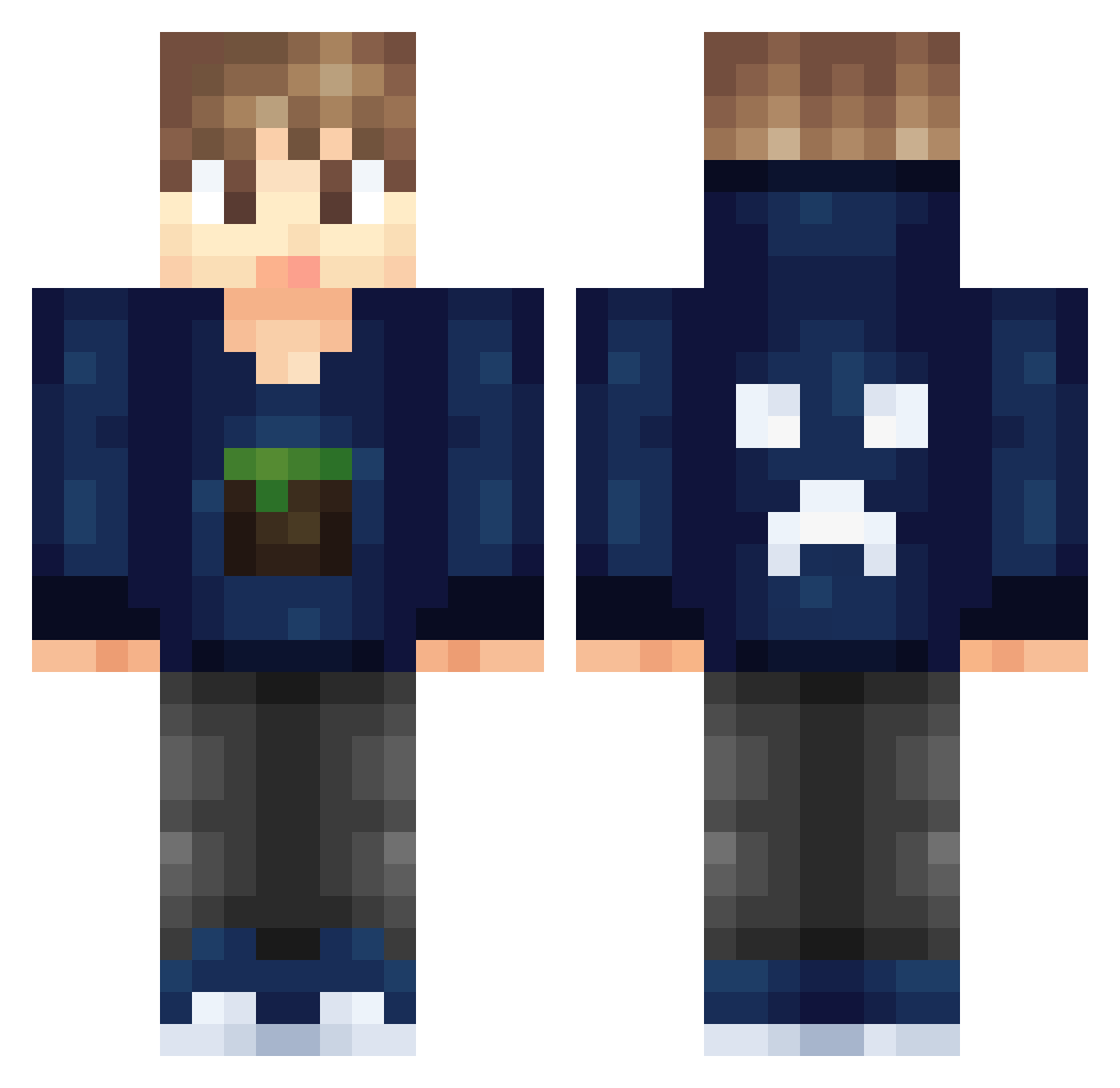
Current Minecraft skin of the player Saschaa333, loaded from the official Mojang API. Rotate the 3D model with your mouse or finger, then download the skin as a PNG file and use it in Minecraft: Bedrock Edition or Java Edition for free. When Saschaa333 changes their skin, this page updates automatically and the old skin stays in the history below.
Other players with this skin (326)
Saschaa333 was the 163rd player we have seen with this skin, first spotted on 27.09.2026. The same skin was seen on these players. Open a nickname to see their current skin and skin history.
 Gamebuster2004 PabloTheGamer06 ItsMeSteve chriller10 Dr_Awesome456 Noudra Pangon DairyTempest Bim2001 gumball09 Breezerdk sheaplays DX3_ Adrianskarp trainman09 Esichi ghost1122 CarmineK Rgames dutchmen blockprice chen_fo SunshinePants07 FTGAMER55 Vrobot SHUAI_Terry SlimiiX_RxpRo JayNetic MaxiiArts Whippys0da jaapaap8 LiamPlaysMCPE Dipsy_Gan Xoid gogommo chairman99 blauwepino OmgItsNarrow PumpkinPine3957 Ekip_MusNation06 DikkyDik minefan99 mcgarry188814 Max_4025 frankzero34 jdueb shinkwon ALFINATOR5000 MajkiGym somekrazykid12 Ramadhany mllade189 jacobrhys2003 FraAgBaAng coolgamerdude123 MassiveGamer861 Axl3 PrinceOmar1 BananaBoooBooo OdoKentang
More Creeper Minecraft skins
How to install the Saschaa333 skin
- Press the Download button above to save the skin as a PNG file.
- Minecraft: Bedrock Edition (PE): open the Dressing Room from the main menu (or tap your character → Edit Character), go to Classic Skins → Owned, press the + (new skin) button, choose the downloaded PNG and pick the Classic (Steve) model. Works on PC and mobile; consoles cannot import custom skins.
- Minecraft: Java Edition: open the Minecraft Launcher, go to the Skins tab, click New Skin, load the PNG, pick the Classic (Steve) model and press Save & Use. You can also upload it at minecraft.net → Profile → Change Skin.
The skin does not show up after import - what should I do?
Restart Minecraft and open the Dressing Room again - imported skins sometimes appear only after a restart. Also make sure you selected the imported skin and picked the Classic (Steve) model.
Which model should I choose, Classic or Slim?
This skin is designed for the Classic (Steve) model. If you pick the wrong model, the arms of the skin will look stretched or squeezed.
Is the skin of Saschaa333 free to download?
Yes. Press Download, save the PNG file and use it in Minecraft: Bedrock Edition or Java Edition - no payment or registration needed. The skin also works on multiplayer servers and Realms.
More skins
Looking for more? Go back to all Minecraft skins and check the top skins of the week, month and all time, or find any player's skin by nickname.