
Der007Agent - Minecraft Skins & Skin History
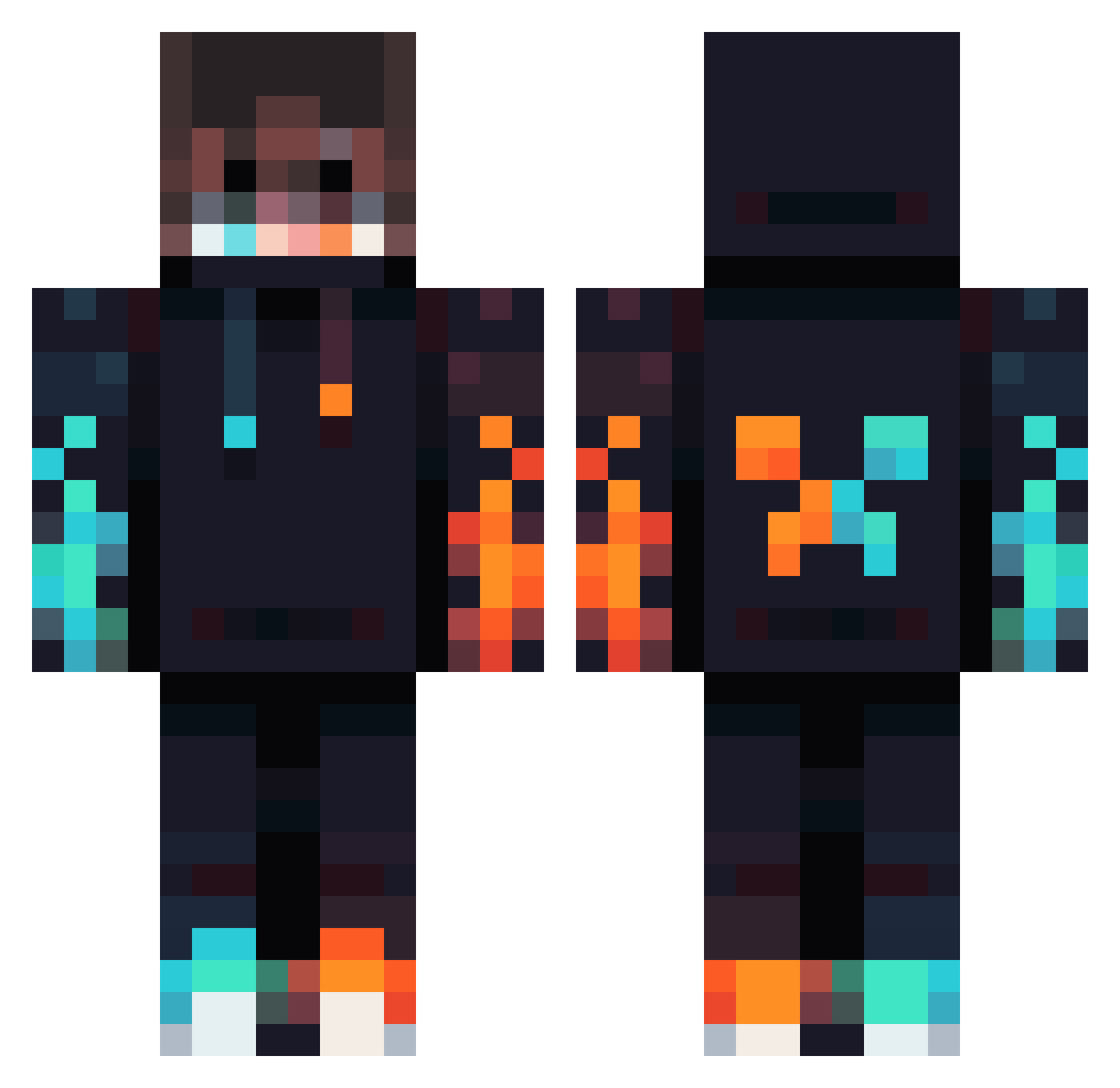
Current Minecraft skin of the player Der007Agent, loaded from the official Mojang API. Rotate the 3D model with your mouse or finger, then download the skin as a PNG file and use it in Minecraft: Bedrock Edition or Java Edition for free. When Der007Agent changes their skin, this page updates automatically and the old skin stays in the history below.
Other players with this skin (1012)
Der007Agent was the 989th player we have seen with this skin, first spotted on 16.11.2026. The same skin was seen on these players. Open a nickname to see their current skin and skin history.
 Rockibest Guko99 CubeElix Lucky_x_Louis ProKingGamer99 Icaka1110 Frej02 AtomicBoi3232 Blockbuilds1005 _p1xelRushYT_ Brodyman1015 PhoenixDigit chuchu6 NorimX123 kennethos2207 Princeclay123 MIRISTOK Senior15 block2man DCombat12 baileynuggie FanManAaron Stuxn3t_ jas9123 AquaticSnail218 ItJxsse ArcticHunter Tigersoap XproX42 shifonkeki Eli172012 Elmarce00 Coolfhconner magnum1468 TheP3nguin Dexter_pro200 gamerprokyan Andi1746 TDGIO Yostinm DottSpace12 Alexnoval Blackwall85_ Realtechfire The_Ninja_95 _cron_ ChickenChili600 crypt0sploit Skeletondasher cedricgames Failer_HD SkyBombus BroTDG FranexMiko Viddy198 PATrick060 Pro_Max5573 AlexZeno07 St1ckzfv XLostADreamX
More Fire Minecraft skins
How to install the Der007Agent skin
- Press the Download button above to save the skin as a PNG file.
- Minecraft: Bedrock Edition (PE): open the Dressing Room from the main menu (or tap your character → Edit Character), go to Classic Skins → Owned, press the + (new skin) button, choose the downloaded PNG and pick the Classic (Steve) model. Works on PC and mobile; consoles cannot import custom skins.
- Minecraft: Java Edition: open the Minecraft Launcher, go to the Skins tab, click New Skin, load the PNG, pick the Classic (Steve) model and press Save & Use. You can also upload it at minecraft.net → Profile → Change Skin.
The skin does not show up after import - what should I do?
Restart Minecraft and open the Dressing Room again - imported skins sometimes appear only after a restart. Also make sure you selected the imported skin and picked the Classic (Steve) model.
Which model should I choose, Classic or Slim?
This skin is designed for the Classic (Steve) model. If you pick the wrong model, the arms of the skin will look stretched or squeezed.
Is the skin of Der007Agent free to download?
Yes. Press Download, save the PNG file and use it in Minecraft: Bedrock Edition or Java Edition - no payment or registration needed. The skin also works on multiplayer servers and Realms.
More skins
Looking for more? Go back to all Minecraft skins and check the top skins of the week, month and all time, or find any player's skin by nickname.