
Defendedpurse00 - Minecraft Skins & Skin History
Current Minecraft skin of the player Defendedpurse00, loaded from the official Mojang API. Rotate the 3D model with your mouse or finger, then download the skin as a PNG file and use it in Minecraft: Bedrock Edition or Java Edition for free. When Defendedpurse00 changes their skin, this page updates automatically and the old skin stays in the history below.
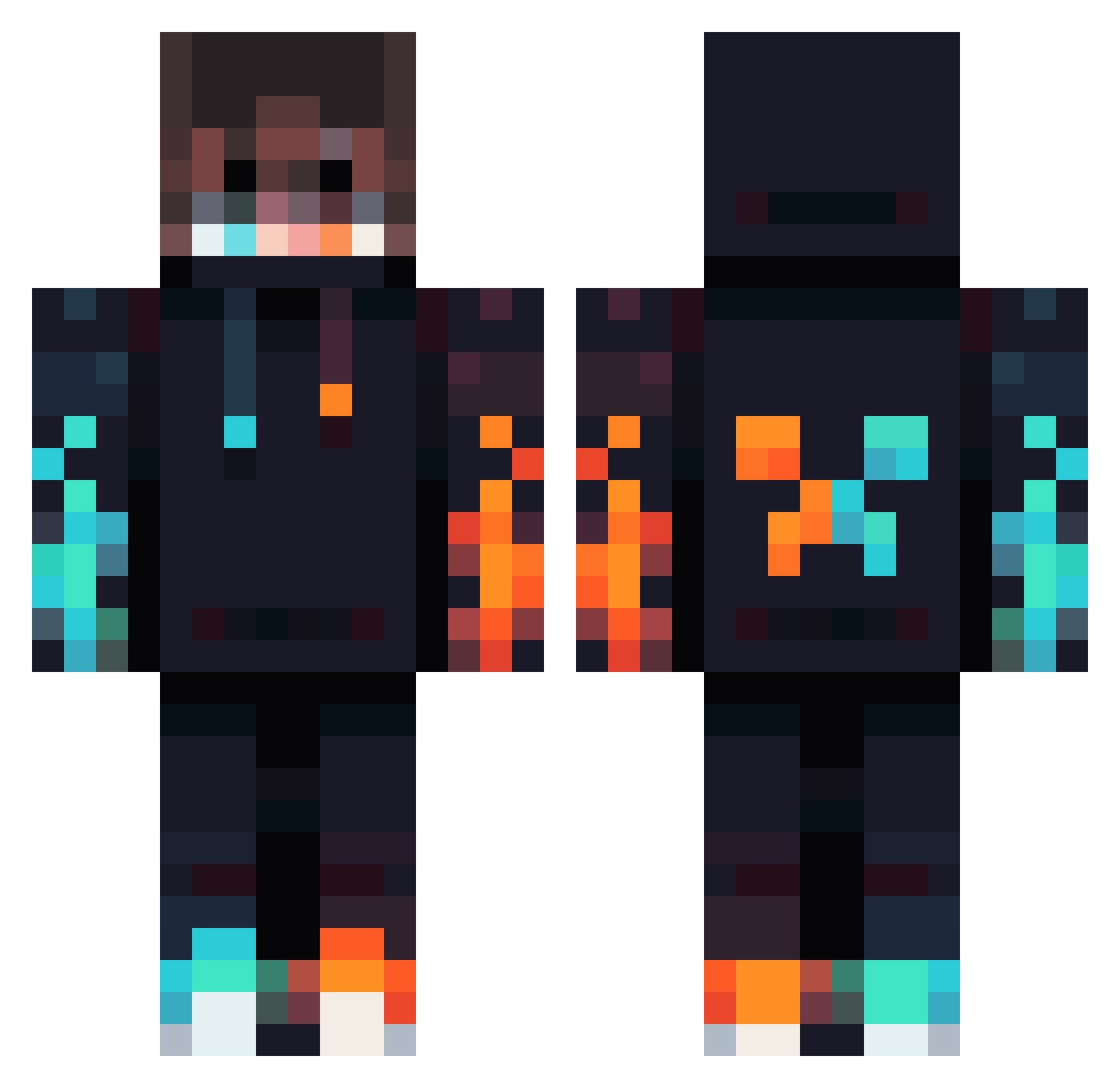
Other players with this skin (833)
Defendedpurse00 was the 96th player we have seen with this skin, first spotted on 08.08.2026. The same skin was seen on these players. Open a nickname to see their current skin and skin history.
 Ramon2603 CTM504 Gasparoft Konstgodx liam12334 oOLIEOo alejandrotiz Journey22405 MoKiHa burgerbutt62 veynov TalIish Jmsiva 834570n Hartexz KreanZ129 Endroyd glogovac Freaky_Mind Itspolarshock Ruben_C moffe1245 Itsa_Jayy Eltitofranco _GCGaming_ Sneezymuffin Ameflo SupeRemek ClaraBe2009 Polesko72 TooMagnificent AP4prez Patti_312 mamas132
 _Cassidy_ thonkf Razzel69 cylreview Deadpool20918 Land_Fort GoldenApple183 s4vageBTW Augu5Tmonkey214 javix54 CrtrWasHere Riinzh SteveKlovsky bingbong248 Harvey_Wang abracadave dropsauceplayz bakermh4 Madaratachi prince1291 BubbersGG ojebus Papa957 swiftAndrei ITZ_Alexxxx Kristofer123504
More Fire Minecraft skins
How to install the Defendedpurse00 skin
- Press the Download button above to save the skin as a PNG file.
- Minecraft: Bedrock Edition (PE): open the Dressing Room from the main menu (or tap your character → Edit Character), go to Classic Skins → Owned, press the + (new skin) button, choose the downloaded PNG and pick the Classic (Steve) model. Works on PC and mobile; consoles cannot import custom skins.
- Minecraft: Java Edition: open the Minecraft Launcher, go to the Skins tab, click New Skin, load the PNG, pick the Classic (Steve) model and press Save & Use. You can also upload it at minecraft.net → Profile → Change Skin.
The skin does not show up after import - what should I do?
Restart Minecraft and open the Dressing Room again - imported skins sometimes appear only after a restart. Also make sure you selected the imported skin and picked the Classic (Steve) model.
Which model should I choose, Classic or Slim?
This skin is designed for the Classic (Steve) model. If you pick the wrong model, the arms of the skin will look stretched or squeezed.
Is the skin of Defendedpurse00 free to download?
Yes. Press Download, save the PNG file and use it in Minecraft: Bedrock Edition or Java Edition - no payment or registration needed. The skin also works on multiplayer servers and Realms.
More skins
Looking for more? Go back to all Minecraft skins and check the top skins of the week, month and all time, or find any player's skin by nickname.