
Dale_4444 - Minecraft Skins & Skin History
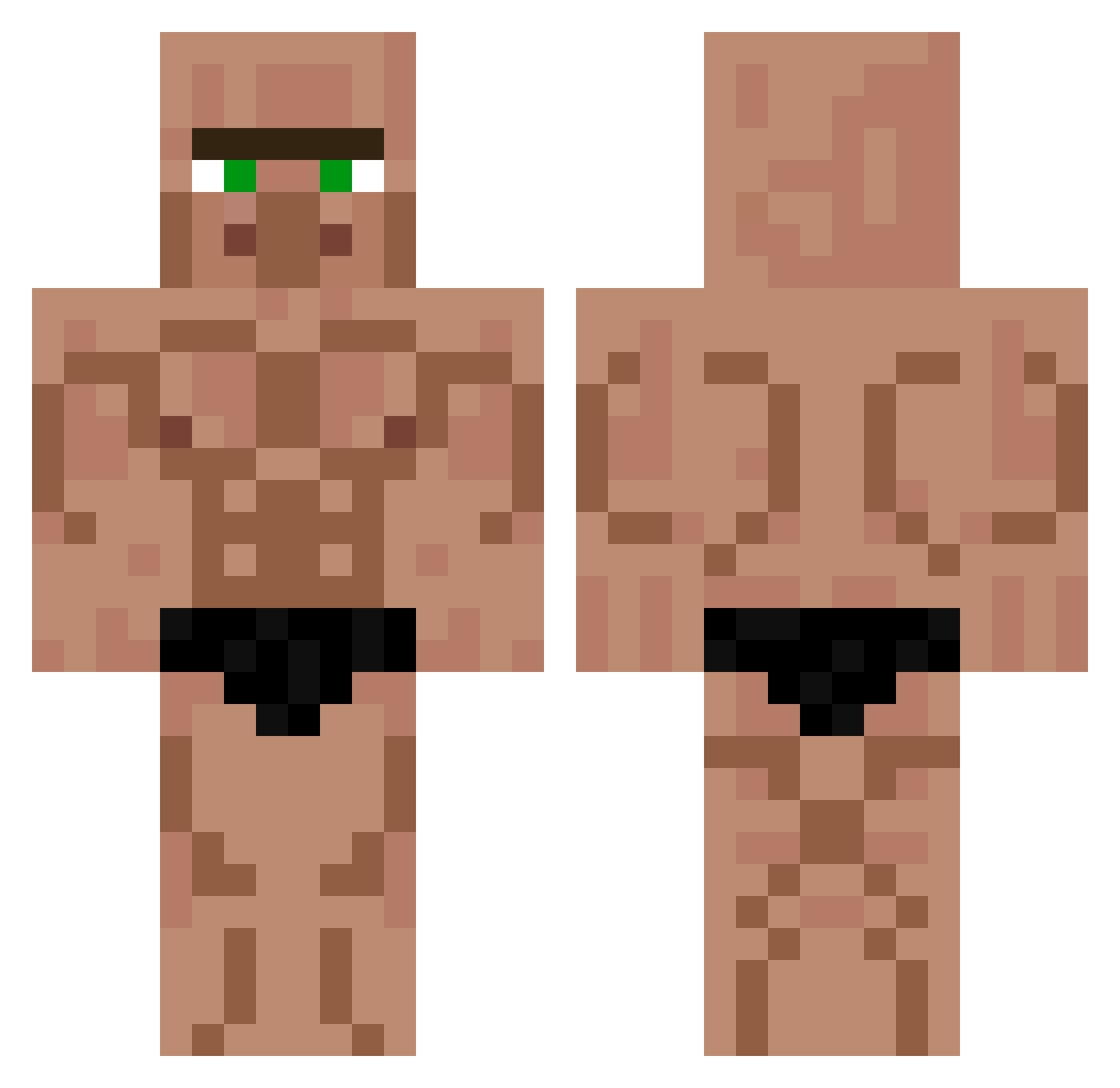
Current Minecraft skin of the player Dale_4444, loaded from the official Mojang API. Rotate the 3D model with your mouse or finger, then download the skin as a PNG file and use it in Minecraft: Bedrock Edition or Java Edition for free. When Dale_4444 changes their skin, this page updates automatically and the old skin stays in the history below.
Other players with this skin (565)
Dale_4444 was the 246th player we have seen with this skin, first spotted on 06.09.2026. The same skin was seen on these players. Open a nickname to see their current skin and skin history.
 qinyong zelenik_ TamerShadow seritex22 Oraquin januzwayne El_Ruke iitsangelicc Kiar4 _Gimlimi_ coalkidz b4forces mala_zmywarka napalonek wfm2009 Pineapple_playa mkm1ke thefelixlol4000 Fugloaf marsik54joljol Chickenuser420 Beaneesweenz Maraviyorsho Junose Jestem_deksi
 RippedVillager AlfonsoRo FENHAUN 1043TKC Yurmo71 Esattttt W9nd3r Sonicplayz23 ChikinOfTheWoods pune0123 IgeogebraI Niedzwiedzi storyedjet209 sneaky_salmon75 Palmqvist21_ XxBeastxFlamesxX Marcelo_Gu_70 philipp_amthor Lorfo luuk1233
 IgnisVandal IamStress OCaranoob Bastos1016 Beshee Polo42000 AfterMeh
 Alprazolam_21 GITAG hardlasagna Pulpbro1 LordOfAlepa DemonicAlien805 Pendoro0 lilmeep69
More Buff Minecraft skins
How to install the Dale_4444 skin
- Press the Download button above to save the skin as a PNG file.
- Minecraft: Bedrock Edition (PE): open the Dressing Room from the main menu (or tap your character → Edit Character), go to Classic Skins → Owned, press the + (new skin) button, choose the downloaded PNG and pick the Classic (Steve) model. Works on PC and mobile; consoles cannot import custom skins.
- Minecraft: Java Edition: open the Minecraft Launcher, go to the Skins tab, click New Skin, load the PNG, pick the Classic (Steve) model and press Save & Use. You can also upload it at minecraft.net → Profile → Change Skin.
The skin does not show up after import - what should I do?
Restart Minecraft and open the Dressing Room again - imported skins sometimes appear only after a restart. Also make sure you selected the imported skin and picked the Classic (Steve) model.
Which model should I choose, Classic or Slim?
This skin is designed for the Classic (Steve) model. If you pick the wrong model, the arms of the skin will look stretched or squeezed.
Is the skin of Dale_4444 free to download?
Yes. Press Download, save the PNG file and use it in Minecraft: Bedrock Edition or Java Edition - no payment or registration needed. The skin also works on multiplayer servers and Realms.
More skins
Looking for more? Go back to all Minecraft skins and check the top skins of the week, month and all time, or find any player's skin by nickname.